• 11 Nov


    In traditional JavaScript coding, if you want to get any information from a database or a file on the server, or send user information to a server, you will have to make an HTML form and GET or POST data to the server. The user will have to click the “Submit” button to send/get the information, wait for the server to respond, and then a new page will load with the results.

    Because the server returns a new page each time the user submits input, traditional web applications can run slowly and tend to be less user-friendly. With AJAX, your JavaScript communicates directly with the server, through the JavaScript XMLHttpRequest object.

    With an HTTP request, a web page can make a request to, and get a response from a web server, without reloading the page. The user will stay on the same page, and he or she will not notice that scripts request pages, or send data to a server in the background.

    This picture is a simplified introduction about how Ajax works:
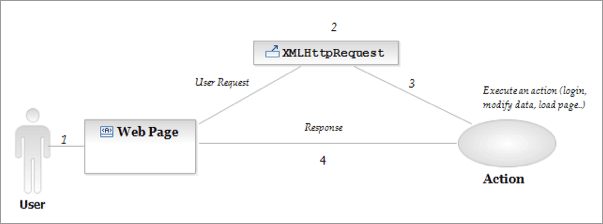
    The user sends a request that executes an action and the action’s response is showed into a layer, identify by an ID, without reload the full page. For example a layer with this id:

    <div id=”ajaxResponse”></div>

    In the next steps we will see how to create an XMLHttpRequest and receive response from the server.

    1. Create XMLhttpRequest

    Different browsers use different methods to create the XMLHttpRequest object. Internet Explorer uses an ActiveXObject, while other browsers use the built-in JavaScript object called XMLHttpRequest.

    To create this object, and deal with different browsers, we are going to use a “try and catch” statement.

    function ajaxFunction()
    {
    var xmlHttp;
    try
    {
    // Firefox, Opera 8.0+, Safari
    xmlHttp=new XMLHttpRequest();
    }
    catch (e)
    {
    // Internet Explorer
    try
    {
    xmlHttp=new ActiveXObject(”Msxml2.XMLHTTP”);
    }
    catch (e)
    {
    try
    {
    xmlHttp=new ActiveXObject(”Microsoft.XMLHTTP”);
    }
    catch (e)
    {
    alert(”Your browser does not support AJAX!”);
    return false;
    }
    }
    }

    2. Sending request to the server

    To send off a request to the server, we use the open() method and the send() method.

    The open() method takes three arguments. The first argument defines which method to use when sending the request (GET or POST). The second argument specifies the URL of the server-side script. The third argument specifies that the request should be handled asynchronously. The send() method sends the request off to the server.

    xmlHttp.open(”GET”,”time.asp”,true);
    xmlHttp.send(null);

    3. Writing server side script

    The responseText will store the data returned from the server. Here we want to send back the current time. The code in “time.asp” looks like this:

    <%
    response.expires=-1
    response.write(time)
    %>

    4. Consuming the response

    Now we need to consume the response received and display it to the user.

    xmlHttp.onreadystatechange=function()
    {
    if(xmlHttp.readyState==4)
    {
    document.myForm.time.value=xmlHttp.responseText;
    }
    }
    xmlHttp.open(”GET”,”time.asp”,true);
    xmlHttp.send(null);
    }

    5. Complete the code

    Now we must decide when the AJAX function should be executed. We will let the function run “behind the scenes” when the user types something in the username text field. The complete code looks like this:

    <html>
    <body>

    <script type=”text/javascript”>
    function ajaxFunction()
    {
    var xmlHttp;
    try
    {
    // Firefox, Opera 8.0+, Safari
    xmlHttp=new XMLHttpRequest();
    }
    catch (e)
    {
    // Internet Explorer
    try
    {
    xmlHttp=new ActiveXObject(”Msxml2.XMLHTTP”);
    }
    catch (e)
    {
    try
    {
    xmlHttp=new ActiveXObject(”Microsoft.XMLHTTP”);
    }
    catch (e)
    {
    alert(”Your browser does not support AJAX!”);
    return false;
    }
    }
    }
    xmlHttp.onreadystatechange=function()
    {
    if(xmlHttp.readyState==4)
    {
    document.myForm.time.value=xmlHttp.responseText;
    }
    }
    xmlHttp.open(”GET”,”time.asp”,true);
    xmlHttp.send(null);
    }
    </script>
    <form name=”myForm”>
    Name: <input type=”text”
    onkeyup=”ajaxFunction();” name=”username” />
    Time: <input type=”text” name=”time” />
    </form>
    </body>
    </html>


  • 19 Comments »

     
    #1
    Jaspal
    November 23rd, 2008 at 22:57

    hello .. i m just starting ajax .. i have copy the code provided in the last point .. and opened it in firefox .. a simple form is there … but it does not work … pls help me out .. what is the staring point and in which extension should i save the code…

    thanx


    #2
    SoN9ne
    November 26th, 2008 at 07:35

    Well, if you just copied the code from above it will not work. Mainly because of xmlHttp.open(”GET”,”time.asp”,true);
    the time.asp is your problem. Create you own validation file, i use a php file and i build my own url as well, here is an example of the url part of my code.


    var url="/v/validate.php?mode="+mode;
    url=url+"&check="+value;

    if (mode == 'check_password2') {
    url=url+"&against="+document.getElementById('pass1').value;
    }

    url=url+"&sid="+Math.random();
    httpxml.onreadystatechange=stateck;
    httpxml.open("GET",url,true);
    httpxml.send(null);

    don’t wory about the mode, i pass different mode types into my validation and for that specific mode i check against another form entry

    i hope this helps


    #3
    Dileep K Sharma
    November 26th, 2008 at 10:19

    ASP pages are server side scripts and run on Microsoft IIS servers. It looks like you are trying to test this on your local machine. If you wish to test it on your local machine you must install Microsoft’s Personal Web Server (PWS) or Internet Information Services (IIS) on your PC. Follow the steps below to do this.

    Install IIS on Windows XP Professional:
    Note: You cannot run ASP on Windows XP Home Edition. You can skip step 1 if IIS services are already available in Remove Windows Components Wizard (step 3).
    1. Insert the Windows XP Professional CD-Rom into your CD-Rom Drive
    2. From your Start Button, go to Settings, and Control Panel
    3. In the Control Panel window select Add/Remove Programs
    4. In the Add/Remove window select Add/Remove Windows Components
    5. In the Wizard window check Internet Information Services, click OK
    6. An Inetpub folder will be created on your harddrive (if your windows is installed in C: drive you may find it at C:\Inetpub\)
    7. Open the Inetpub folder, and find a folder named wwwroot
    8. Create a new folder, like “MyWeb”, under wwwroot.
    9. Copy “time.asp” and “ajaxtest.html” used in this example to the “MyWeb” folder
    10. Make sure your Web server is running – its status can be checked by going into the Control Panel, then Administrative Tools, and double-click the “IIS Manager” icon
    11. Open your browser and type in “http://localhost/MyWeb/ajaxtest.html”, to view your the page. Just type something in the Name field and you would get the time in next field without the page being refreshed.

    If you are running different version of Windows the steps to install IIS server may vary. Refer your copy of installation for detailed instructions.


    #4
    Jasper
    February 12th, 2009 at 21:04

    This article looks a lot like the article about AJAX @ W3Schools:
    http://w3schools.com/ajax/

    Like it though.


    #5
    Directory marocplus
    April 6th, 2009 at 13:49

    Ajax it’s very good


    #6
    Fuad Ahasan Chowdhury
    May 14th, 2009 at 10:37

    I’m not an expert on programing as well as not so comfortable on coding foding ;) though it’s helpful for me. Thanks


    #7
    Hugo
    May 20th, 2009 at 09:43

    Although this is very interesting, people often do not want to waist their time understanding the technique behind it, they just want it to work.
    Use jQuery, it has a very simple syntax.

    $.post(
    ‘example.php’,
    {
    function: getTime,
    another: post_variable
    },
    function(data){
    alert(data);
    //Alert the response from the example.php file
    }
    );


    #8
    Doug Vanisky
    June 24th, 2009 at 19:08

    While this becomes more technically oriented as it goes on, I’m bookmarking this page because the first paragraph is such a clear and simple explanation to share with peeps. Thanks.


    #9
    film izle
    September 16th, 2009 at 00:55

    Everything you can think about JavaScript here. This kind of useful information to share with us how beautiful.

    JavaScript and apart from that all kinds of html coding may ask our questions here isn ‘t it heralde


    #10
    adrienne
    October 13th, 2009 at 11:19

    hello///…. im starting to learn AJAX


    #11
    Roy Ho
    December 1st, 2009 at 10:47

    Nice…good way to learn some AJAX…


    #12
    erotik market
    January 4th, 2010 at 10:29

    ajax it’s very good for fiyakali web’s


    #13
    Anmy
    January 22nd, 2010 at 18:54

    wery good text//im starting to learn AJAX


    #14
    Paralante
    February 10th, 2010 at 22:28

    “With AJAX, your JavaScript communicates directly with the server, through the JavaScript XMLHttpRequest object.” This is not web design information. This web programming information…


    #15
    DrBB
    March 30th, 2010 at 17:23

    All very lucid, and thanks. What brings me here is trying to figure something out about AJAX architecture. Is it possible to embed another AJAX call within the content that gets returned to the user-facing page by the initial call? I’ve got an app that successfully runs a database query and echoes the results to my page, but in some cases there is more than one row that fits the query criteria. I’d like to be able to display part of the information (just the name) and let the user select the one that fits, with the selection action also running as an Ajax script so no additional page load is needed. But whereas I can include html tags–e.g. hyperlinks–inside the initial data return and they work fine, I can’t seem to run any additional javascript from there. Any suggestions on how to get around this problem?


    #16
    istsexshop
    April 10th, 2010 at 13:21

    ajax it’s very good for fiyakali web’s


    #17
    Billy
    April 21st, 2010 at 14:57

    A great little introduction to Ajax, It’s really worth looking into this more


    #18
    technology
    June 9th, 2010 at 19:57

    ASP pages are server side scripts and run on Microsoft IIS servers. It looks like you are trying to test this on your local machine. If you wish to test it on your local machine you must install Microsoft’s Personal Web Server (PWS) or Internet Information Services (IIS) on your PC. Follow the steps below to do this.


    #19
    wedding invites
    July 7th, 2010 at 21:31

    It looks like you are trying to test this on your local machine. If you wish to test it on your local machine you must install Microsoft’s Personal Web Server (PWS) or Internet Information Services (IIS) on your PC.

     
    Name (required)

    E-mail (required - never shown publicly)

    Web-site

    Your Comment (smaller size | larger size)

Home| Advertising| About| Contact

© 2010 All Rights Reserved