• 5 Feb

    Just when you thought you were done with IE 6 and its hacks and exceptions, now you’ve got a new browser to consider: Google’s Chrome.

    The good news is that Chrome is a lot more compatible with web standards than IE 5 and 6. However, Chrome has its own idiosyncrasies and bugs.

    No one knows if Chrome is here to stay, but it has already captured a surprisingly decent share of the web browser market in a short period of time.

    Here are some tips to get your web pages working in Chrome and hopefully looking the way they were designed to look.

    Mac Users

    As of February 2009, Chrome is still a browser for Microsoft Windows PCs. If you use a Mac, you will need to run Microsoft Windows through Bootcamp, or one of the virtualization products for the Mac (Sun’s VirtualBox, Parallels, VMWare Fusion). If you are really daring, you can try and get Chrome to run using Darwine. Google promises to have a native Mac version of Chrome available in the coming months.

    Vanishing Pop-Ups

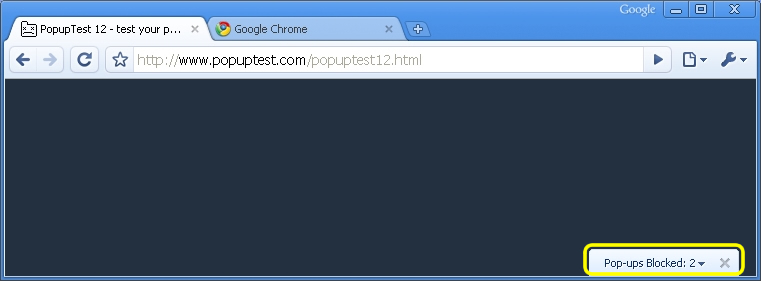
    Pop-Up blocking is great unless your website really needs pop-up functionality. If you have a web page that must use pop-ups, you won’t see them in Chrome. By design, Chrome only displays the title of a pop-up and minimizes it to the bottom right corner of the browser window. Users will need to click and drag the pop-up’s title in order to view its content.
    SSL is Broken?

    By design, Chrome will only certify a valid SSL (secure sockets layer) page with the padlock icon if all the elements on the page are served via SSL. In other words, if your page is served via SSL but it calls elements via non-secured HTTP, Chrome will give your page an exclamation point icon indicating that it considers your page to be an inconsistent SSL transmission. To get around this, make sure that all the resources loaded by your web page, including all images, are prefaced with HTTPS.

    Declare Encoding First

    If your web page text is garbled or otherwise just plain wrong in Chrome, you may need to insert encoding information into the <head> section of each web page. If you already have encoding information, it must come first, before any CSS or Javascript. Otherwise, Chrome will just ignore it. A working example:

    <html>
    <head>
    <meta http-equiv=”Content-Type” content=”text/html; charset=windows-1251″>
    <script type=”text/javascript”>
    … your JavaScript code …
    </script>
    … your CSS code …

    Also, Chrome will ignore encoding specified by Javascript. Period. For example, the following would be ignored:

    document.write(”<meta http-equiv=”Content-Type” content=”text/html; charset=windows-1251″>”);
    Instead of using JavaScript, you must insert your encoding into the beginning of the <head> section of each web page as shown above.

    Bookmark Favorites

    When users choose to bookmark your web site, you can control the default bookmark name, description, link, and bookmark icon. Just make sure to place your code in the <head> section of your web pages. Here is a working example:

    <head>
    <meta name=”application-name” content=”Greatest Website”/>
    <meta name=”description” content=”The very best on the web”/>
    <meta name=”application-url” content=”http://www.superfantasticgreatestweb.com”/>
    <link rel=”icon” href=”great-icon_32×32.png” sizes=”32×32″/>
    <link rel=”icon” href=”great-icon_48×48.png” sizes=”48×48″/>

    </head>

    Fixing JavaScript

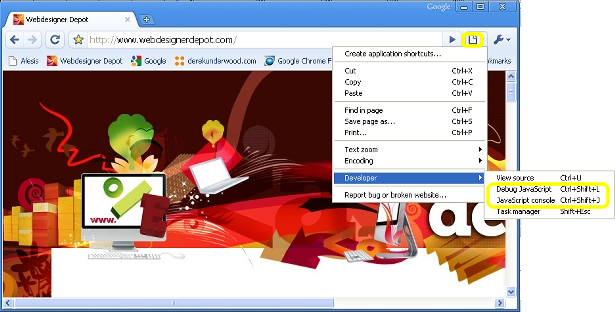
    If your JavaScript is not working properly in Chrome, check Chrome’s JavaScript console, accessible from the Page menu icon -> Developer -> JavaScript console. That should give you some direction as to what you can change.

    For the more advanced JavaScript developers, you can also use the JavaScript Debugger, accessible from the Page menu icon -> Developer -> Debug JavaScript. That will allow you to watch variables and set breakpoints.
    CSS Image Problems

    If you are using images or backgrounds implemented through CSS and they are not rendering properly in Chrome, you might want to convert images between GIF, JPG, and PNG to see if a different image format solves your problems. Although this makes no sense, it sometimes works, especially with random spacing and image formatting problems.

    CSS “First” Selector Hack

    Chrome can be finicky and unforgiving about CSS and may ignore styles applied to certain page elements. You might try using the “first-of-type” keyword which will be ignored by all other browsers (except for Apple’s Safari). For example, if you cannot get a particular style applied to the <body> section of your web page to work in Chrome, add in something like the following:

    body:first-of-type p {color:#ff0000;}

    “First-of-type” will simply be ignored by the browsers that are already displaying your page the way you intended.

    GiantIsland CSS Hack

    Chrome interprets cascading style sheets (CSS) differently than other browsers. Then again, IE 5, 6, and 7 do not even interpret CSS the same! The GiantIsland CSS Hack is a relatively simple CSS markup hack that makes use of square brackets [ ] to target CSS on specific browsers like Chrome. As a bonus, it can also help you conform your CSS to IE 5, 6, 7, Safari, and Firefox, all at the same time. For more details, check it out at http://www.giantisland.com/Resources/LitePacificHackforSafariAndIE7.aspx.

    Stay Away from HTML5

    Chrome does not try to conform to HTML5 API standards yet, even though Webkit, its rendering engine, does support HTML5. If you use HTML5 features or syntax, you will likely run into problems. Stick with HTML4 standards and you should have an easier time. Chrome will likely support HTML5 in the near future.

    Validate Your Pages

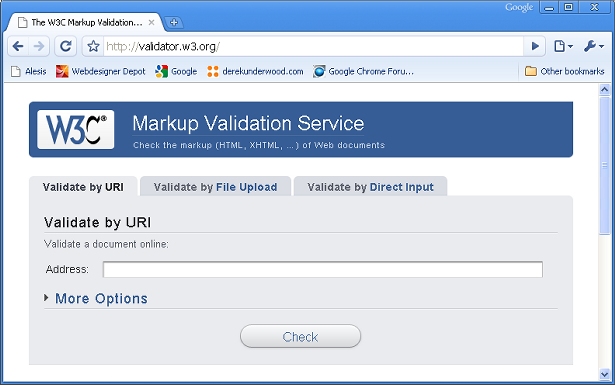
    Before swearing at Chrome and throwing in the towel, validate your pages to make sure you have not inadvertently used a non-standard HTML call. You can validate any web page at http://validator.w3.org/. Some web browsers allow you to take some shortcuts with web standards, but Chrome is not very lenient.
    Try it with Safari

    If you can’t get your web pages to look right under Chrome no matter what you try, try your web pages in Safari before giving up. Safari is Apple’s web browser and is available for both Mac and Windows PCs. If you use Windows, you can freely download Safari from Apple at http://www.apple.com/safari/download/. Both Chrome and Safari are built using the open source “Webkit” browser rendering engine. If you can see a rendering error in both Chrome and Safari, there is a good chance that Webkit is the culprit. You can post a bug for the Webkit developers at http://webkit.org/quality/reporting.html.

    Aw Snap!

    The Chrome developers have provided some funny error messages (if an error can be considered funny). If Chrome gives you the dark grey “Aw Snap!” page which also says “Something went wrong while displaying this webpage,” it might not be your web page at all. Chrome has a tendency to crash on some PCs depending on system settings and other installed applications. Try a few other well-known web pages, and see if they crash. Also try closing Chrome, re-launching it, and then test your web pages again. Some people have found Chrome to be unstable on some PCs. Google intends for Chrome to become more sturdy with each new version.

    Bug Reporting

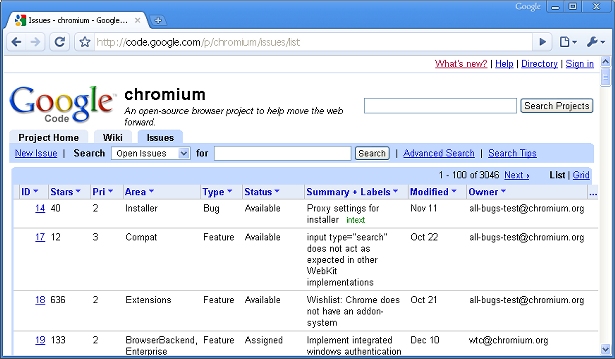
    If you find a bug with Chrome’s rendering, report it! You will be making the world a better place. Google maintains a public bug list for Chrome at http://code.google.com/p/chromium/issues/list.
    Written exclusively for WDD by Derek Underwood, a professional web designer and software developer. You can read more about Derek and contact him at his website:
    http://www.derekunderwood.com

    Have you been testing your web pages in Chrome? Do you think Chrome is here to stay? Share your opinions and experiences.

  • 95 Comments »

     
    #1
    Austin Web Design
    February 5th, 2009 at 10:07 pm

    Not really. The difference is that IE6 actually has a reasonably high market share. It’s the default web browser on the most common OS on the planet, so obviously a lot of folks still use it. Otherwise, no one would care about designing for it. Take a look at your Analytics and see how many users actually have Chrome.


    #2
    Walter
    February 5th, 2009 at 10:25 pm

    Only 5.6% use Chrome for viewing WDD, however, that translates to thousands of visitors. Since, I’m dealing with stats, this is the breakdown for WDD:

    Firefox – 64.87%
    Internet Explorer – 14.38%
    Safari – 10.40%
    Chrome – 5.62%
    Opera – 3.48%


    #3
    STPo
    February 5th, 2009 at 10:33 pm

    Chrome has 1-4% of the market share (depending on the sources) whereas IE6 had 70%… not the same kind of problems we will face as web developers.

    I for one think that the new IE 6 for web designers will be… IE 7!

     
    1 Reply
     
    #4
    Timothy
    February 5th, 2009 at 10:46 pm

    Ok. First off, you can’t really wonder if Chrome is going anywhere. It is out there, a significant amount of people use it and it is owned by Google. It obviously is not going anywhere.

    Second off, the few quirks it has are due to its young age. Google has clearly stated it is working on certain fixes in the engine. For example, when the browser crashes. This will be fixed, and is not something for developers to concern themselves with.

    As for popups, popups should be avoided. Firefox users install pop-up blocking scripts. Similar is done of IE. Use overlays, dynamic DIVs, or other “ajax”ish techniques. You can always get around using popups (and should).

    As for SSL, if images or any other element in a page is not secure then all that you are doing on the page IS NOT secure. Therefore Chrome is actually unique in telling you the truth. If you log onto a banking website with insecure images (which can store code, mind you) your actions very well may be traced.

    Encoding should always be placed as the first item in the header of a page. Otherwise you are not following correct standards. Chrome is following standards.

    And, I have never, personally, encountered image problems. The only real CSS issue I find (often) is that the body background color stops short and the remainder is white. That’s just a render issue and should be fixed. It usually goes away if you refresh the page.

    Some JavaScript problems do occur. Usually when you get into heavy JavaScript. This is a bit of a pain, but in comparison to IE 6 (or even 7) it is nothing to worry about.

    In total, Chrome is in no way close to the horrible nature of IE 6. And the next IE 6 will be IE 7. I’ve heard good things about IE 8, but time will tell if all of that is hot air.


    #5
    Timothy
    February 5th, 2009 at 10:47 pm

    But, I may be biased since I am on Chrome as I type this


    #6
    kremalicious
    February 5th, 2009 at 11:40 pm

    The headline also came to my mind when working with Chrome in the past especially in terms of PNG24 alpha transparency. The first Chrome version wasn’t able to render transparent PNGs correctly when they were on different layers (z-index) and the recent version still has huge problems with transparent PNG24s which are faded through jQuery (which is the case with IE7 too). Just don’t know why they messed up with WebKit that much.


    #7
    Derek Underwood
    February 5th, 2009 at 11:52 pm

    The title of this article is dramatic and is just intended to let designers know that Chrome may display their pages differently and that developers may need to check their pages and markup for Chrome compatibility. As Chrome is a Google product, it has a chance of being an important browser, plus it already has a fair amount of market share for a young browser. A few percentage points is actually a huge number of real users out there in the wild.

    I agree with Timothy that Chrome is doing the right thing in some places, like telling the truth about a secure session, and following standards fairly closely. And, that is where some of the problems with Chrome come up for designers – i.e. (no pun intended) designers are used to some markup and designs that may not follow web standards, but work in other browsers nonetheless. Chrome has some of its own quirks but it also makes designers tighten their work to comply with web standards.


    #8
    Fergal
    February 5th, 2009 at 11:54 pm

    I like how you say to try Safari, because it illustrates the apparent hoplessness of someday developing one set of code for all browsers – despite both using WebKit, Chrome and Safari render things differently.


    #9
    Derek Underwood
    February 6th, 2009 at 12:08 am

    Fergal is right. Safari and Chrome, despite both using Webkit, do not always render pages the same. Unfortunately, I suspect both Apple and Google are modifying aspects of Webkit, so its tough to say who is deviating furthest from Webkit’s intended rendering.

    As I mentioned in the article, if you are lucky and your page is wrong in both Chrome and Safari, then Webkit could be to blame. It its wrong in just Chrome, then you can narrow your focus on Chrome idiosyncrasies.

    Kremalicious is right on target also. If Webkit can render PNG24, why break it? Although I should mention that both Safari and Chrome also will falter even on certain non-transparent PNGs in CSS elements also. I recently had to change a DIV’s background from PNG to JPG and then it simply displayed properly. “That can’t be right,” I thought, but it worked for no good reason.


    #10
    Gabe Diaz
    February 6th, 2009 at 1:37 am

    I have the following installed on this machine at work: Firefox 3.05, IE 7, IE 6, IE .5., Safari and Chrome.

    So far I have had no render issues with Chrome, yes it’s relatively new but to not take it into consideration when designing it poor practice.

    One day, I think we all hope that there will be standard practices on the browsers until then we have to wait for all the IE 6 installs that came with those Dells, HP’s etc. to disappear…which will take awhile considering the number of corporate computers in offices.


    #11
    pedroqi
    February 6th, 2009 at 2:47 am

    Thanks for tips, awesome article! Chrome: I have no fear!


    #12
    kremalicious
    February 6th, 2009 at 2:48 am

    Maybe some clarification for the WebKit part. Derek is right with his suspicion of modification by the Browser vendors but Apple doesn’t change that much on WebKit in Safari. The render differences between WebKit itself and Safari are likely caused by the fact that most people use the WebKit nightly builds. And Safari’s (3) WebKit is always a bit behind the current state of WebKit. But it’s definitely Chrome which not only modifies WebKit but strips it down. Image rendering is one thing, text-shadow support another one.

    So for us web-developers it would be much easier if Google would use the standard WebKit stuff. As the article says, with the current state, Chrome is just another Browser we have to test and optimize our sites for.

    On the other hand, in terms of standards implementation Google did a great job with Chrome and therefore its definitely unfair to compare it to IE6. :-)


    #13
    GiantIsland
    February 6th, 2009 at 4:40 am

    I am the creator of the GiantIsland CSS Hack mentioned about. So, thanks for the props in this article above.

    I will add some additional information. IE 6 is fading fast now behind IE7 and now IE8. So, It may be a problem but not a big problem as time goes on. The reason we have to support IE5 and 6 is we have so many Windows 2000 and older PC’s and servers floating around the world(IE7 and 8 not supported on Win 2000). You also have many XP user’s who never upgraded to 7. So, it is very good practice to have a plan for these agents. I wrote the GiantIsland CSS fix and use it for very very rare occasions in my web sites where CSS problems like “height” isn’t interpreted correctly by Chrome/Safari versus the others. In IE5 and 6 you have worse problems with height where min-height isn’t supported and they use the expanding box model….not good. Because the Gecko Firefox engine gets it right, Chrome/Safari kinda right, and IE5-6 wrong, its a bit tricky to resolve.

    As for Chrome, because its not really a new rendring engine or codebase (its based on Webkit, like Safari), so I wouldnt consider it to be a big problem moving forward and you should be able to wrap most of your CSS and markup issues in with Safari as it evolves. If it works in Safari, its its very likely to work in Chrome. If it fails in Safari, very likely to fail in Chrome. If Safari goes and switches gears and adopts yet another codebase, then things would change dramatically. But for now, its kinda like what Netscape 8 and Firefox and Mozilla are to each other…..just different versions of the same rendering engine.

    So, lots of little things to think about, that involve Chrome, Safari, and the IE series that get a little complicated. With my CSS fix, it hopefully gives you one more rabbit in your hat of tricks to address all that as needed. Again, if you write solid CSS and XHTML code in your web sites, you should rarely have these issues or even need a hack. But for those rare ones, there are fixes. I rarely use mine, because I try and keep everything standardized and avoid the browser vendor’s proprietary technologies and add-ons.


    #14
    Michael
    February 6th, 2009 at 6:02 am

    To compare Chrome to IE6 just isn’t fair, it’s only been out a few months. Despite the apparent issues with Chrome, Google is Google after all and there goal of Chrome was to eliminate IE so though no perfect now I wouldn’t condemn it quite yet.

    I’m an optimist by nature, so I will give Google the benefit of the doubt here and have confidence that they will resolve the issues quickly. However, I did expect much better from Google as they are a company I respect. Only the future will tell.


    #15
    insic
    February 6th, 2009 at 8:35 am

    If I were ask to choose between the two GC vs IE6, I go to GC without any doubt. Needless to say that chrome still needs a lot of improvement coz its so new compare to the very old IE6.

     
    1 Reply
     
    #16
    David Hucklesby
    February 6th, 2009 at 8:56 am

    Chrome may be based on Webkit, but will likely remain one or two versions away from Safari– hence there will be differences.

    I don’t advise applying hacks to *any* browser that is still being developed – what happens when the bug you fix with your hack gets fixed, or the hack (which by definition relies on a bug) itself gets corrected?

    Fortunately, updates to IE 5, 6, and 7 only fix security issues. Bug fixing is not at all likely on those versions.


    #17
    Andre
    February 6th, 2009 at 8:57 am

    calling it the new IE6 isn’t fair to Google :P anyway about the HTTPS thing — that is supposed to be the proper behaviour. if a page is served via HTTPS, all elements in the page should also be served via HTTPS. otherwise a warning should be issued to the user. with IE, a dialogue box pops up and asks the user if he/she wants to download the non-secure elements in the page.


    #18
    GiantIsland
    February 6th, 2009 at 10:37 am

    I agree, that hacks are bad…no doubt about it. But they are necessary in some cases, and are used around the world to solve unsolvable issues in layouts where the current diverse group of agents leaves many designers no other option, if they want cross-browser compatibility.

    They also can be used so, as they are deprecated in later versions, the css hack itself is also no longer a working filter. For example, the “Star Hack” for IE5 and 6 works very well, in allowing you to apply expanding box model fixes for those browser, but which is hidden from view for all other agents. When IE 7 came out, they fixed the bugs, but also stopped supporting the CSS hack so that hack now is very reliable as a tool to apply IE6 fixes from IE7.

    The GiantIsland Hack so far continues to fix bugs in Safari versions going back to 1.2, yet they still have the same bugs in later versions for the CSS it fixes. So, works well and is supported in the latest Chrome and the oldest Safari versions. All those seem to share the same basic CSS problems, which Webkit continues to expose.

    But you should rarely need CSS fixes for Chrome or any browser in your CSS if you know how to type in clean, standardized markup and CSS, and avoid vendor proprietary tags and tricks. Allot of web devs get hypnotized by all the eye candy that browsers provide. Chrome is no different. If you choose to use proprietary browser technologies that they provide, be prepared to dig for hacks to hide those things in the other browsers. But if you avoid them or know what you can get away with, you will not need CSS hacks.

    At this time, I rarely use hacks, but when I need them… I do use my GiantIsland CSS Hack mentioned above, as it allows me to address Chrome, Internet Explorer, Firefox, and Safari in one fix. The Star, Tantek fix for IE5, and an old Netscape 4 hack are also helpful, if you care about really old agents like I do.


    #19
    V1
    February 6th, 2009 at 12:29 pm

    Chrome will not be the IE6 for webdesigners.
    Chrome auto updates, to latest version ;) IE.. doesn’t


    #20
    Ahmed El.Hussaini
    February 6th, 2009 at 12:36 pm

    Great article however, I think that now browser can be as bad as IE :)


    #21
    Carlos Eduardo
    February 6th, 2009 at 1:18 pm

    Well, I haven’t sooo many problems with Chrome…

    Today I have to test any site on Chrome, but it never gives much problems to me =)


    #22
    Jon
    February 6th, 2009 at 1:43 pm

    Interesting – Chrome’s probably not quite as bad as IE6 but it has caused me a few headaches. I’ve been trying to download an XML file from a company and kept getting lots of errors – moaned at tech support and they said it was fine – decided that support didn’t know what they were talking about:)

    The page displayed fine – just came up with a user generated error so I never thought it was Chrome – I’ve had this problem since Nov!! Tried it in Firefox yesterday and it worked a treat – anyway the bottom line is some sites don’t work properly in Chrome!

    Not tried beta 2 but hopefully a lot of problems ironed out – On a positive Chrome is so much faster than FF and IE and I do like the application short cuts and porn mode is excellent for logging into customers google accounts without signing out of mine.


    #23
    gareth hunt
    February 6th, 2009 at 1:45 pm

    Is this post a joke? Even implying that Chrome has html rendering problems or css bugs comparable to IE6 is simply ridiculous.

    Every browser has it’s own little quirks and Chrome is no exception but it is an excellent standards compliant browser that is only getting better with each update.

    In contrast, IE6 is a very out-dated browser that uses a host of proprietary css properties and non-standard rendering behaviours, and cannot receive regular updates or fixes.

    Obviously I understand the desire for bloggers to attract traffic with eye catching post titles and claims, but frankly, this is scraping the barrel.


    #24
    nemeseri
    February 6th, 2009 at 2:38 pm

    Webkit is one of the greatest engine now, I can’t understand what’s wrong with safari or chrome these are really good browsers..


    #25
    John Faulds
    February 6th, 2009 at 3:01 pm

    You might try using the “first-of-type” keyword which will be ignored by all other browsers (except for Apple’s Safari).

    Other browsers might ignore it now, but there’s no guarantee they will in the future, so it’s not a future-proof method for targetting only certain browsers.


    #26
    mbh
    February 6th, 2009 at 5:14 pm

    OMG… yet another thing to compensate for — I’m tired. It’s like attempting to build a bullet proof vest that protects against all of the variations of artillery / ammunition you might encounter! How many companies want to sanely attempt that.

    We had IE5, then 6 hackamania, then 7 improved with standards but still hacks, then 8 improved with standards… Sure chrome should get better with age and I have no bones to pick with it. I’ll stick primarily with Firefox… and IE for a quick analysis view.

    I have to take the build for the least common denominator approach. There’s way too many blind spots to even ATTEMPT TO COVER so I’ll have to keep my eyes peeled for things requiring little to no hacks. Beauty in simplicity!


    #27
    Chris Wallace
    February 6th, 2009 at 5:20 pm

    Yeah Chrome sucks. I tried using it and just got blank pages. All. Over. The. Internet. I don’t want to browse a website and just hit a blank page when it’s obviously not really a blank page.


    #28
    Alex Burr
    February 6th, 2009 at 5:26 pm

    So apart from the CSS and image issues, which could be genuine bugs (and therefore forgivable if they’re addressed), really the only thing about Chrome that’s tricky is that it adheres more strictly to standards?

    Regarding the SSL thing, Andre and Timothy are right. Frankly developers ought to be encoding all links relatively, and this is one of the reasons why.


    #29
    Knoxville Web Deisgn
    February 6th, 2009 at 5:29 pm

    Seriously, nothing is as bad as IE6.


    #30
    Garrett
    February 6th, 2009 at 9:15 pm

    The headline for this article is absurd. It appears that someone just wants attention. Anyone who is familiar to web standards and web development is very aware of the rendering differences that all browsers have.

    The bottom line is that chrome in it’s beta form is far superior to IE6 and any other browser that is that old.

    The biggest problems with ie6 surround the fact that people just don’t update it. Was anyone else around back in 2001 when ie6 came out? This was back when ie had 90%+ of the browser marketshare and about a year before safari and firefox came out.

    It literally took years for the other browsers to catch up to being as crappy as IE.

    I was in high school at the time that ie6 came out but you know what everyone said back then? “This browser is getting so much better than Netscape!”.

    My point is put things in perspective. If people would just update their browsers we coud actually criticize IE for the problems (yes I agree there are still many) that it now has.


    #31
    Scarfoo
    February 6th, 2009 at 9:22 pm

    If you check your pages for problems with Safari (which you should, btw), then you should be ok with Chrome.


    #32
    Timothy
    February 6th, 2009 at 11:19 pm

    @ gareth hunt, that was my feeling exactly

    @ Garrett, sounds about right. There is always one browser that holds back new standards. Right now it is IE 6, as we are all aware. And you mentioned Netscape, which used to be the browser holding us back. Now IE 6 is going away (very slowly) and will be replaced by (probably) IE 7. IE 7 did fix a lot of problems with IE 6. But not enough. Just enough for people to say “this is better.” Better, but not perfect. Not great. Not good. Just better.

    @ Chris Wallace, you must be doing something wrong.


    #33
    Kent
    February 6th, 2009 at 11:30 pm

    If we are still supporting Chrome 1.0 four years from now because ~20% of users still haven’t upgraded to Chrome 2.0 or 3.0, then I would compare it to IE6. Otherwise, it isn’t even close.


    #34
    Derek Underwood
    February 7th, 2009 at 12:34 am

    @ GiantIsland

    Thanks for sharing your insights and your CSS code. You make the web a better place.

    Some of my favorite quotes from the comments above:
    “The headline for this article is absurd.”
    “Is this post a joke? Even implying that Chrome has html rendering problems or css bugs comparable to IE6 is simply ridiculous.”

    This article is a guide to working well with Chrome and not a blog post about my personal views or rants. I agree that the title is dramatic but it is also in the form of a question. Readers should note that the only reference made to IE is in the opening paragraph, and I do not mean to pass judgment about any browsers – just that they all have differences that need to be addressed.

    I read a lot of the comments above regarding market share and noting that Chrome has a small market share. I would say that any browser considered mainstream is probably getting enough market share to be important. A few percentage points represents a lot of users. Without compliance with all mainstream browsers, web sites will lose visitors.

    @ Chris Wallace

    You are not alone! In working on this article, Chrome failed to render some major websites and simply gave me its “Aw Snap” page a number of times. It also crippled Safari on one of our Windows test machines.

    Overall, I think Chrome has a bright future and a lot of dedicated developers and users behind it. I’m interested to see what Google does with it in the near future. Competition is good and as a lot of comments noted, if you keep your designs and code clean, crisp, and universal, you can avoid a lot of cross-browser issues.


    #35
    Matt
    February 7th, 2009 at 2:48 am

    Wow, I cannot believe I am reading an article that compares IE6 to Chrome. It is almost like we have forgotten what it is like to work with IE6.

    Box model hacks, png fixes, numerous positioning issues… I have yet to even “fix” a layout specifically Chrome.


    #36
    Penguin
    February 7th, 2009 at 3:08 am

    nice detailed article

    @ everyone

    Chrome is EXACTLY like IE
    It’s yet another Windows only job
    No Mac No Linux
    Just more bloated buggy Windows junk we don’t need and now we have to tweak for Chrome/Chromium just like IE
    Hopefully it will shrivel away


    #37
    S.K.
    February 7th, 2009 at 3:44 am

    As for validating pages, makes sure to validate your CSS too. Unlike IE and Firefox, all webkit browsers are not lenient towards invalid CSS. It’s a very simple check to prevent that “WTF” look on your face when viewing your project in Chrome or Safari.


    #38
    Robert K
    February 7th, 2009 at 4:34 pm

    Misleading post title. Not only is Chrome based on Webkit, making the assertion that it’s the next IE 6 a bit silly, but none of the issues you describe are related to all the problems that make IE so notorious in the developer community.


    #39
    Devon
    February 7th, 2009 at 9:51 pm

    @Penguin.: someone gets it right and you win the prize

    @Robert K: I think this post title is actually right on target because Chrome requires you to tweak stuff that is actually rendered differently than vanilla WebKit would render and different than Safari, which is another “webkit” browser doing its own thing by the way.

    Makes me laugh to read all the Chrome lovers here, acting like Chrome is a perfect presentation of WebKit, which it’s not. And acting like Chrome renders perfect if you just follow standards. Newsflash: it doesn’t. Why? Because it’s bug-a-licious and Google has modified Webkit. Period. Webkit is open source people. Google and Apple modify it, use different versions of it, and disable parts of it. People here are acting like Google just follows Webkit to the letter. Wrong-o, it doesn’t. Our team has TONS o’ problems getting stuff to work in Chrome, and I mean stuff that is already working in IE, Firefox, and even Safari, so how great is Chrome really? To me, it is the new IE 5/6 pain in the neck and I wish it goes bye-bye.


    #40
    Rilla
    February 9th, 2009 at 1:07 am

    I’ve designed and seen various designs in Google Chrome and its problems are farrrrr less than IE6. In general, a design just needs to be coded properly to display properly in Chrome, and that’s the way it’s supposed to be done anyway. As for the new CSS selectors and HTML5, I personally stray away from those to cater for IE6 viewers anyway.


    #41
    Anonymous
    February 9th, 2009 at 1:15 am

    Sensationalist headlines like the one on this article should be avoided. IE6 shows a direct disregard for established standards (like the flawed box model) and chronic unfixed bugs (like the double margin bug). Chrome suffers from some extremely minor bugs.

    The article writes just like the author is particularly averse to Chrome itself. The SSL issue is not an issue. It comes off as criticism of Chrome, when, in fact, it correctly warns that the page is not entirely secure.

    This whole website seems anti-Chrome. At the time of writing, there is an annoying popup recommending an upgrade to Chrome 2 beta. You should not be recommending that people upgrade to beta software. You should definitely not be interfering with user experience with an annoying popup. Instead, fix your site.

    Instead of scaremongering like this, call your article something like ‘incompatibilities and bugs in Chrome’.


    #42
    king
    February 9th, 2009 at 9:55 am

    I thank you for the help it is really a very good article
    Especially for beginners like me
    Thanks!


    #43
    Daniel Erickson
    February 9th, 2009 at 11:08 am

    I’m an XHTML, CSS, and jQuery developer. I use linux, but have chrome on my windows box. So it has rendered everything exceptionally well, better than firefox in my opinion.

    @Penguin:
    Google is currently working on versions for Mac and Linux, so you can’t say its windows only.

    @Devon:
    I’ve been using chrome (along with IE, Firefox, Opera, and Safari) on my test box for a few months now, so far its had the least amount of rendering problems with 100% valid code. I usually have to hack things to work with IE, Opera, and even Safari to an extent. Google did it right with chrome.


    #44
    Garrett
    February 9th, 2009 at 12:07 pm

    @Penguin: “Hopefully it will shrivel away”. Hmm, sounds like something yahoo or lycos might have said a few years back.

    @Devon: “I wish it goes bye-bye.” Once again, do I hear microsoft talking?

    Ok, we get it. The mac cult and linux fanboys seem to be the big chrome haters for now beacause they can’t use it on their native platform and take that as an insult. Google has openly stated that they will release it for these platforms and historically Google seems to have a very good track record for keeping these sorts of promises.

    As for the browsers specific issues regarding rendering, stability, security, etc… Anyone heavily involved in web development might agree at some point that there still is no singe “perfect” browser.

    We all have such high hopes for the web and rightfully so. It seems that, in the past, the only times that one browser has successfully eclipsed the others was when they integrated and supported new, cutting edge, 3rd party technologies and embraced them as their own. Remember the mid 90’s when Netscape fully embraced this new javascript thing and AOL (dont laugh) and Mosaic95 didn’t? They were left in the dust. Remember the late 90’s when IE started bundling flash with it, supporting CSS, and some genius at netscape thought it would be a great idea to sell out to AOL? IE’s market share climbed to over 90%.

    So, maybe google hopes that gears or cloud computing or YouTube will be the next big thing that only their browser will be able to handle and everyone will come running to download it. Maybe not. All I know is that it’s free, nobody is forced to use it, and it is constantly getting better. And no, it is not the next IE6 for web developers.


    #45
    deizel
    February 9th, 2009 at 1:25 pm

    i think the title of the article is a bit misleading, as chrome is obviously the new safari :p

    one small point though, the meta tags for ‘application-name’ and ‘application-url’ should only be used by “web applications” in my opinion.. like google mail or something.

    i’m sure you can imagine how frustrating it would be to bookmark a few pages on a site, only to realise they both have the same name and point to the index page. :/


    #46
    PKRipper
    February 9th, 2009 at 4:32 pm

    Wow, some tough comments up in here.
    The title is a question, not a statement.
    The writer basically answers the question “No” in the very first paragraph.
    Anyways, title is good because a lot of us don’t know what the heck to make of Chrome or how it works. Heck, all of us Mac and Linux folks can’t even run the freakin thing! Maybe it should be called Crime instead of Chrome for not running on Mac! I mean come on, so many programmers work there and its released as Windows only ?? And can’t they come up with their own killer app instead of making a webkit based browser? Like we really needed another Windows only web browser to deal with.


    #47
    Eric Torvinen
    February 9th, 2009 at 4:57 pm

    I am not validating my site for google chrome just yet. I don’t really see it a standard browser yet. (Maybe in the future)

    LOL the only browsers I test is: Firefox, Internet Explorer, Safari
    (In the order shown.) Firefox usually works for all mozilla browsers.
    including opera.
    If you test using those browsers you will find that your site will work for many browsers.

    mysite


    #48
    James Mason
    February 9th, 2009 at 9:36 pm

    do we really need another browser ? and windows only, tut.


    #49
    anonymous
    February 9th, 2009 at 9:45 pm

    all you’re trying to do with this article is cause FUD. with chrome’s limited market share, the title of this article could easily just have been “Is Opera The New IE 6 For Web Designers?”


    #50
    Marsca Ponee
    February 9th, 2009 at 10:02 pm

    @ daniel erickson

    Yes it is Windows only. Everyone can say that and should! Where can you download a Mac or Linux version?

    Just because they say it is “coming” that does not mean it is or soon. Nobody can really say unless you work for Google? And why wasn’t it built cross-platform to begin with? If you use Linux, then you must know about Qt toolit. That has been used by Adobe and others to make great cross-platform apps. Not to mention, Borland’s Kylix and other frameworks. There are even versions of Apple’s Cocoa for compilation on Linux and Windows. No excuse.

    The real truth is that Chrome is meant to be Windows only because they want to tie right into the OS and do things that other browsers can not do (and should not do – hence the term “browser” not “take over my computer app”)

    Is it the new IE? The author basically says “no” in the opening sentences, and a lot of the comments here say “no”, but you know what? It sort of is. It meets 3 criteria: Windows only, not compliant rendering with any other browser, and buggy. Just because it is “standards” based does not mean that it is implemented well, and we’re all used to using shortcuts in our designs, some of which don’t work on Chrome (unless you are perfect and write “pure” standard code as some of you seem to act). So is it the new IE? Maybe. Time will tell…


    #51
    Marsca Ponee
    February 9th, 2009 at 10:08 pm

    @ anonymous
    an article about getting pages right in Chrome = FUD?
    where does the article slam Chrome or scare people?
    seems to me like it actually has a lot of compliments for Chrome and its users
    2nd sentence: “The good news is that Chrome is a lot more compatible with web standards than IE 5 and 6″

    I don’t get it. Why don’t people post comments about OTHER tips for working with Chrome? All I am reading is it works great, better than sliced bread. Really? Nothing further about tweaking pages for Chrome? No problems whatsoever? Acting like if a lage doesn’t work in Chrome it is our fault because Chrome is perfect. Whatever…


    #52
    Daniel Erickson
    February 10th, 2009 at 3:27 am

    @Marsca Ponee:

    Google Chrome for Mac: http://www.google.com/chrome/intl/en/mac.html

    You sound bitter though, have you had a bad experience with Chrome or Google?

    I can’t give any tips for working with Chrome, because if you use standards compliant code, everything should be just fine. I’m not saying that because I’m a Chrome fanboy, I use Firefox, I’m just saying that in no way can Chrome be compared to IE6- Its going to be cross platform, its standards compliant, and its more secure than firefox or IE.

     
    1 Reply
     
    #53
    PKRipper
    February 10th, 2009 at 5:53 am

    @ Daniel Erickson (chrome fan)
    Did you go to your own link?
    Marsca Ponee is right and your link just says they’re working on a Mac version with no release date. You say it’s going to be cross platform? When? Why not now? If they used real cross platfom tools it would all be ready at same time. The windows version is buggy anyways – so, they can’t release mac and Linux because they’re still buggy? Makes no sense. This is google we’re talking about, with 1000s of programmers
    You say Chrime simply works great if you write standard code? That’s the tip? Our web pages are all messed up in chrome and we think we follow standards pretty well here and we have awards to prove it. And even we need help with Chrome
    Sorry for typos, blame the iPhone


    #54
    Daniel Erickson
    February 10th, 2009 at 6:20 am

    No, there is no release date yet, yes they will release it. Google is pretty good about keeping their promises.

    @PKRipper:
    Can you send me a link to a site that you made that doesn’t work in Chrome, I’d like to see what you’re talking about. I’ve had no problems at all.


    #55
    Remiz
    February 10th, 2009 at 7:49 am

    I don’t think that Chrome is new IE6. But soon or later firefox is gonna die. Google announced extension withing May, and MAC is growing faster than before in the market. So major browser share will be Safar. Who hate Google ? If not, use chrome. Both of them are on webkit. Microsoft will be same with few loses. But IE share will be considerable. So who will care that developer’s only Geeko browser?
    Webkit is gonna rock. And there is a talk that IE is gonna take webkit into it.
    And you should read why I switched from FF to Chrome.
    http://www.htmlremix.com/uncategorized/i-love-you-firefox


    #56
    Nick
    February 10th, 2009 at 10:00 am

    This is retarded. Chrome is based on webkit and is nowhere near the horrible flaws of ie6.


    #57
    PKRipper
    February 10th, 2009 at 3:38 pm

    @ Daniel Erickson
    Didn’t mean to rant or denigrate anyone
    You can look through our pages at nike.com in Chrome and some of our content is off. We’ve really tried to tweak and refine but have had a lot of problems. Any tips hacks hints we can get we are gratful indeed. Learned some things from this article but still looking for more tips if you’ve got ‘em


    #58
    Ivan
    February 11th, 2009 at 5:24 pm

    I dont care – all I know is that I don’t provide support for it yet. I’m pretty sure that it’ll get better.

    If it works in Safari – which also uses webkit is good enough for me. I personally stick to my FireFox. There’s no reason to switch…keep giving google all the power…

    @Remiz you have no idea what the hell you’re saying…’Firefox is gonna die’, what a stupid comment. lol


    #59
    Diego
    February 12th, 2009 at 3:18 am

    Hi I want to clarify some points made in the article:

    Vanishing Pop-Up
    IE7 and Firefox also filters pop-ups. The only difference in Chrome is that instead of a warning you get a minimized pop-up.
    I don’t see any problem here.

    SSL is Broken?
    But if IIRC IE and Firefox also shows a warning message if a HTTPS page contains unsecure elements. So what is the problem?
    Note that in “history” of web there was a lot of attacks based on exploits by mixing secure and unsecure elements in a HTTPS based page, so the warning sign has a reason. (ok maybe in the most cases is a useless warning, take a look at: http://www.37signals.com/svn/posts/1431-mixed-content-warning-how-i-loathe-thee)

    Declare Encoding First
    Note that the correct way to declare encoding is by using HTTP Headers (not HTML, or JavaScript).
    The tag meta http-equiv tells the browser to replace the HTTP Headers, but it also causes problems in IE and Firefox… so don’t use http-equiv for the encoding, just set the correct HTTP Header from the server.

    As other comments note: Chrome is based on WebKit, so the CSS,HTML5 and images issues maybe are present in WebKit too.

    The comparison between a beta product which uses a rendering engine based on standards with IE6 is unfair.
    I’m a Firefox/Safari user, but as a web developer I think that the release of Chrome is very positive, maybe it begins a trend towards a market share of two main rendering engines: Gecko and WebKit :)


    #60
    Jorge Linares
    February 12th, 2009 at 6:57 am

    I don’t think it’s going anywhere, it’s here to stay for long, really long. I don’t think it’s as bad as IE but it does needs more support and work put into it to make it a better browser like Firefox, at least for web designers not to have to make hacks, and different CSS for each browser. I hate so much IE, that I think they should compensate all web designers for wasting our time every time something doesn’t work with this browser, IT’S SO FRUSTRATING!

    Having Chrome as another browser helps to demolish ie, since it’s another option for those few who don’t like firefox to maybe try it out choose it as their default browser. I don’t mind having firefox and chrome as the top browsers, as long as IE is wrapped up in a tiny box, lock it, and send it 5 million light years AWAY from here.

    *exhales* I feel so much better now!


    #61
    Giantisland
    February 12th, 2009 at 10:16 pm

    Chrome is a very good browser and will get there, in terms of better CSS3 support, XML, support on Mac, and plugin support over time. But it isnt as good as Firefox, which is based on the Gecko Engine, and to me the best agent we have so far to date. Keep in mind that Firefox has had many many years of constant refinement and developer support and debugging and now is a superior product to any of the browsers out there in terms of css, xhtml and a number of other add-ons and standards support. I would say its also the only browser which has a true XML/XHTML validating parser, which is what all the browsers should be supporting, but dont last I checked. So, when you are testing, whether you like Firefox or not, it should be a top priority to test its rendering of your site. That is not to say there are not a few bugs in that engine. Ive found one or two to date that bother me. Anyway, just something to add to the discussion.


    #62
    Amber Weinberg
    February 14th, 2009 at 5:58 am

    I have to say that I don’t support Chrome or any other low level web browser (Opera, etc) I mostly code for FF3, Safari3, IE7, and IE6 on both Mac and PCs…..it’s already pretty time-consuming to do that, and as I’ve yet to see a significant market share on those smaller browsers (all of them are less than 1% according to google analytics) I think my time is better spent elsewhere.


    #63
    Lexii
    February 15th, 2009 at 2:02 am

    I agree with Amber but thanks, I will save this info in case I need to modify pages for Chrome


    #64
    Reginald
    February 17th, 2009 at 1:54 am

    “…the development Chromium version of the Mac browser, which is still in a early state and may not produce a formal Mac version of Chrome until as late as June…”


    #65
    Henrique Martins
    February 17th, 2009 at 5:53 pm

    I realy don’t understand all the discussion around the borwser specific formating. I’ve been developing web pages for a while and I consider my knowledge of CSS a little bit poor. I mostly develop for IE6/IE7 and sometimes making minor changes to my CSS, the pages render correctly in all browsers.
    Now with Safari and Chrome we have to had some more attributes in order to render correctly some fonts and other minor things.
    CSS3 will be a reality within a year or two, so I guess today it will not be our concern in a short term. Of course there is a lot of good things in CSS3, but not for now – the 70% or more users of IE will not be able read correctly those new tag attributes.
    In conclusion, I don’t think that Chrome brought anything new to the browser scene, and the lightweight browser is now a little bit fat (about 100MB).


    #66
    ritchan
    March 8th, 2009 at 5:37 am

    Tell me about it. I’m having issues getting Chrome to display sub menus properly with a floated unordered list. Specifically when position:fixed is set. I hope it never catches on.


    #67
    ritchan
    March 8th, 2009 at 5:38 am

    P.S.: If this is indicative of WebKit, I hope it never catches on either.


    #68
    Frank
    March 11th, 2009 at 10:14 am

    Reading what “flaws” chrome has, I’d always tend to use it anyways as these minor problems are easily taken out, not so in IE 6. This saves a lot of time for developers. Just to mention, we stopped supporting IE 6 by now, as it’s stone age and unbearable when there are so many browsers out that display css and html correctly.

    People really should consider updating to at least IE 7, although that one ain’t perfect too, but worlds better than the old crappy IE 6. This addresses not only normal users but also administrators inside companies, who apparently live the old rule “never touch a running system” – yet they seem to forget that their nice IE 6 is a security flaw par excellence.


    #69
    otustata
    March 23rd, 2009 at 11:18 pm

    not fair to compare chrome to ie6, have checked several sites on Chrome, even sites 2-3 years old and Transitional, and haven’t experienced any issues at all. When ie7 was released we had to go through dozens of sites we released in past years for little fixes and adjustments, when release of Chrome has not affected us in any way. I like the fact Chrome pushes developers to use more valid code, so far the browser been pleasant to test on, and any issues just indicate there is something not valid, so I’d say well done Google! If only microsoft could ever release anything so painlessly… (postponing installation of ie8 in fear of a need for ie8 spec stylesheet ;) )


    #70
    Carlos
    March 26th, 2009 at 6:21 pm

    With all respect, don’t make us do the same mistake as for IE6. It’s our, the webdesigners, fault that IE still is an issue. Why? Because we provide workarounds! We are shitting on our own legs. I think we are going in the wrong direction by making it way to easy for clients or readers, and that we should be more demanding. Theres outstanding browsers out there, available for free, and still people choose to use crappy browsers for no good reason at all. If webdesigners all over the globe comes together with their demands and good explanations I think that browser-developers will eventually understand that they have to get their butts out there and give quality to the customers. We have to say no some day, and I think that day has come. Give us the best or you’ll loose.


    #71
    overrated designer
    April 15th, 2009 at 2:20 am

    I personally will never use Chrome/Chromium because of the Terms and Condition clauses that most people are not aware of. If Google manages to kill Firefox in the future I will use Safari for Windows that’s for sure.
    IE6 still has tremendous market share to date. At least we know everything about ie6, and after 5-6 sites you slice/build you probably know the things to consider. It is not that scary.
    I personally check ie6, ie7, ie8, FF2, FF3, Safari that’s considerable amount of market share.
    Huge multi-national firms still use ie6 because of the applications developed for it and because of several security issues of “modern browsers” and they won’t switch any time soon.


    #72
    Saddam Azad
    April 27th, 2009 at 7:20 pm

    Chrome is gaining popularity quite fast. I have recently started to test my designs in Chrome. So far, I have not come across any inconsistencies.

    I don’t think Chrome is as bad as IE6 for web designers. Nevertheless, this is a great article. If I ever come across any of these issues, I’ll know where to look instead of pulling my hair.

    Thanks.


    #73
    David
    June 2nd, 2009 at 5:21 am

    Top 7 browsers in a 30 day period on one of my sites.

    1. Internet Explorer / Windows – 38,490
    2. Firefox / Windows – 11,201
    3. Safari / Macintosh – 6,244
    4. Firefox / Macintosh – 5,488
    5. Chrome / Windows – 791
    6. Safari / iPhone – 619
    7. Firefox / Linux – 150


    #74
    Ricardo
    August 27th, 2009 at 11:27 pm

    I have yet to see any difference in rendering between Chrome and Safari except for some CSS3 attributes that are only supported in Safari.

    “Declare Encoding First” – that’s the way the specs say it must be. At least it reads the encoding, Firefox ignores it completely regardless of where it is. And it doesn’t make sense via Javascript cause the browser must know the encoding before processing any content. Why would you need that anyway?

    Javascript – if you don’t have syntax errors there is 0 possibility Chrome will throw an error other browsers didn’t throw, unless you’re calling some undefined objects or methods.

    HTML5 – also yet to see any difference, I created a whole HTML5 site (using the namespace fix for IE) and it displays perfectly across all browsers including Chrome.

    CSS Image problems? “finicky and unforgiving about CSS”? Would be nice if you showed some examples or at least a practical description of these issues, haven’t seen these either… and comparing Chrome to IE6 is a joke.


    #75
    Lobo
    September 23rd, 2009 at 2:10 am

    So far chrome has 2-2.5% of market share in my country (and it’s like that since version 1 and we got v3 now), IE “6ug” has 10% and lose few points every month(will lose even more after windows 7 and holidays ).

    So far i can stick my middle finger to chrome and safari(sth around 0.40% market share) and starting doing same to ie6 in 2010.

    Ah good times are coming…


    #76
    Mark Carter
    October 3rd, 2009 at 2:18 pm

    Thanks for the tip about Chrome and Safari sharing webkit. I had an issue last week with neither browser loading a page properly (unlike all other browsers) …. looking into webkit commonalities led to solving the issue …..

    many thanks for that ….


    #77
    ugg
    November 16th, 2009 at 11:21 am

    its clear that lots of research was put into this. keep it up!


    #78
    Ivan Tolmachev
    November 19th, 2009 at 7:25 pm

    Chrome is here to stay and is fairly easy to control


    #79
    Lush
    December 3rd, 2009 at 2:50 am

    I started using Chrome, and I think it’s interface is better than others, definitely is here to stay


    #80
    andreas
    December 5th, 2009 at 7:04 pm

    IE8 is the new IE6. It is just as behind it’s competitors when it comes to support and performance of the modern web as IE6 was a few years ago.


    #81
    uggs outlet
    December 8th, 2009 at 4:25 am

    I have yet to see any difference in rendering between Chrome and Safari except for some CSS3 attributes that are only supported in Safari.


    #82
    Joe
    December 13th, 2009 at 10:38 pm

    Found this page while trying to figure out why Chrome and Safari are ignoring the bgcolor tag in some css on a friend’s site. Weird…


    #83
    codeED
    December 14th, 2009 at 5:33 am

    Google is little more than Big Brother SpyWare!
    Stop using it & block it.


    #84
    Uggs Outlet
    December 16th, 2009 at 9:51 am

    nice post!


    #85
    Nike basketball shoes
    December 21st, 2009 at 6:52 am

    Found this page while trying to figure out why Chrome and Safari are ignoring the bgcolor tag in some css on a friend’s site. Weird…


    #86
    brand clothing
    January 6th, 2010 at 6:49 am

    Found this page while trying to figure out why Chrome and Safari are ignoring the bgcolor tag in some css on a friend’s site. Weird…


    #87
    Heinrich
    January 6th, 2010 at 11:14 am

    The answer is NO, Google Chrome is here to stay, It is a sin to compare Chrome and IE.

    Cheers :)


    #88
    air jordans shoes
    January 12th, 2010 at 6:13 am

    The answer is NO, Google Chrome is here to stay, It is a sin to compare Chrome and IE.


    #89
    Chtistine
    January 12th, 2010 at 5:47 pm

    After reading through the article and the lots of varied opinions of the commentators, I feel that Chrome should be considered during testing. The facts are simple and straight – It is a product of Google, worlds largest Search Engine who is expanding its wings in desktop applications. Chrome had been in the beta for quite many months (or should I say, years) and the stable version has recently been released. IE on the other hand is now old and more of a legacy type. A point to note is that Google is coming up with its own OS sometime late this year and this means Chrome will be there. So as the wise say – Better Prepare than to Perish. Chrome is here to stay and in the near future will become more popular than IE or others.


    #90
    Joe
    January 19th, 2010 at 7:53 am

    No problems with Chrome so far. Good list to look out for though!


    #91
    sefat
    January 19th, 2010 at 1:59 pm

    ive seen many ppl already have made up their mind on CHROME to be the default browser for them…and the reason is GOOGLE ! just because GOOGLE is the best search engine, many ppl will starts believing CHROME woule be no different. Personally, this doesn’t make sense for CHROME rendering stuff differently than FF or SAFARI at this stage. Or is CHROME trying to establish BODY tag should not be styled ??


    #92
    Alvaro Hernandorena
    January 19th, 2010 at 9:20 pm

    i use chrome for navigate, cuz it open faster than all the others.

    my web stats are diferent from WDD, obviously becouse this is a website visited by designers, that loves firefox.

    IE 72%

    firefox 15 %

    safari 6%

    chrome 5%


    #93
    kok aan huis
    January 20th, 2010 at 3:19 am

    I use chrome as my standard browser and I never had any problem displaying a page


    #94
    Liam Goodacre
    January 31st, 2010 at 4:57 pm

    I’ve never had problems with Chrome displaying anything incorrectly, nor Safari… only IE6, IE7 and Firefox.


    #95
    Marcel
    February 5th, 2010 at 8:13 pm

    Remember this post is (exactly) a year old now. As far as I know, with Chrome 4.0 (and Chromium on Linux), most rendering issues are gone. It even runs the Acid3 test almost flawless.

     
    Name (required)

    E-mail (required - never shown publicly)

    Web-site

    Your Comment (smaller size | larger size)

Home| Advertising| About| Contact

© 2010 All Rights Reserved