• 20 May

    It’s really easy to find yourself wondering how your CSS got to be such a mess.

    Sometimes it’s the result of sloppy coding from the start, sometimes it’s because of multiple hacks and changes over time.

    Whatever the cause, it doesn’t have to be that way. Writing clean, super-manageable CSS is simple when you start off on the right foot and make your code easier to maintain and edit later on.

    Here are 11 tips for speeding up the process, writing CSS that is slimmer, faster and less likely to give you a headache.

    1. Stay Organized

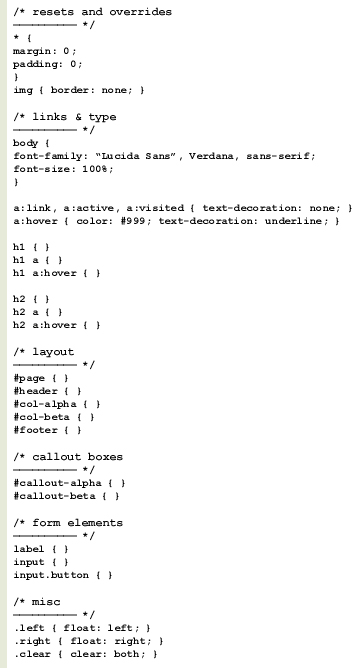
    Just like anything else, it pays to keep yourself organized. Rather than haphazardly dropping in id’s and classes in the order in which they come to mind, use a coherent structure.

    It will help you keep the cascading part of CSS in mind and sets your style sheet up to take advantage of style inheritance.

    Declare your most generic items first, then the not-so-generic and so on. This lets your CSS properly inherit attributes and makes it much easier for you to override a specific style when you need to. You’ll be faster at editing your CSS later because it will follow an easy to read, logical structure.

    Use a structure that works best for you while keeping future edits and other developers in mind.

    • Resets and overrides
    • Links and type
    • Main layout
    • Secondary layout structures
    • Form elements
    • Miscellaneous

    Screenshot


    2. Title, Date and Sign

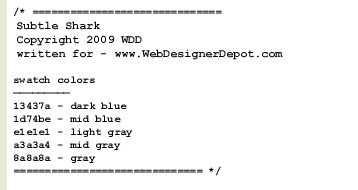
    Let others know who wrote your CSS, when it was written and who to contact if they have questions about it. This is especially useful when designing templates or themes.
    Screenshot

    Wait a minute… what’s that bit about swatch colors? Over the years, I’ve found that adding a simple list of common colors used in my style sheets is extremely helpful during initial development and when making edits later on.

    This saves you from having to open up Photoshop to sample a color from the design, or look up colors in the site’s style guide (if it has one). When you need the HTML code for that specific blue, just scroll up and copy it.


    3. Keep a Template Library

    Once you’ve settled on a structure to use, strip out everything that isn’t generic and save the file as a CSS template for later use.

    You can save multiple versions for multiple uses: a two-column layout, a blog layout, print, mobile and so on. Coda (the editor for OSX) has an awesome Clips feature that lets you do this easily. Many other editors have a similar feature, but even a simple batch of text files will work nicely.

    It’s insane to re-write each and every one of your style sheets from scratch, especially when you’re using the same conventions and methodologies in each.

    Screenshot


    4. Use Useful Naming Conventions

    You’ll notice above where I declared a couple of column id’s and I called them col-alpha and col-beta. Why not just call them col-left and col-right? Think of future edits, always.

    Next year you may need to redesign your site and move that left column to the right. You shouldn’t have to rename the element in your HTML and rename the id in your style sheet just to change its position.

    Sure, you could just reposition that left column to the right and keep the id as #col-left, but how confusing is that? If the id says left, one should expect that it will always be on the left. This doesn’t leave you much room to move things around later on.

    One of the major advantages of CSS is the ability to separate styles from content. You can totally redesign your site by just modifying the CSS without ever touching the HTML. So don’t muck up your CSS by using limiting names. Use more versatile naming conventions and stay consistent.

    Leave position or style specific words out of your styles and id’s. A class of .link-blue will either make more work for you, or make your style sheet really messy when your client later asks you to change those blue links to orange.

    Name your elements based on what they are, not what they look like. For example, .comment-blue is much less versatile than .comment-beta, and .post-largefont is more limiting than .post-title.


    5. Hyphens Instead of Underscores

    Older browsers like to get glitchy with underscores in CSS, or don’t support them at all. For better backward compatibility, get into the habit of using hyphens instead. Use #col-alpha rather than #col_alpha.


    6. Don’t Repeat Yourself

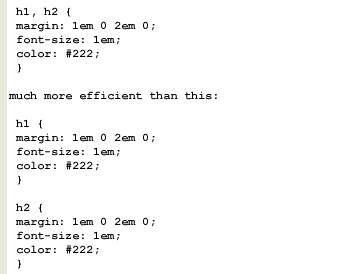
    Re-use attributes whenever possible by grouping elements instead of declaring the styles again. If your h1 and h2 elements both use the same font size, color and margins, group them using a comma.

    This:
    Screenshot

    You should also make use of shortcuts whenever possible. Always be on the lookout for opportunities to group elements and use declaration shortcuts.

    You can accomplish all of this:

    Screenshot

    with only this:

    Screenshot

    It’s very important that you understand the order in which CSS interprets these shortcuts: top, right, bottom, left. A big clockwise circle, starting at noon.

    Also, if your top and bottom, or left and right attributes are the same, you only need to use two:

    Screenshot

    This sets the top and bottom margins to 1em, and the left and right margins to 0.


    7. Optimize for Lightweight Style Sheets

    Using the above tips, you can really cut down the size of your style sheets. Smaller loads faster, and smaller is easier to maintain and update.

    Cut out what you don’t need and consolidate wherever possible by grouping. Use caution when using canned CSS frameworks as well. You’re likely to inherit lots of bulk that won’t be used.

    Another quick tip for slim CSS: you don’t need to specify a unit of measure when using zero. If a margin is set to 0, you don’t need to say 0px or 0em. Zero is zero regardless of the unit of measure, and CSS understands this.


    8. Write Your Base for Gecko, Then Tweak for Webkit and IE

    Save yourself troubleshooting headaches and write CSS first for Gecko browsers (Firefox, Mozilla, Netscape, Flock, Camino). If your CSS works properly with Gecko, it’s much more likely to be problem free in Webkit (Safari, Chrome) and Internet Explorer.


    9. Validate

    Make use of W3C’s free CSS validator. If you’re stuck and your layout isn’t doing what you want it to do, the CSS validator will be a big help in pointing out errors.


    10. Keep a tidy house

    Separate browser-specific CSS to its own individual style sheet, and include as needed with Javascript, server-side code or conditional comments. Use this method to avoid dirty CSS hacks in your main style sheets. This will keep your base CSS clean and manageable.


    Written exclusively for WDD by Jeff Couturier

    Do you follow these methods when coding your websites? What other techniques do you use to create better code?



  • 124 Comments »

     
    #1
    ideamashups.com
    May 20th, 2009 at 7:55 am

    Thanks for the tips, good points that I always try to keep to.

    Have you heard of blueprintcss? [http://www.blueprintcss.org/] Would like to get peoples thoughts…?

     
    1 Reply
     
    #2
    Alan Leonard
    May 20th, 2009 at 7:56 am

    This is important stuff! I can’t start a project unless things are well formed. CSS when formatted well looks so good.

    Adding on to what you were saying for useful naming conventions, I take a page from Javascript/Actionscript and use lowercase first word, capitalized second for my classes (ie: #upperRight) I’ll eliminate hyphens and underscores this way as well.22


    #3
    Brian
    May 20th, 2009 at 7:57 am

    Very good post. I have been incorporating some of these methods and I’ve benefited from them a lot.


    #4
    D.
    May 20th, 2009 at 8:01 am

    Good tips, I should always follow these principles, but sometimes I slip….


    #5
    insic
    May 20th, 2009 at 8:07 am

    thanks for the tip. this 10 practice is a must for front end developers.


    #6
    Dre
    May 20th, 2009 at 8:10 am

    A welcomed approach.

    Out of habit I find myself not grouping like elements as I should while doing my initial styling. I also find myself not using shortcuts as often as I should.

    Once I have my design finalized, I take a run through all my sheets to ensure that I clean it up as much as possible.

    This is a lot easier when you stay organized and comment your sheets. You then have an easy way of going back and finding the elements you want to look at by group.

    As usual, thanks for the post.


    #7
    Gabe Diaz
    May 20th, 2009 at 8:29 am

    Great info!

    Not always needed, but if you have alot of code, adding a table of content sometimes helps.

    Sectioning off your CSS with section labels(caps, roman numbers) that match your table of content, will help when scrolling down trying to find the correct id/class. Also helps when more than one person is accessing and editing the style sheet.


    #8
    The CSS Gallery List
    May 20th, 2009 at 8:39 am

    I’ll admit my stylesheets can be a bit messy sometimes. I break it up into sections but I really need to start commenting to let others know what’s what.


    #9
    Chris Howard
    May 20th, 2009 at 8:41 am

    Great list, thanks.

    #8 though, I have a question. I am still relatively new to serious web development (less than a year). Wouldn’t it be better coding for the lowest common denominator first? i.e. IE.

    I had read before always code for Firefox first and so always do so, but the pain of making sites IE compatible has left me doubting that approach.

    I’m in at the stage now with a site I’m developing of trying to make it IE compatible. Everytime it’s something different. This time it’s a problem with z-index. It’s a nightmare. So now I’m wondering if I woulda been better off coding for IE compatibility from the outset.

    I do these cool (yet simple) things that work in Firefox and Safari, but spend hours trying to get them to work in IE. If I coded for IE first, I prob wouldn’t do the cool stuff, but at least I wouldn’t waste so much time.

     
    2 Replies
     
    #10
    Bogdan
    May 20th, 2009 at 9:36 am

    Regarding the first point to stay organized I can recommend CSSEdit:

    http://macrabbit.com/cssedit/

    Besides other powerful features like live preview, it helps you organize your code in groups that behave like folders in the finder and can be also nested.

    I am a pro web-designer but after I started using CSSEdit I got much faster in developing the CSS for my projects.


    #11
    Ced
    May 20th, 2009 at 9:51 am

    What is the problem with underscores ?

     
    2 Replies
     
    #12
    web design cheltenham
    May 20th, 2009 at 9:51 am

    All good sound advice, when you talk about templates I presume this is the same as a framework, I keep a selection of frameworks that I can refer to when a particular design requires it ie 2 column, fixed widths etc. the danger with templates or frameworks is that your designs can start to look the same but you can over come this by continuously creating new templates from finished designs this way you can vary and develop typography and colours in your designs slightly but retain the fundamentals.


    #13
    Mark
    May 20th, 2009 at 10:00 am

    realy usefull,

    but i prefer my way :
    i use only 2 stylesheets

    -one for text
    -one for layout

    ___________________________________
    in my layout stylesheet i first declare al the generic div’s like #main #footer #header
    beneath those i put comments like: /* =footer */ or /* =main */
    and then i write down al the children element of the div i commented beneath.
    ___________________________________
    Its just my aproach, it works for me ;)


    #14
    Abrishca Digital Media
    May 20th, 2009 at 10:12 am

    Thanks for the post. I didn’t know about hyphens and underscores – you learn something new every day!


    #15
    Paul de Vries
    May 20th, 2009 at 10:22 am

    Nice article, one suggestion through:
    You shouldn’t define (anymore) the ‘clear’ property within your HTML structure, remember to keep the design and the HTML seperate;

    A simple way to avoid the ‘clear’ property is to use overflow:hidden; or overflow:auto; to make the div match your floats. More at it on http://www.quirksmode.org/blog/archives/2005/03/clearing_floats.html


    #16
    Zábavná videa
    May 20th, 2009 at 11:15 am

    Very good post, i again smarter. Pleas! What is the best (x)html editor for windows??? Thanks all.

     
    1 Reply
     
    #17
    Charles-Henry Vespierre
    May 20th, 2009 at 11:28 am

    Well, nice post.
    We can add sort alphabetically your classes for a better reading.


    #18
    rsstudio
    May 20th, 2009 at 11:59 am

    Great list again! I might say that listing the color swatch is really a SMART move. It really is time consuming to check hexadecimal codes in an image editor. Kudos!


    #19
    Jacob Rask
    May 20th, 2009 at 12:01 pm

    Nice list indeed. If anyone is worried that their CSS files will be too big with all the comments, simply minify it with the YUI minifyer or something else.


    #20
    Yaili
    May 20th, 2009 at 12:03 pm

    Cool, I’m glad to see I follow all these tips :)

    One thing I also like to do, specially when you’re handing down the CSS files to someone else, is to add a little comment in front of the selectors that are overridden by IE specific stylesheets, and sometimes even add a comment as to why.

    For example:
    div { min-height:200em; } /* ie.css: IE6 needs a height property instead */

    This way, if I or someone else has to later edit the CSS, we’ll make sure we also change the IE one.


    #21
    Andy Walpole
    May 20th, 2009 at 12:08 pm

    I disagree Chris. I design in Firefox but I’m always constantly checking between different browser and particularly IE6 and 7.

    It’s not like I finish a site in Firefox and then go and check it in other browsers – it’s a continuous process.

    I use Firefox as my base worktop, but not the only one.


    #22
    orphicpixel
    May 20th, 2009 at 12:20 pm

    nice learning resources and a list of good css practices


    #23
    Matt H
    May 20th, 2009 at 12:32 pm

    @Chris Howard Some tips for developing with IE (6 especially). I always code for Firefox / webkit / opera first then use conditional comments for any changes you have to make for IE. If you pick a good reset style sheet will help when coding cross browser.

    A couple of rules of thumb when fixing things in IE6. If something is broken then it can usually be fixed by adding a width. If you are having issues with z-index make sure you only have 1 container with position relative. IE gets confused when you have multiple containers with position relative, it doesn’t know where to place things.

    Also read up on hasLayout (http://is.gd/ojE). Good knowlege to know on debugging for IE.

    Hope that helps


    #24
    Hunter Hastings
    May 20th, 2009 at 1:36 pm

    All obvious yet helpful to have laid out in plain English, thanks :)


    #25
    Manuel Garcia
    May 20th, 2009 at 1:58 pm

    Comments, comments and more comments, if html and css i well commented, is always much more easy to go back to them and “understand them”


    #26
    Andy Couch
    May 20th, 2009 at 2:36 pm

    You probably already know this, but you can simplify #6 a tiny bit more.

    h1 {
    margin: 1em 0 2em;
    }

    When you have three values, they are applied to the 1) top, 2) left & right, and then 3) bottom.


    #27
    Gabe Harris
    May 20th, 2009 at 2:52 pm

    Excellent tips. I can’t tell you how many times I wrote the same CSS over, and over, and over, before I started creating templates that I could re-use.

    Two things not mentioned in here that I also do are: #1 listing attributes in alphabetical order. For example I list background: #fff; before width: 960px every time.

    And #2 using multiple stylesheets for pages that are really different from other pages on the site. For example, on a site with a lot of forms I’ll have a style sheet specifically for styling them, but I won’t link to that style sheet from every page (only the pages with forms).


    #28
    Casey
    May 20th, 2009 at 3:06 pm

    I like the idea of commenting color swatches. I had never thought of that. Thanks.


    #29
    Kai Chan Vong
    May 20th, 2009 at 3:23 pm

    Whilst I agree with you that hyphens are clearer & faster to read + easier to edit and differentiate between seperate classes in FireBug… do you have anything to back up your comment that underscores are not backwards compatible in browsers?

    Nice list… I think everyone has their own way of working and as you spend more and more time you begin to have your own philosophies in the best way to markup/edit and such.


    #30
    Osito
    May 20th, 2009 at 3:34 pm

    2+1=3 (validation)

    Me + 10 Best CSS Practices to Improve Your Code = Happy coder :)

    Thanks!


    #31
    Chris
    May 20th, 2009 at 3:45 pm

    Finally, somebody else that realizes that underscores break old browsers! I like @Alans idea too about the camel case method, but It’s good to point out that underscore glitch in older browsers. Whenever I tell people about that they look at me like I’m telling them an urban myth or something.

    Good tips overall.

    Has anyone tried the one-line method for CSS? e.g. using
    h1 { color:something; font:something; }

    Rather than
    h1 {
    color:something;
    font:somethign;
    }

    I know it’s an adjustment, but in larger projects with a few people touching the style sheets, it ends up (i think) being easier to find declarations if grouped nicely. (Though I agree, it’s harder at first to see attributes inside the definitions.)


    #32
    Patrik
    May 20th, 2009 at 3:50 pm

    I wouldn’t recommend writing “* { margin:0;padding:0 }” as a “basic reset”. Various margins will be out of sync and some margins will be that to. It also takes more time for CSS to render that. Use a “CSS-reset” stylesheet instead.

    Great article by the way :-)


    #33
    Jack Westbrook
    May 20th, 2009 at 3:51 pm

    At the risk of being pedantic your tip #6 shortcut example can actually be written like so:

    h1{
    margin: 1em 0 2em;
    }

    So long as the right and left values are the same there’s no need to specify the left.

    @Chris Howard – the main reason for coding for gecko first is due to the number of developer extensions available for firefox. Firebug and the web dev toolkit can seriously speed up production. Once done, you can move over to IE (and if necessary Safari/Chrome) and tidy things up. Tip #10 conditional stylesheets helps with IE.
    The IE z-indexing you’re struggling with is generally caused by a bug, where the z-index is inherited from the parent elements. This link might help: http://annevankesteren.nl/2005/06/z-index


    #34
    Jonas Feiring
    May 20th, 2009 at 3:53 pm

    #8 I do webkit first. It’s more standards compliant.


    #35
    dadmtb
    May 20th, 2009 at 4:00 pm

    Very good article ;)


    #36
    Mr. R
    May 20th, 2009 at 5:08 pm

    Chris Howard: or you’d waste even more time getting it to work in FF and Safari :) And Opera of course (did you guys forget about Opera?). Anyway I’d say it depends on which IE version you are talking about, if it’s 6 then absolutely no!
    Btw, z-index problem in IE? any chance it’s SELECT box or Flash movie rendered above everything else? :) If so, google “Iframe Shim”.


    #37
    Zuquirio Ámaur
    May 20th, 2009 at 5:10 pm

    Thanks Alex to highlighting these best practices for CSS.


    #38
    Brett
    May 20th, 2009 at 5:12 pm

    Great ideas. I use all of them except I’ve never thought of defining swatch colors. Great idea!

    One idea I’ve been toying around with in my head is compressing my CSS in a CSS compressor, so I can squeeze that extra bit of speed. Yet the only problem is it is really hard to make any edits after.

    So my idea is once the site goes live, have 2 copies. One you keep compressed, and one you keep uncompressed so you can go back and edit if the client wants to make changes.

    I don’t know if it the increase in loading time is worth the hassle of maintaining 2 style sheets?


    #39
    Adam
    May 20th, 2009 at 5:22 pm

    Nice simple tips there. I agree with your point about naming classes – the minute you want to start moving stuff around you start getting confused over which class is which. Nice idea about the swatch colours and taking ownership over a stylesheet – simple and effective little standards.


    #40
    Pixelz
    May 20th, 2009 at 5:25 pm

    Some excellent points here. Some things become difficult to implement when working with enormous sets of stylesheets with Drupal. The template thing is a great idea for that though!


    #41
    Sandy
    May 20th, 2009 at 5:32 pm

    Thanks for the reminders – glad that you mentioned the swatch colors. I have recently started including those in my css after having to go back and look them up too many times. Too bad I didn’t read this list a couple of years ago (Doh)!

    @Chris Howard – Typically you code for the gecko browsers (FireFox, etc) first as they are the most standards-compliant. That way you can be more certain of your code validating. And, if you separate out the IE hacks in a conditional stylesheet as Alex suggests in #10, only the IE users have to load that sheet so you get a performance improvement for everyone else.


    #42
    Eric Miller
    May 20th, 2009 at 5:44 pm

    Chris, not really no. Although IE has a larger browser market share it in fact varies from version to version. To base your primary stylesheet on the Gecko Engine (ex. Firefox) you in fact will cover multiple browsers instead of a single one or a single version. It is then just a simple fix to add in an IE only or IE6, IE7, & IE8 stylesheets to adjust to meet that need. You have saved yourself a lot of work and now compatible with 7+ browsers.

    With regards to the list, I would have to admit I wasnt even aware of the hypens vs underscores issue. I advocate forcing users to update to the most current version in lieu of making extra work for myself. If your browser is two major versions old (IE6) than you get what you deserve.


    #43
    hadi060
    May 20th, 2009 at 5:46 pm

    Great tips! To be organised is very important, so it’ll be easy to edit or add later, and the code will be very clean..
    Thanks very much for these gogd tips :)


    #44
    Adam
    May 20th, 2009 at 5:55 pm

    Good and helpful tips


    #45
    Health Guy
    May 20th, 2009 at 6:07 pm

    Some good tips there – thanks.

    Regarding #6 and the correct shorthand order for padding or margin, etc – you can think of it as the letters in the word TRouBLe – Top, Right, Bottom, Left. Just ignore the vowels and you’re set!


    #46
    Scott
    May 20th, 2009 at 6:09 pm

    Chris Howard: Just a quick help note. Many people do not seem to realize that in order to use z-index properly it must be used on an element that has been absolutely positioned (position: absolute).

    And do not fall for coding for IE first. (and by this I am assuming you mean IE6)

    Firefox is used as the design platform of choice for many reasons, but an important one is their adherence to Web Standards. If you use markup and CSS following these Standards, they should work nicely in most browsers. It is only after the fact the you need to clean things up for IE6 (and sometimes 7).


    #47
    Eric Barb
    May 20th, 2009 at 6:48 pm

    I like the idea of putting the color swatch in the css. Can’t tell you how many times that would have helped to have.


    #48
    Ben
    May 20th, 2009 at 6:51 pm

    I disagree completely with #5 re: underscores. Unless you are supporting browsers older than IE5 (which turned 10 years old this year) this won’t be an issue. I personally find that underscores are far more readable than hyphens and camelCase and use them JS, PHP etc… Like I said, it is a matter of personal preference, but using the argument that older browsers will not understand underscores is about as strong as advocating the use of over css margins.

    Other than that, nice article!


    #49
    Chris
    May 20th, 2009 at 7:21 pm

    Mozilla does a nice job explaining the underscore issue.

    https://developer.mozilla.org/en/Underscores_in_class_and_ID_Names


    #50
    Gabriel Harper
    May 20th, 2009 at 7:25 pm

    Great tips. Solidified some existing practices and added a few new ones.

    I prefer hyphens for naming in CSS but use both. I’ve never had problems using underscores.


    #51
    HQ tamil
    May 20th, 2009 at 9:26 pm

    thanks good post


    #52
    r_jake
    May 20th, 2009 at 10:27 pm

    According to the Mozilla article, underscores are only an issue if you are wanting compatibility with IE 5, Netscape 4, Opera 3 or below, or are following the original specification of CSS.

    If you take a look at the W3Schools stats these browsers aren’t included because nobody uses them anymore! It’s not 1998…


    #53
    Jeremy
    May 20th, 2009 at 10:40 pm

    I remember going crazy troubleshooting and finding out about the underscore issue. Great list and thanks for the underscore link Chris.


    #54
    Mark
    May 20th, 2009 at 10:52 pm

    Hm, yeah the underscores vs hyphens issue… glad that I’m not the only person who frowned upon that one. :) Sure, older browsers might not support it, but then again, aren’t there a million other issues you’ll encounter when you test a modern webpage in Netscape Navigator?
    According to the Mozilla article references by Chris, “errata to the specification published in early 2001 made underscores legal for the first time”. Early 2001… it’s been “legal” for over 8 years people, I’d say it’s time to get over it. Underscores_are_fine, is my humble opinion. ;)


    #55
    Jeff Couturier
    May 20th, 2009 at 11:27 pm

    Thanks for all of the comments on this. I’m really glad everyone found this useful.

    @Chris Howard – It’s much more efficient to code for the most standardscompliant browsers first, then error-correct for the rest. If you go the other way around, your base code can easily wind up optimized for IE and it’s bugs/quirks. You’ll spend much more time near the end of development “fixing” things to be standards compliant for Gecko and Webkit. If you code to web standards the first time, you’ll only have minor tweaks to handle IE’s bugs.

    @Ced – as I wrote in the article, underscores cause older browsers to choke on your CSS. Further, they weren’t supported at all in CSS1.

    @Zábavná videa – check out Komodo Edit. It’s free, and pretty slick.


    #56
    arnold C
    May 21st, 2009 at 12:43 am

    thanks for this stuff,

    another thing if your using Mozilla as your browser,
    use FirebUg and Webdeveloper tool it will somehow lessen to give you a headache when coding in CSS


    #57
    Chris Howard
    May 21st, 2009 at 1:53 am

    Thanks heaps to all who provided answers to my question, and links. Will check them out. Hopefully they’ll reduce my headaches.

    Another question, can anyone recommend a good webdev forum to hang out in?


    #58
    ChaosKaizer
    May 21st, 2009 at 5:24 am

    There is lots of good points in this articles but I disagree with #8

    ” Write Your Base for Gecko, Then Tweak for Webkit and IE”

    .

    You should write for standard not base on browser specific layout engine. Support the standards so it will continue to look good in the future.


    #59
    Jaime Daveggio
    May 21st, 2009 at 5:52 am

    thanks for the code!


    #60
    Snookerman
    May 21st, 2009 at 11:24 am

    4. Use Useful Naming Conventions – I reckon col-alpha and col-beta is limiting as well. You should use a name that actually describes what the element is, not what it looks like (what if you don’t want it to be a column anymore?). I would recommend to use article, section and aside which describe what the elements are and will make the transition to HTML5 much easier.

    6. Don’t Repeat Yourself – Actually 2em 0 1em 0 could be written as just 2em 0 1em because when you use 3 values, the first one is top, the last one is bottom and the middle one is left and right.

    7. Optimize for Lightweight Style Sheets – Also remember that you don’t need to wrap urls in single quotes, so url(’image.png’) should be just url(image.png).

    8. Write Your Base for Gecko, Then Tweak for Webkit and IE – Netscape?


    #61
    rasitha
    May 21st, 2009 at 2:30 pm

    hi! Thanks for the sharing. and code….


    #62
    Nano
    May 21st, 2009 at 3:48 pm

    I also indent in the same hierarchy the elements appears in the HTML (but only with specific elements classes or ids).


    #63
    Jamie
    May 21st, 2009 at 4:53 pm

    Very Helpful!!


    #64
    DollarDuel
    May 21st, 2009 at 4:58 pm

    Great article!

    I personally do not agree with 5 or 8. Newer browsers can handle the underscores and if someone is browsing my site with Netscape 4 (11-12 years old), IE4 or IE5 (9-12 years old), or an Opera that is 3-6 versions (8-12 years) old… chances are great that I do not care who the person is or why they are on my site. Some designers will say not to forget about a particular browser, but I personally draw the line as time wasters – which I believe #5 is. I have been using underscores for years and have never noticed a problem where a browser isn’t rendering my content correctly.

    As for #8… I never design for gecko and tweak for others. I design for ALL. If you are using proper HTML structure and correctly marked up CSS syntax, you should run into minimal problems when coding for IE, Opera, Safari, etc. I personally have a Mac set up (which I am using now) and a PC next to me for all Windows browser testing – and I refresh that page every time I preview it on my current screen. If there is a problem in any of the browsers, I fix the change immediately instead of waiting until the sites “complete” to tweak all the problems.


    #65
    Pau lJ
    May 21st, 2009 at 7:36 pm

    I also frown on the using hyphens tip. I find underscores much easier to read then hyphens. Abc-Abc is easier than Abc_Abc ? I don’t think so. the underscore provides greater distinction between parts due to the increased space above the line, whereas a hyphen providers equal space above and below the line, thus less distinction. Just my personal preference I guess.

    And I’ve never had any problems with underscores; though I don’t test (nor worry about supporting) browsers that are so old they’d have a problem with underscores.


    #66
    Jeff Couturier
    May 21st, 2009 at 8:08 pm

    @ DollarDuel – You may have the luxury of disregarding certain visitors based on the browser they use, but many others don’t. Client requirements, company policies, government ADA/DDA compliance, etc. can all force the developer to take those older browsers into consideration.

    On #8, a lot of people have commented on my choice of words with “design for Gecko.” I should rephrase: design *IN* Gecko (Firefox). I don’t mean you should design *for* any specific browser. The Gecko engine is the most developer-friendly, and is highly standards compliant. Think of the browser you primarily develop in as a blueprint. If you’re blueprint has lots of misalignments, errors and omissions then whatever you construct using that blueprint will inherit those issues. Use a solid blueprint – in this case, a highly standards compliant browser – and what you build will in turn be more standards compliant from the ground-up.
    Further, I absolutely wasn’t suggesting that you wait until a site is finished before even testing with other browsers.

    On a side note, if you work mainly on a Mac, but have a totally separate machine just for IE testing, you’ll probably be interested in this screencast of mine:
    Install Internet Explorer on OSX Using VirtualBox
    http://www.10voltmedia.com/blog/2008/12/screencast-install-internet-explorer-on-osx-using-virtualbox/


    #67
    rdh
    May 21st, 2009 at 8:41 pm

    i am neurotic when it comes to stuff like this especially because i work with three other designers/developers. i get crazy when i go into others style sheets and i have no idea where anything is. arg!


    #68
    Mario
    May 21st, 2009 at 11:11 pm

    Good Idea. I especially like #3. Im going to start building my template library for Two, Three Column Layouts.


    #69
    Shreemani
    May 22nd, 2009 at 9:25 am

    Nice suggestions. But 1 suggestion, the css codes should have been given in text formats rather than images.


    #70
    Sklep Wędkarski
    May 22nd, 2009 at 10:08 am

    Those are rather basics but anyway nice article, very comprehensive tips.


    #71
    Webbo
    May 22nd, 2009 at 12:24 pm

    Thanks for the great post. Always nice to see how others set-up their CSS, so that I can incorporating some of the good ideas into my work.


    #72
    Adeel Mughal
    May 23rd, 2009 at 11:02 am

    Thanks Really nice


    #73
    Yaggo
    May 23rd, 2009 at 5:17 pm

    “8. Write Your Base for Gecko, Then Tweak for Webkit and IE”

    No reason to prefer Gecko over Webkit. Webkit is as standard compliant as Gecko, if not even more. Especially on Mac platform, Webkit handles some things (e.g. font related) clearly better than Firefox for Mac. If you can write standard compliant code, you can use any modern browser for testing (no, IE8 is not modern, unless you stay strictly in CSS 2.1) and are unlikely to run into problems, except very minor tweaks. Finally do specific stylesheets for IEs (zoom: 1 is your friend) and put include them in IE’s conditional comments.


    #74
    Vector Grunge Graphics
    May 23rd, 2009 at 8:26 pm

    Another thing to think about: Try not to use a lot of nested divs if you don’t have to! CSS is great for table-less design, but if you are nesting divs all over the place, your code gets cluttered, disorganized, hard to update and debug, and google doesn’t like messy code!


    #75
    Dominik Deobald
    May 23rd, 2009 at 10:32 pm

    About “10. Keep a tidy house”

    I prefer to have all “browser tweaks” in the main CSS file, too. I use conditional comments to add a DIV around the whole page content identify IE browsers and then have…

    #ie6 h1 {font-size: 20px} /* just an example */

    … in the CSS file especially for IE6 tweaks.


    #76
    Dominik Deobald
    May 23rd, 2009 at 10:34 pm

    @Yaggo: I believe there are much more Firefox-Users than users of all webkit browsers combined. So from my point of view that makes it very sensible to optimize for Firefox first ;)


    #77
    Musa
    May 25th, 2009 at 10:18 am

    Like this post. One thing, would you tell me which browser doesn’t support underscore. Also, most important things in css, we must have use inherited features for each object that you may refer here.

    Anyway, Great post indeed.


    #78
    Jeff Couturier
    May 25th, 2009 at 9:12 pm

    @Musa – A link for more detail on the underscore issue was posted in an earlier comment above: https://developer.mozilla.org/en/Underscores_in_class_and_ID_Names


    #79
    Tyler Lange
    May 26th, 2009 at 2:04 am

    These best practices are great. I have been coding CSS for 8 years and I still find this useful. Thanks from all the web designs! Web Designer depot is very helpful when I am skinning CSS / XHTML.


    #80
    Louis
    May 26th, 2009 at 8:49 am

    Nice list, thank you very much for posting.

    However, I strongly disagree with #8. I develop all my CSS in IE7, and never have problems getting the other browsers to behave with a few minor tweaks.

    If you do it the other way around, you’ll end up using too many hacks and/or separate stylesheets to get IE7 and IE6 to behave.

    CSS developers should learn CSS principles (i.e., understand what float is really for, what block-level elements are, etc.) in order to develop cross-browser code. A CSS reset also helps.

    In the past two years I’ve worked on about 60-70 websites, building 20+ sites from scratch, and in that time, only twice have I been forced to use an IE7-only style. Generally, the only hacks I ever need are for IE6.


    #81
    Lonny
    May 27th, 2009 at 7:49 pm

    Thank you so much for posting this. This gives me some ideas on how to create my own CSS-website.


    #82
    hydev
    May 28th, 2009 at 4:59 pm

    I use most of these “rules”… but I’m not very organized. I will keep in mind your 6th rule. By the way great article.


    #83
    Toivo
    May 30th, 2009 at 8:34 pm

    Good post, nicely done. It’s helpful for me to have a checklist on hand with points such as these to mark-off as I go. Organization is not one of the more exciting pieces in the puzzle, but there’s no doubting its importance. Thanks for the tips!


    #84
    WebDev
    May 31st, 2009 at 9:18 pm

    Useful and rational tips! Most of them is in use at my household, but there are new tricks too. Thanks!


    #85
    lomoman
    June 2nd, 2009 at 11:58 am

    Thanks for your useful tips.
    I can play the CSS like PSD now~
    :P


    #86
    Nihar
    June 2nd, 2009 at 5:35 pm

    Thank you very much.

    Great tips…


    #87
    Rupert
    June 3rd, 2009 at 12:56 pm

    Great post! :)
    The #1 Stay organized is really the base of everything even if it’s not the first thing that comes in mind when you’re busy and in hurry for the client.
    The secret is to keep it always in mind and remember that this “loss of time” will be the time and money gaining of the next working years


    #88
    Sharlene
    June 5th, 2009 at 4:00 pm

    Really awesome post.

    Though I got to add, if this is about writing and developing CSS faster, it’s all about the Firebug plugin for Firefox.

    No matter how organized you are, Firebug expedites CSS development.

     
    1 Reply
     
    #89
    Dax Hansen
    June 5th, 2009 at 11:33 pm

    Great points. I need to be better organized… in more that just my style sheets.


    #90
    web2000
    June 6th, 2009 at 10:31 pm

    Always nice to have this as a resource whenever I start a new project (like right now for instance!) Thanks!


    #91
    wędkarstwo morskie
    June 9th, 2009 at 7:47 pm

    Those are rather basics but anyway nice article, very comprehensive tips. Phx so much.


    #92
    DemoGeek
    June 11th, 2009 at 10:29 pm

    I think Tip# 8 clearly makes sense. I always went the other way of targeting IE and then fixing for Gecko and WebKits and it never was a happy experience. Great tip!


    #93
    CSS Gallery Submit
    June 15th, 2009 at 5:44 pm

    It is very informative post. These points should need to be keep in mind when we write css. Great Post.. Thx


    #94
    Sam
    June 26th, 2009 at 5:38 pm

    One of my new year’s resolutions was to organise my stylesheets better when coding, but I keep falling back into bad habits :( Great article anyway, was very informative!


    #95
    TND webdesign
    June 30th, 2009 at 9:31 am

    Just read this one. Good read and very handy.


    #96
    website design New York City
    July 25th, 2009 at 9:12 am

    your post is helpful and informative


    #97
    Hussain Cutpiecewala
    July 27th, 2009 at 7:30 am

    Thanks for such a nice post.
    It is very helpful to me and my work


    #98
    mindfullsilence
    July 30th, 2009 at 2:39 am

    One point I’d like to make about tip number 7.

    For some reason, chrome doesn’t interpret “0″ as anything and won’t apply it to the site. So I would suggest using 0px just to be safe. 2 bytes of data aren’t going to hurt much.


    #99
    scottlepich
    July 31st, 2009 at 9:22 pm

    Great article! I wish more developers would follow “CSS style” rules like this.

    One difference that I have is #7: I have switched to developing on Webkit (Safari), then checking IE, followed by other standards browsers. Firefox has gotten so slow in the last few versions.

    Some of my personal favorite tips are:

    1. One selector per line (when stacking selectors use multiple lines)
    2. One property definition per line
    3. Alphabetize your property definitions (seems restrictive at first, but once you are used to it, it’s super quick and easy)

    Example:

    #container em,
    #container span {
    background-position: 100% -200px;
    display: block;
    font-weight: bold;
    padding: .5em 1em .4em;
    }

    Thanks!


    #100
    j000
    August 8th, 2009 at 2:13 pm

    Thanks for invaluable tips I especially liked the one with CSS template ready. I will keep that in mind.


    #101
    CSS Showcase @CSSMadness.com
    August 13th, 2009 at 6:21 pm

    Thanks for the tips, this will sure improve CSS skills of many people.


    #102
    pesho
    September 17th, 2009 at 11:06 am

    thanks a lot man
    you are the best


    #103
    Ares download
    October 19th, 2009 at 8:18 pm

    Pretty basic stuff, but valuable nonetheless. Organization is probably the most important part of the approach.


    #104
    Phil Owen
    November 9th, 2009 at 11:40 pm

    Thanks for another great web design post. I think CSS is always something can be improved…


    #105
    web tasarım
    November 11th, 2009 at 12:48 pm

    Great article! I wish more developers would follow “CSS style” rules like this.


    #106
    فندق كوم
    November 13th, 2009 at 5:22 pm

    Nice tips


    #107
    vivek bandebuche
    November 27th, 2009 at 6:43 am

    vary nice post for wordpress users


    #108
    Shawn Mclean
    December 14th, 2009 at 4:08 am

    Are you sure about #8? Write on gecko and it will ‘more than likely work in IE?” Nothing ever works properly in IE, even IE8 does not know to render css properly yet.


    #109
    Julio
    December 14th, 2009 at 9:08 am

    Gracias por los tips, en realidad yo ya los conocía pero nunca está demás recordarlos xD

    Respecto a trabajar los Websites para navegadores Gecko en realidad no ayuda con Internet Explorer, para IE siempre me ha tocado retocar más cosas de lo normal y por eso lo dejo al final xD

    saludos!!


    #110
    Web Design from Lyons Solutions
    December 19th, 2009 at 6:23 pm

    Great tutorial and as always in my link library of faviourites ;)


    #111
    Web design
    December 26th, 2009 at 2:40 am

    Thanks for great article about CSS aspects.


    #112
    Nazim
    December 29th, 2009 at 1:59 pm

    Really a good job. many many thanks


    #113
    creatives
    December 31st, 2009 at 1:54 am

    Just for the sake of the Swatch Colors tip in CSS comments, Thank you! I always have to open up Photoshop to get the color I want. Switching back and forth, I’ve always thought; there has to be another way :) . Now i found out. My I add my tip: Always backup your css files while working on them.. I’m often changing a lot of things in my css file within just a couple of minutes time, to see how it looks. Making sure that I have a backup of a working css file gives me the confidence to go and change (experiment) more and more, knowing that if somethings goes wrong, I’ll always have my backup ;) .


    #114
    BrettM
    January 5th, 2010 at 2:01 am

    What’s the best practice for how to name your rules referring to nested elements?

    #menu li a {}
    or
    #menu ul li a {}
    etc

    And if a paragraph or header etc has a class, would you use:

    p.class {}
    or
    .class {}

    I see a lot of people using div#id too. Is that overkill?


    #115
    Domain Names
    January 18th, 2010 at 3:16 pm

    Some great CSS tips for us novices. It’s good to share – thanks :)


    #116
    Van Owen
    January 19th, 2010 at 8:12 am

    Thanks for the post. Really interesting stuff. This a step closer to mastering CSS.


    #117
    kok aan huis
    January 20th, 2010 at 3:04 am

    interesting tips, thanks


    #118
    Glen
    January 24th, 2010 at 1:16 pm

    One of the simplest, but best CSS articles I’ve seen for a while. Mandatory knowledge for any web designer, and great to be reminded of. Toolbar bookmarked! :)


    #119
    SEO Cheltenham
    January 26th, 2010 at 8:34 pm

    Thanks for the ideas – really interesting.


    #120
    ebooker
    January 26th, 2010 at 8:36 pm

    Any response to Brett M’s comment yet? p.class {} – to P or not to P, that is the question!


    #121
    Jeff Couturier
    January 26th, 2010 at 9:49 pm

    @BrettM and ebooker:

    .class {} is more efficient than p.class {}

    You should also avoid descendant selectors when possible. If you have to use them, try to keep the descending level to 2 or less:

    #menu ul li a – will work
    #menu ul a – is better
    #menu a – would be best

    Check out “How to Write Efficient CSS Selectors” from O’Reilly.com here: http://answers.oreilly.com/topic/647-how-to-write-efficient-css-selectors/
    and look at the section titled Writing Efficient CSS Selectors.


    #122
    ireng_ajah
    January 26th, 2010 at 10:42 pm

    Thanks for the tips. Its very usefull


    #123
    dallas porcelain veneers
    January 28th, 2010 at 10:14 pm

    Staying organized is most important tip. you cannot go off track when you are coding.


    #124
    Manan
    February 9th, 2010 at 8:43 am

    Thanks for very helpful post.

     
    Name (required)

    E-mail (required - never shown publicly)

    Web-site

    Your Comment (smaller size | larger size)

Home| Advertising| About| Contact

© 2010 All Rights Reserved