• 15 Nov

    10 Essential WordPress Plugins to Start Your Blog (and Why)

    Add Ons, Extensions, Plugins, WordPress

    Share


    Ready to start your own blog or online portfolio? Interested in downloading and incorporating WordPress into it? Or maybe you need to spruce up your current site?  Well here are 10 essential WordPress plugins to get your blog started today.

    Maintaining a blog requires some work, but with WordPress plugin capabilities it has become a lot more convenient and less time consuming.

    Literally take these plugins and dump them into your /wp-content/plugins/ directory, turn them on in your Dashboard and Voila! A fully functional blog with all your vital needs.

    First and foremost, it can be quite a hassle to skim through lists of spam-ridden comments with nonsensical advertisements for Viagra and various other prescriptions drugs. Avoid them all together by adding one of these Spam filters:

    1. WP SpamFree

    WP SpamFree allows you to eliminate automated spam bots from controlling your comments, by using javascript and cookies that stops the bots from processing the automated spam. This virtually eliminates the need to type out annoying CAPTCHAS for your commenters. However, nothing is as full proof as the CAPTCHA method, as annoying as it may be. Thus, I’ve also recommended the WP-reCAPTCHA plugin as an alternative.

    2. Ultimate Google Analytics

    Ultimate Google Analytics allows you to automatically sync your Google Analytics account with your website. This plugin helps you manage your visits, page views-by date and location; and track links. This is very helpful in understanding and analyzing who frequents your site, where they came from, where they linked to from your site. Very useful if you are managing a blog with ads, in which advertisers are paying per page view, etc. Which leads me to my next essential plugin:

    3. All in One Adsense and YPN

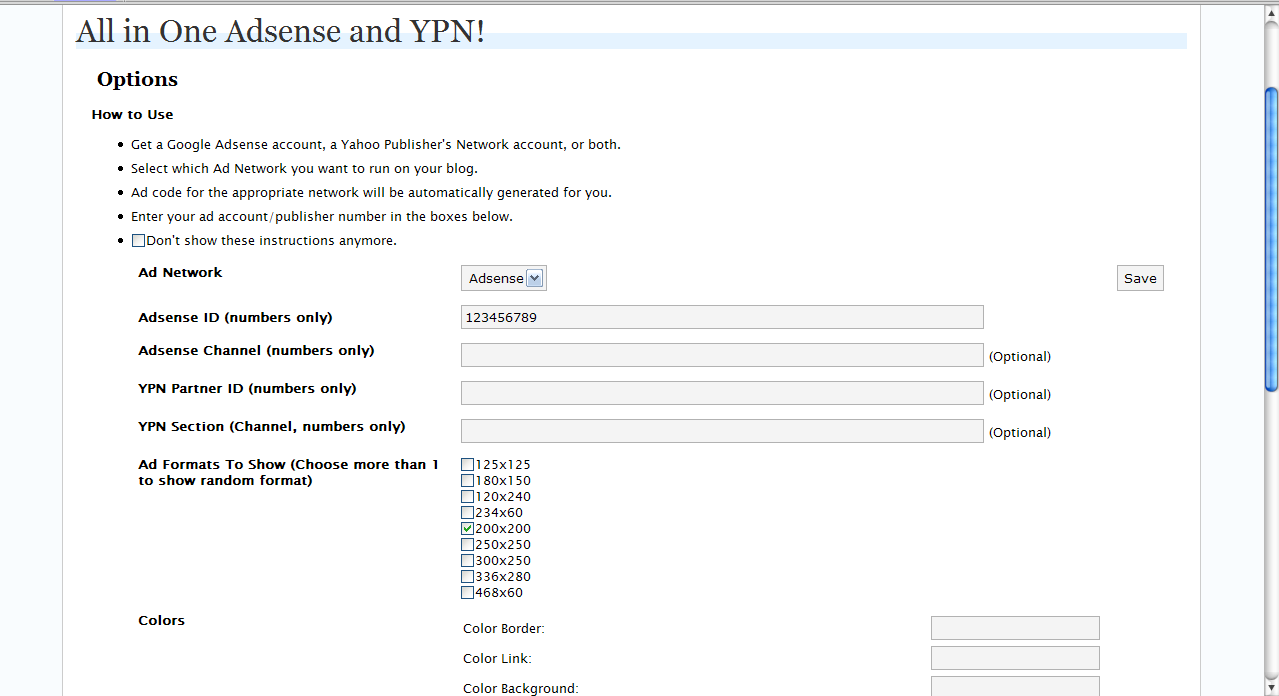
    All in One Adsense and YPN is essential if you want link up your Adsense account with your WordPress blog, with the added benefit of adding your Yahoo! Publisher Network account, as well, doubling your advertising options. It will automatically create the ad codes in your posts, once you provide the publisher/channel IDs. Everyone enjoys the benefits of the lucrative advertising empire (except those unfortunate internet perusers unaware of Firefox’s Adblock add-on).
    4. Feed WordPress

    Feed Wordpress syndicates your posts into lists of entries viewable from your audience’s feedreaders. This allows for simple access to your site through a feedreader, which allows people to stay updated on your posts. Practically everyone in the world-o-blogs needs a way to manage the sites they frequent through a feedreader, and this plugin allows for fast, easy syndication to assist these audiences without difficult configuration.

    5. Add to Any Share/Save/Bookmark Button

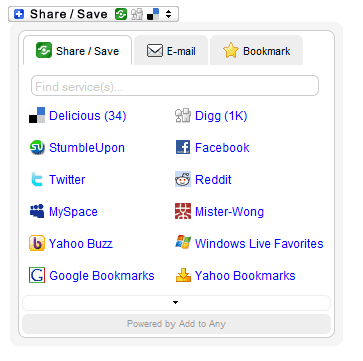
    Add To Any is pivotal to the success of sharing and spreading your name or your blog. Seen at the bottom of nearly every editorial/news/blog/photolog article is this easy-to-share-with-any-social-networking/bookmarking-site-button. Reddit, Diggit, Facebook post-it, email it: you’ll need this plugin in order to share your thoughts with audiences beyond your control.
    6. Insights

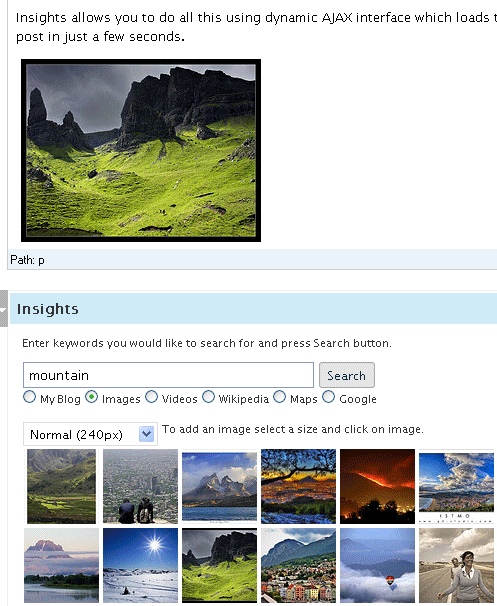
    Insights is literally heaven-sent. This plugin is a mold of interconnectedness that will improve your efficiency and strengthen the credibility, understanding, and efficiency of your entries. It allows for interconnection through this dynamic AJAX control with Flickr, Google Maps, Wikipedia, YouTube, etc., establishing a dynamic experience with your audience.
    7. Global Translator

    Global Translator is a fantastic plugin for reaching a wide variety of audiences, allowing for immediate translation of up to 14 different languages in an easily configurable plugin. If you are trying to reach large audiences of various nations and languages, this plugin will save you a lot of time and sanity.

    8. About Me Widget

    About Me Widget allows for a clean-cut, CSS-able/customizable interface, designed for the sidebar of your WordPress blog. This isn’t terribly difficult to create yourself, but having a copy/paste plugin option is always the more convenient route.

    The following are not necessarily essential to the blogosphere, but definitely spruce up the interactivity between your audience and your blog:

    9. NextGen Gallery

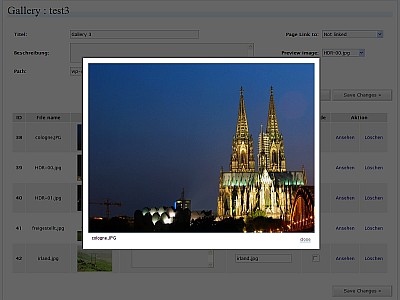
    NextGen Gallery is an aesthetic, interactive photo gallery to host your portfolio or just random, personal photos. You have the visual impact of Jquery’s Lightbox and Thickbox galleries, without the inconvenience of integrating the Jquery code, with this conveniently configurable plugin that packs a powerful punch to the interface of your site/blog/portfolio.
    10. iLastFM

    iLastFM is an awesome little plugin that will connect your Last.FM account with your blog, in a customizable, easily-configurable interface that creates a little sidebar widget. It can display CD covers with artists for a visual interface that offers a audible delight to your site, while sharing new music with your friends or fans.



  • 36 Comments »

     
    #1
    Tiago Pimentel
    November 27th, 2008 at 9:42 am

    Hey very good tips. Maybe in the future you would publish some more cool WP plugins. Thanks!!!


    #2
    Alison
    December 1st, 2008 at 5:43 pm

    although I think there should be others up there, it really depends what you’re using the blog for! But I do like #10, I didn’t know they had a plugin for Last.Fm


    #3
    eddai
    December 2nd, 2008 at 4:04 pm

    many thanks,though seems different than top plugins recommended in other sites~


    #4
    Chad
    December 3rd, 2008 at 2:10 pm

    Thanks for the article. I’m curious, where do all these web design blogs get their content (articles + beautiful pictures)??? I’m lost how each blog has unique articles with all these related pictures. I’ve tried Googling about this, got nothing much but generic article repo sites with no pictures.


    #5
    Walter
    December 3rd, 2008 at 2:18 pm

    Chad, the content is researched well and the pictures we take screenshots for example or stock photos, like from iStockphoto and others.


    #6
    Donjuanito
    December 22nd, 2008 at 2:42 pm

    Found the post to be valuable and love the design of your website.


    #7
    Niels Steinmeier
    December 27th, 2008 at 7:05 am

    Thanks … always great and valuable to see what other people find “must have”. But when it comes down to it, it’s all a matter of “taste” and what you need for your blog/site. But thanks for sharing … I found some “undiscovered territory” that I’m going to explore now … thanks!


    #8
    elmoes
    January 9th, 2009 at 4:00 pm

    Very nice!
    Thx i will use some of the plugins


    #9
    Jennifer Hartley
    January 10th, 2009 at 6:17 am

    Thanks for the useful information! I’m just getting started with my blog and you’re great list and links to the downloads has helped me tremendously. You’ve got a gorgeous looking website too, by the way.


    #10
    Faisal
    February 1st, 2009 at 12:51 am

    Thanks for sharing this gr8 combination of plugins. I will put all these in my blog.


    #11
    Juergen
    February 6th, 2009 at 7:46 pm

    Thank you very much for posting this list.
    I used almost all of them now on my first steps in my blog
    Juergen


    #12
    2expertsdesign.com
    February 14th, 2009 at 10:36 pm

    Great Post! really useful Plugins.


    #13
    SammyTerO
    February 17th, 2009 at 5:28 am

    :) Wow. nice arcticle


    #14
    rizal
    February 28th, 2009 at 7:38 am

    great post .
    is there anyone
    using intensedebate ?
    i think that is a great plugin for commenting


    #15
    miniBlogs
    March 27th, 2009 at 4:06 am

    Thanks for the list, I use a few of these.

    What about seo plugins such as the all-in-one or platinum-seo plugins? I think they not only help optimize your blog pages better but help “newbies” get into the habit of considering Title and Description when making a post.


    #16
    RaiulBaztepo
    March 29th, 2009 at 2:32 am

    Hello!
    Very Interesting post! Thank you for such interesting resource!
    PS: Sorry for my bad english, I’v just started to learn this language ;)
    See you!
    Your, Raiul Baztepo


    #17
    Designer-Kamrul
    May 27th, 2009 at 2:56 pm

    No matter boy! Just one thing! Do not express your weakness. However, learning is great. You are learning English and i am learning WordPress here.


    #18
    Brad Hart
    April 1st, 2009 at 3:46 am

    I think you got a lot of those wrong, especially wp-spamfree. WP-spamfree plugin is a menace! It as often as not blocks legitimate comments as it does spam, not to mention it also interferes with those same people’s ability to use most wordpress plugin comment forms so they can’t even tell you how screwed up your blog is. The creator claims he can’t duplicate the errors that far too many people have, so they don’t exist and have not nor will they ever likely be fixed.

    Ultimate google analytics is good but why bother putting it up if you aren’t using google xml sitemap plugin. Joost de Valk’s google analytics program is better than UGA as well, and if you are using Headspace 2 for SEO you can skip a separate analytics altogether.

    If you want images I suggest you also ad Tagaroo which will pick out public flckr images based on your tags, as well helps you pick out good semantic tags.

    When it comes to social plugins what you want one that isn’t giving up google juice with live links.


    #19
    Ali R Khan
    April 3rd, 2009 at 4:59 pm

    Really Nice collection of Useful Wordpress Plugins…I have them all on my blog and many more… One more I want to suggest is CFORMS for Custom sontact forums as widget or on page.

    Regards.


    #20
    Blaine
    April 5th, 2009 at 7:56 pm

    That’s a pretty good list depending on what your doing with your blog. I’m sure it was very hard to pick just 10!

    How about twitter tools or something of the sort to post up to twitter when you have a new blog post?

    And why not just use akismit for spam… It comes with wordpress..


    #21
    Directory marocplus
    April 6th, 2009 at 3:02 pm

    it’s good
    thanks


    #22
    Mark B
    April 7th, 2009 at 12:37 am

    Good article – I have know what works well with Joomla, and most of the joomla equivalents I would agree with.

    Recently asked to set up a wordpress site, so your article will be a big help. Thanks.

    As with joomla the SEO and SEF plugins are high up the list – will need to check out brads suggestion Headspace 2.


    #23
    Jens
    May 16th, 2009 at 11:38 am

    I prefer Shadowbox JS instead nextgen


    #24
    bartcatapult
    May 27th, 2009 at 9:43 am

    Thanks for sharing bos..;)


    #25
    Adam
    June 2nd, 2009 at 7:47 pm

    I love that iLastFM one – I tried a last fm plugin a while back and it was useless – it just slowed the site down. I’ll give this one a go.

    Can I also recommend Google XML Sitemaps plugin? Search for it…


    #26
    wordpress theme
    June 23rd, 2009 at 2:07 pm

    This is a great list of plugins. To be honest, I have the first 5 on most of my blogs, but I have never come across the Nex Gen gallery, or the Global Translator, both of which I’m keen to install on my main blog. Overall, this is a ‘must have’ list for a newbie Wordpress blogger!


    #27
    AnbroK
    June 30th, 2009 at 6:45 am

    Great tips! Thanks!!


    #28
    Jonny
    July 1st, 2009 at 12:28 am

    My top 10 would include the linkbuilding plugin from IBL Builder, its getting me quite a few decent one way backlinks for my blog. Its on their homepage at http://www.iblbuilder.com


    #29
    Kahuki Network
    July 8th, 2009 at 8:02 pm

    These are really useful tips, thanks for putting these altogether in one place. I am already using some of these on my blog, but 2 or 3 I had never even heard of, so I guess I’ve got quite a bit to learn! Thanks again!


    #30
    Spanish Property bargains
    August 17th, 2009 at 2:27 pm

    Its very useful to find all these plugins in one useful list. I use a couple, but hadnt even heard of most of the, so will definitely be adding some more to my blog soon – thanks for the great advice!!


    #31
    Mmorpg
    August 8th, 2009 at 6:48 am

    Wordpress is such a good CMS mainly because of the sheer amount of plugins there are for it. Out of all the plugins listed here, I feel that Nextgen gallery is the most important, as it’s such a powerful tool. You can use it for anything! Then again though, some sites don’t need it. I’m surprised you didn’t mention asikmet, as it’s the most powerful plugin to prevent spam.


    #32
    Jessica
    August 28th, 2009 at 5:35 am

    I will use some of these on my blog. thanks


    #33
    Cheap Jordans
    September 22nd, 2009 at 3:25 pm

    Hey,it’s a nice post.
    So great.Good article.


    #34
    miguel
    October 19th, 2009 at 6:06 am

    chebre por el dato, se los recomiendo


    #35
    jeprie
    January 28th, 2010 at 6:45 am

    i assume you dont add akismet because its already in wp.
    great collections but i dont use any of them.


    #36
    abhi
    January 28th, 2010 at 7:33 pm

    As a novice to wordpress, I was excited to find this collection of tools and plugins. Sweet article! thanks much!

     
    Name (required)

    E-mail (required - never shown publicly)

    Web-site

    Your Comment (smaller size | larger size)

Home| Advertising| About| Contact

© 2010 All Rights Reserved