• 21 Nov

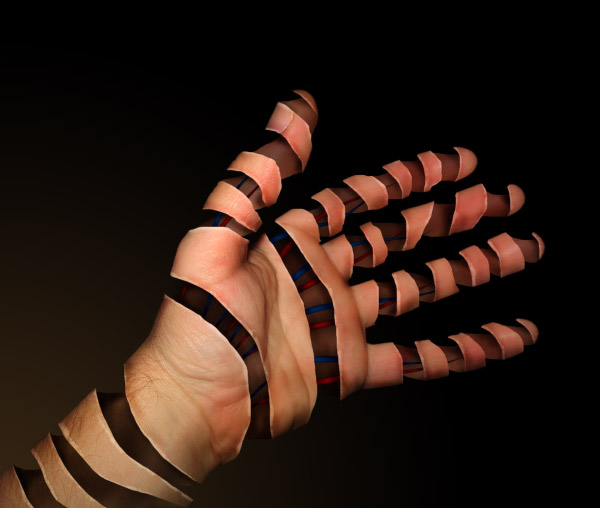
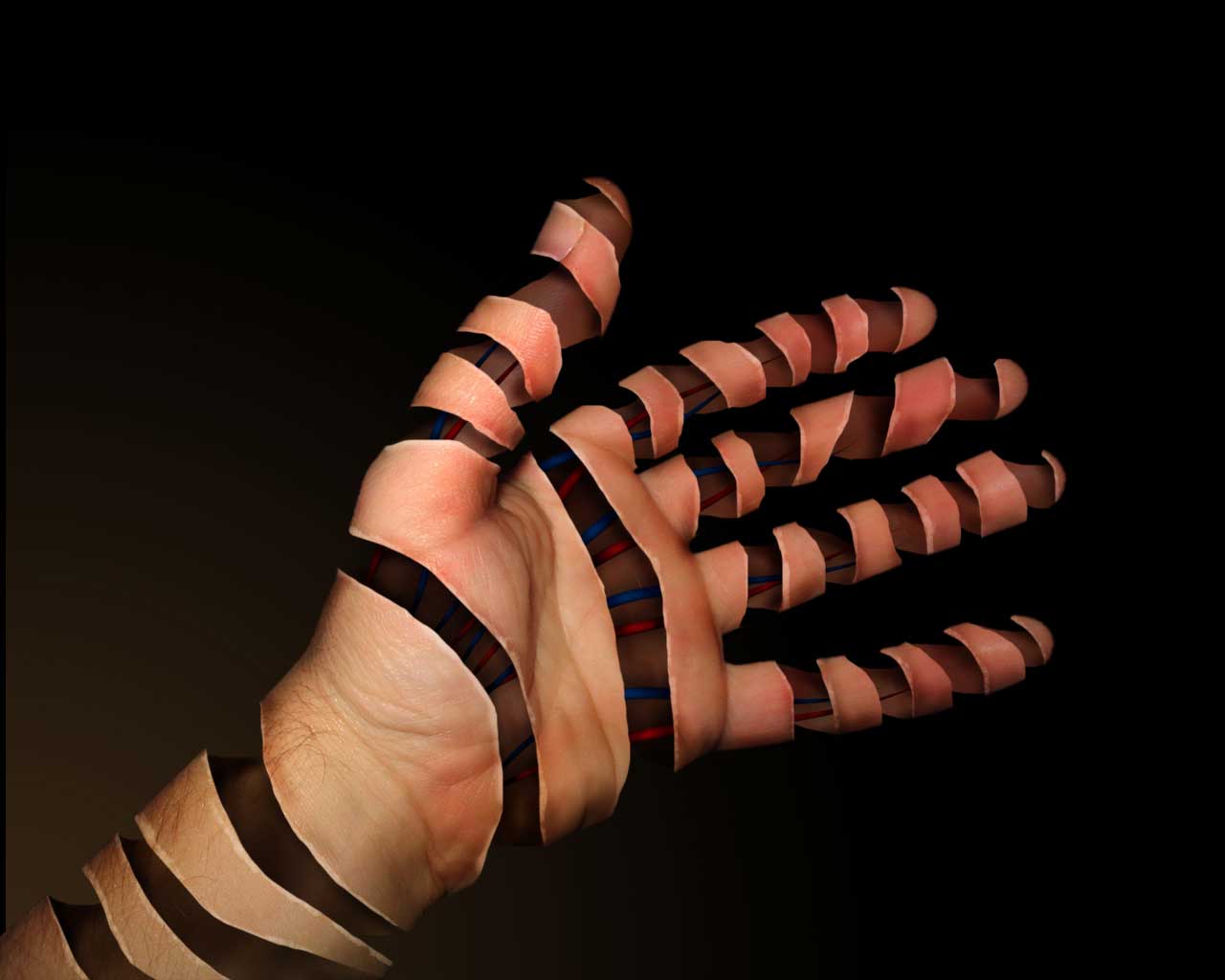
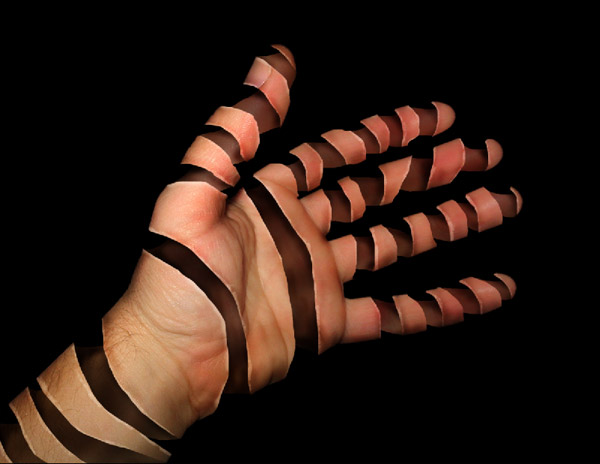
    Today we’re going to demonstrate how to peel a hand in Photoshop. You can use this technique to peel other objects of course. This is the final image preview..
    Step 1

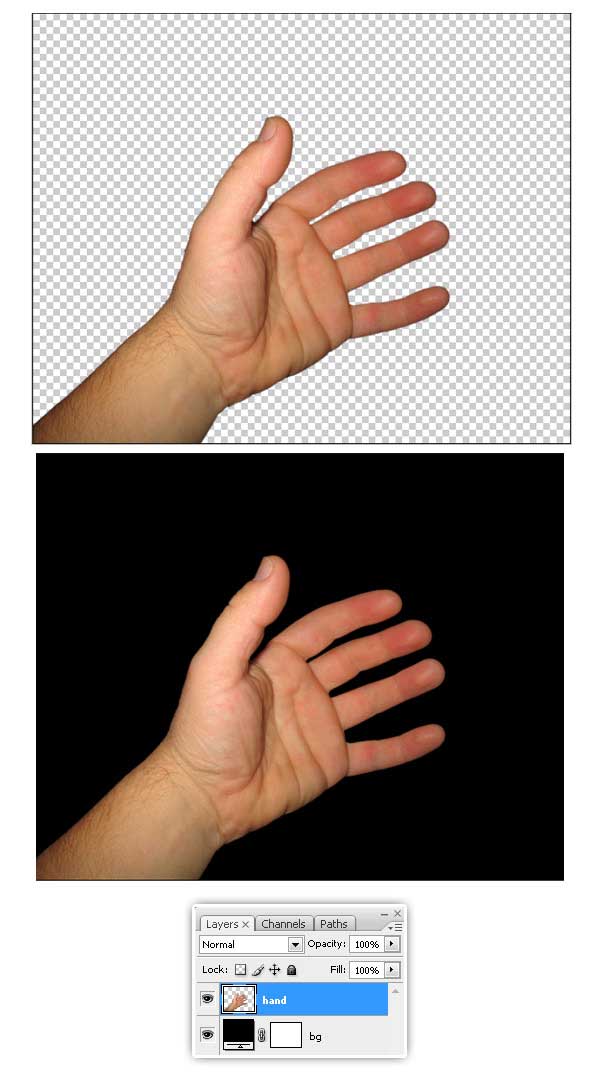
    Let’s get started, first download this picture of an open hand. You can use any other if you want to. Start extracting the hand from the background and pasting it into a new document, 1280 x 1024 pixels. Then create a new Black Fill Layer below “Hand” layer.
    Step 2

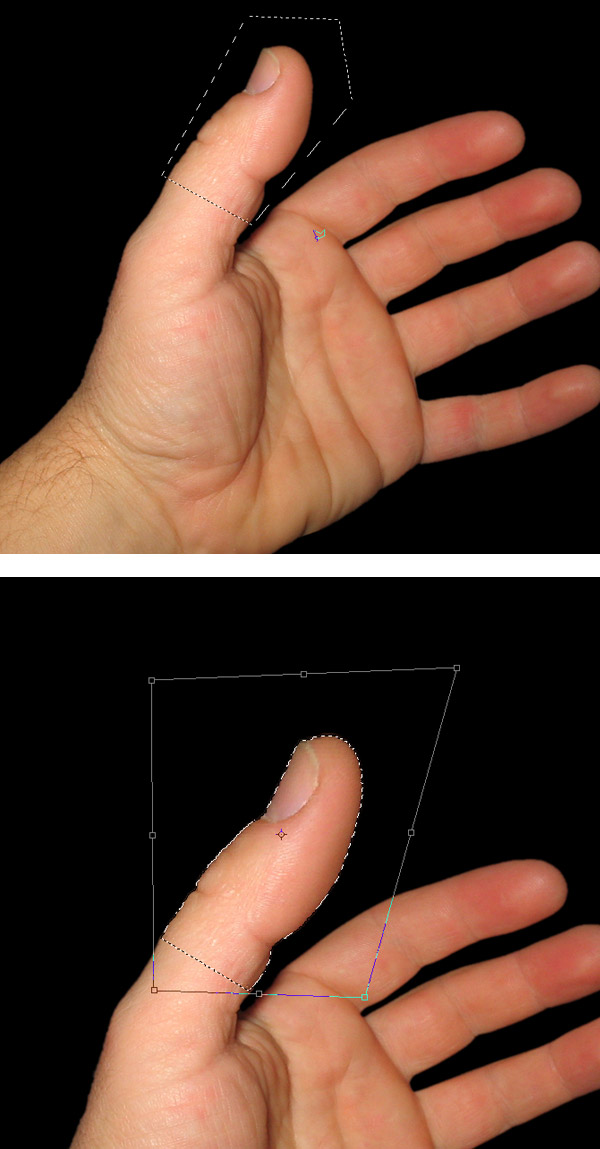
    Now, what we need is to make all the fingers larger. Using the Lasso Tool, select only the thumb on “Hand” layer, then press V key to activate the transform options and distort the thumb a little bit, you can Command (Ctrl) – Click one of the selection corners and transform the shape.
    Step 3

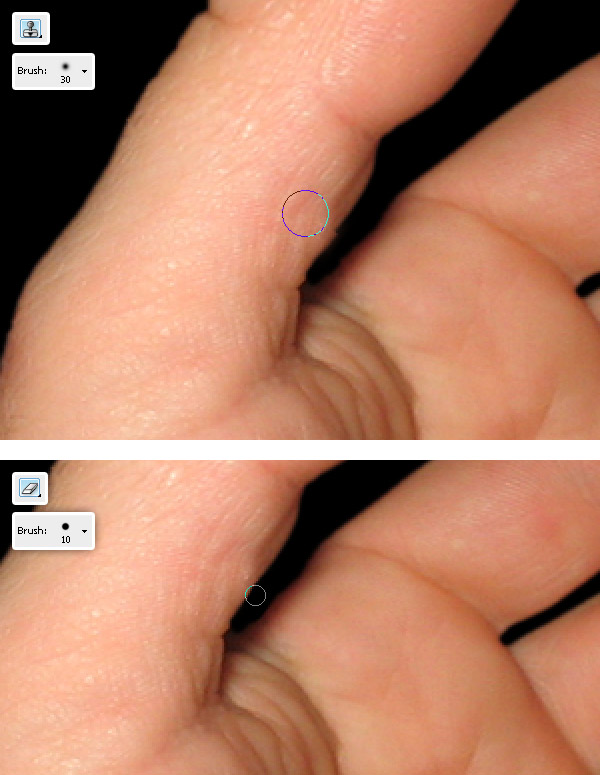
    With the Clone Stamp Tool fix the distortions on the finger, also Erase the bad areas.
    Step 4

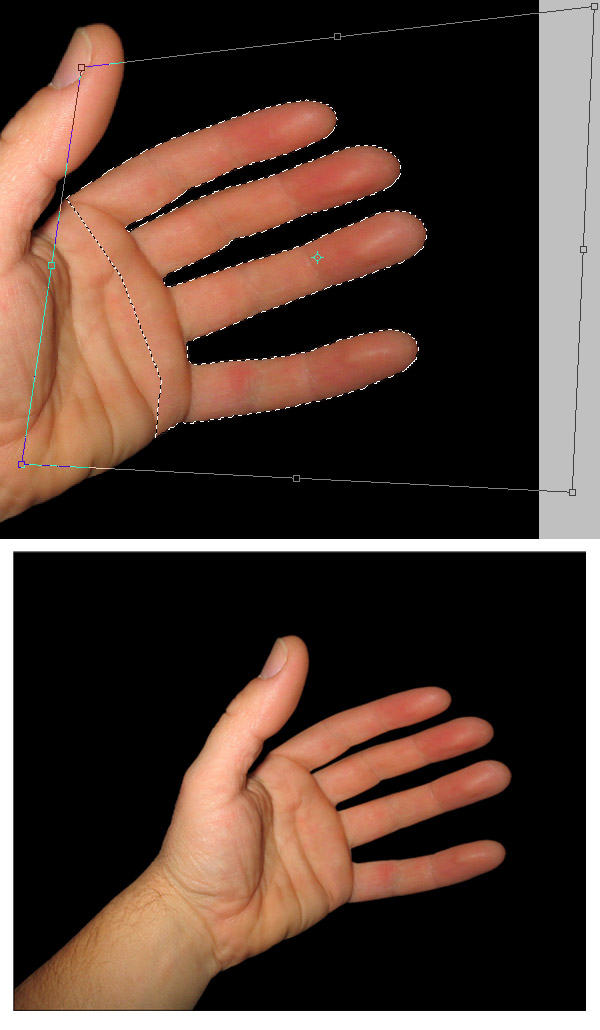
    Repeat the same process than step 2, but this time select the rest of the fingers, distort them and fix the details.

    At this point you must have a nice hand with long fingers. Now it’s time to start the peeling process.
    Step 5

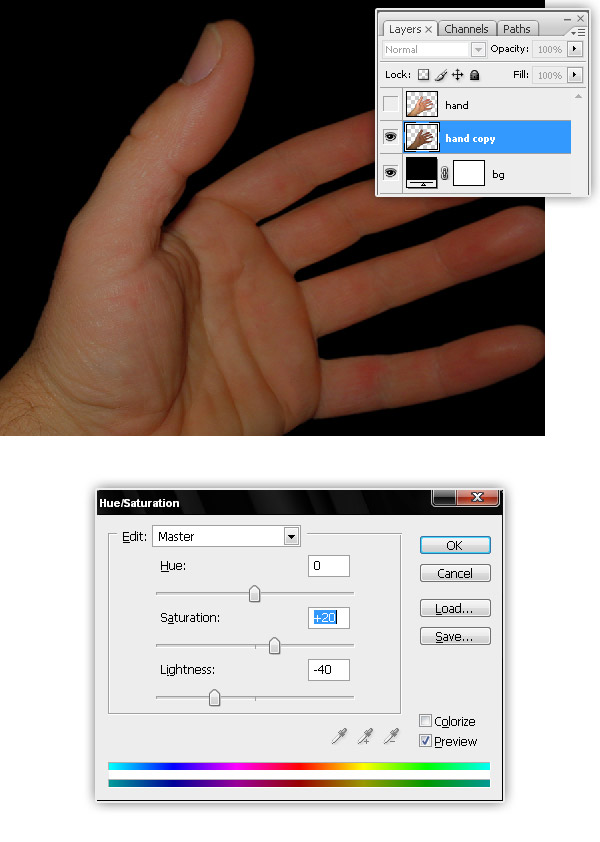
    Duplicate the “Hand” layer, hide the original for a while and then adjust the Hue / Saturation values of “Hand copy” layer, set Saturation: +20 and Lightness: -40.
    Step 6

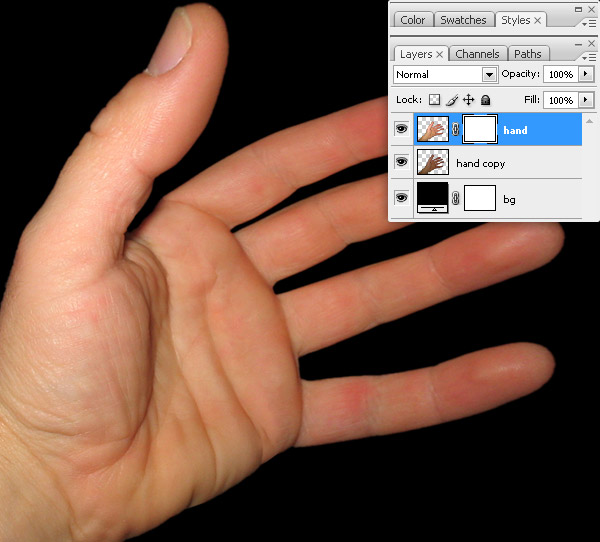
    Now select “Hand” layer on Layers palette and go to Layer > Layer Mask > Reveal All.
    Step 7

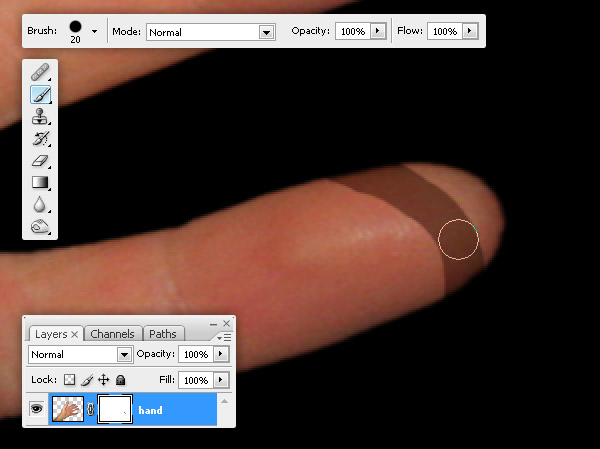
    Now start peeling, select a 20px brush (Hardness 100%), set a black foreground and start painting on the hand’s layer mask.
    Step 8

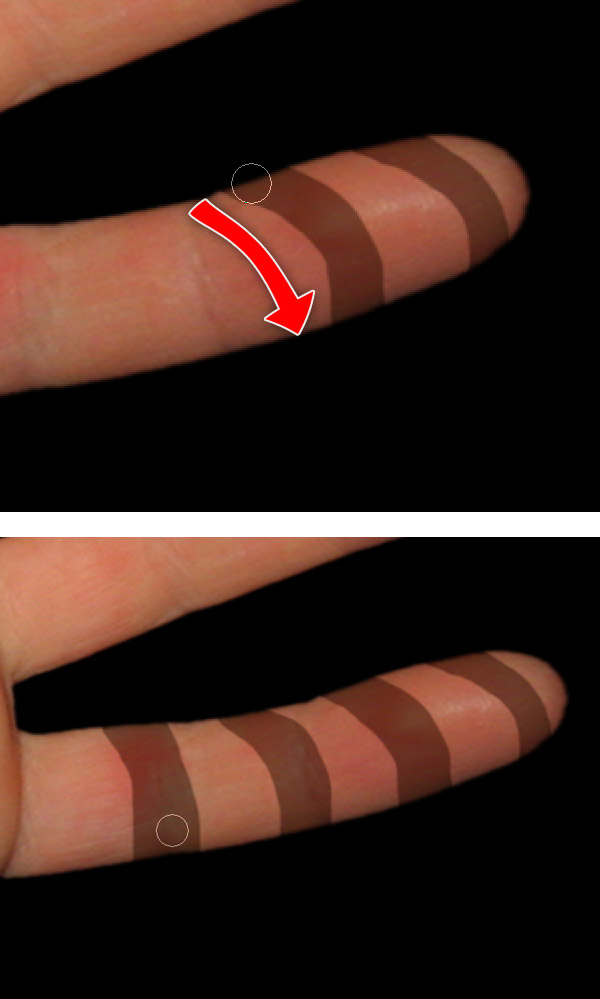
    Paint more stripes on hand’s layer mask across the finger.
    Step 9

    Now select “Hand copy” layer and apply to it a Layer Mask > Reveal all.
    Step 10

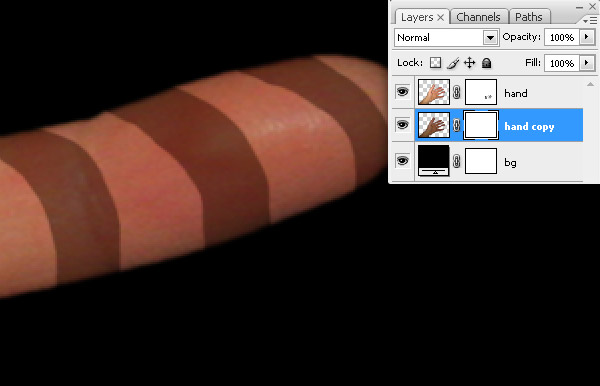
    On “hand copy” layer mask, paint some black stripes. Check the tiny red circles, those will be the visual join points between the two hand layers.
    Step 11

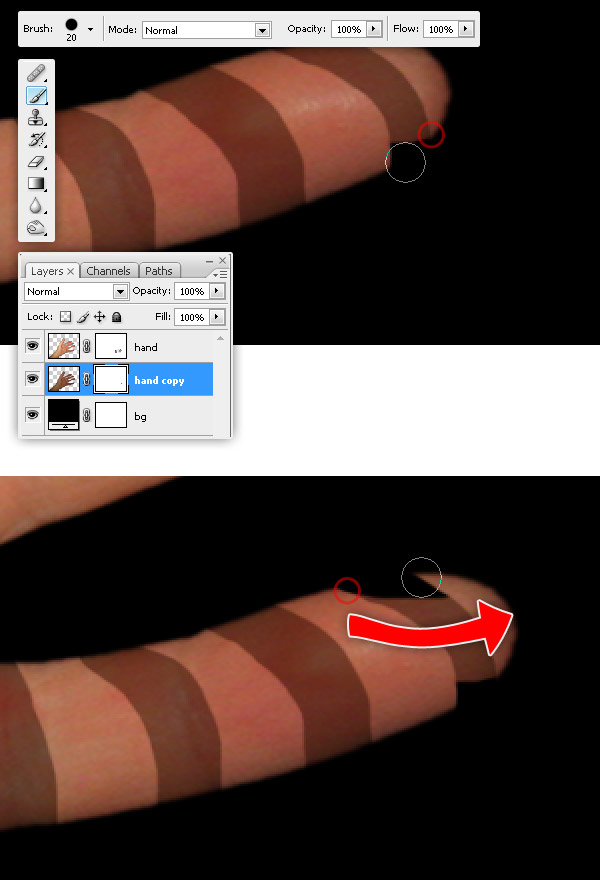
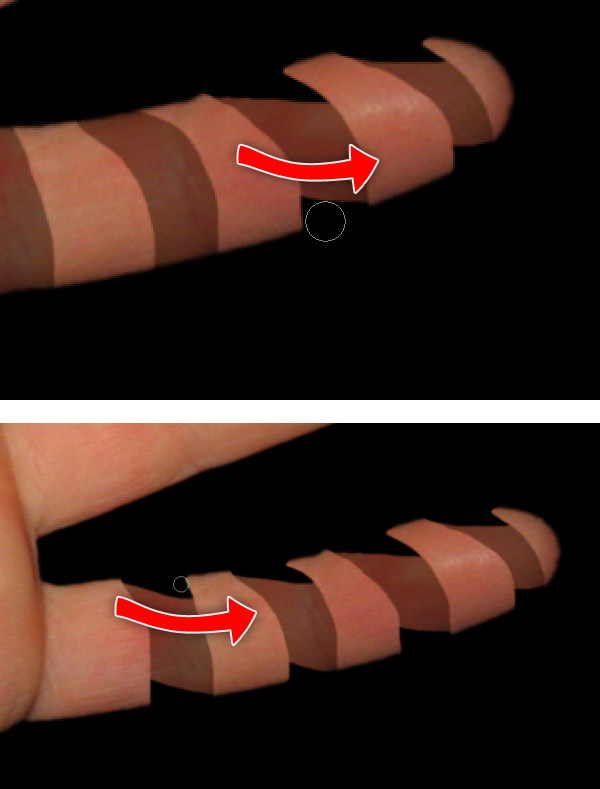
    Repeat the previous steps as many times as needed, try to get something like the images below. Remember, take care of the join points because those will give realism to our design.
    Step 12

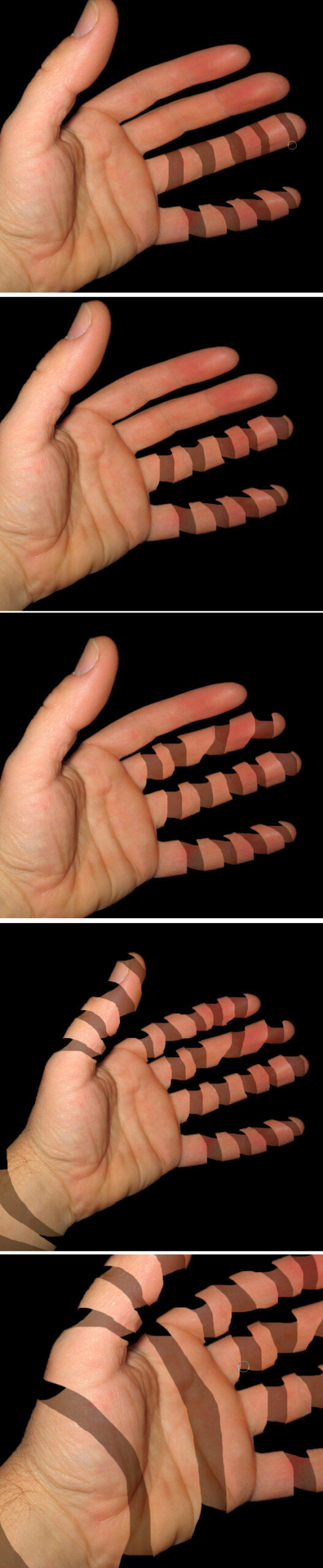
    Now repeat the peeling on all other fingers, wrist and palm.
    Step 13

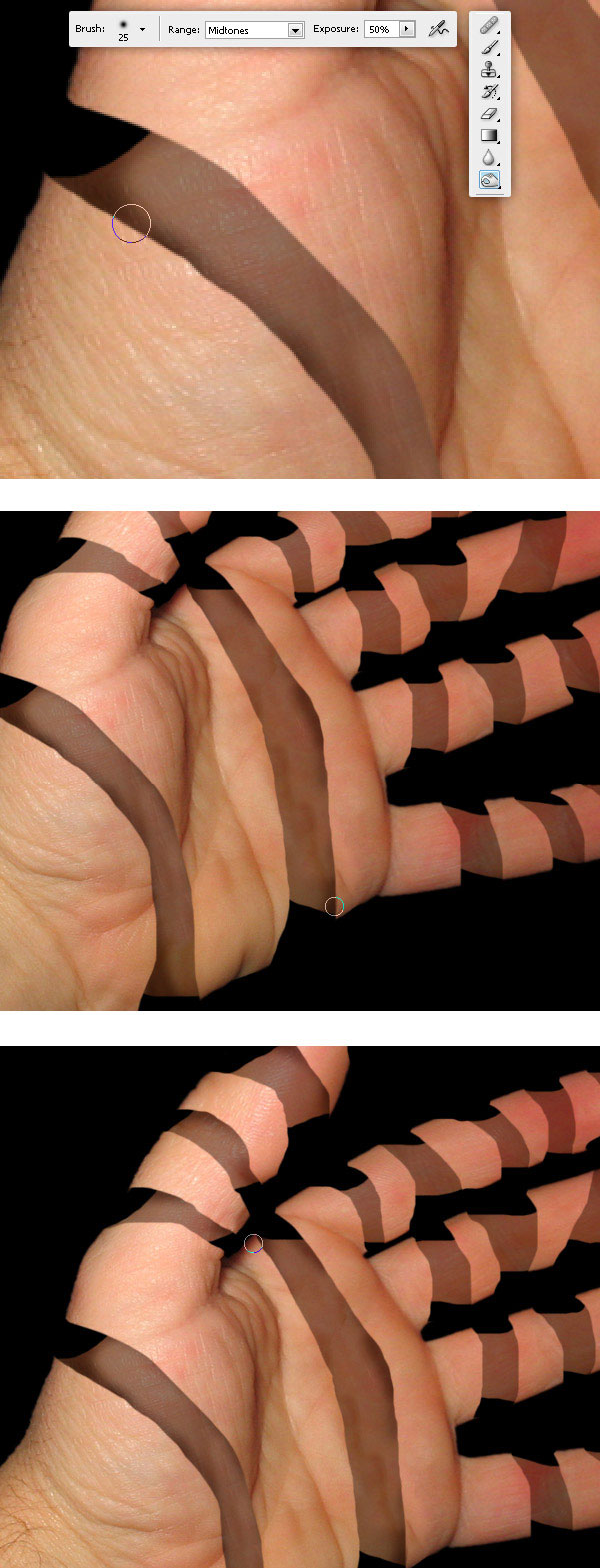
    Then select the Burn tool, set the brush to 20px Hardness 0% and Exposure to 50%. And paint over “Hand copy” layer, burn all the areas next the joins. Burn some areas of “Hand” layer aswell.
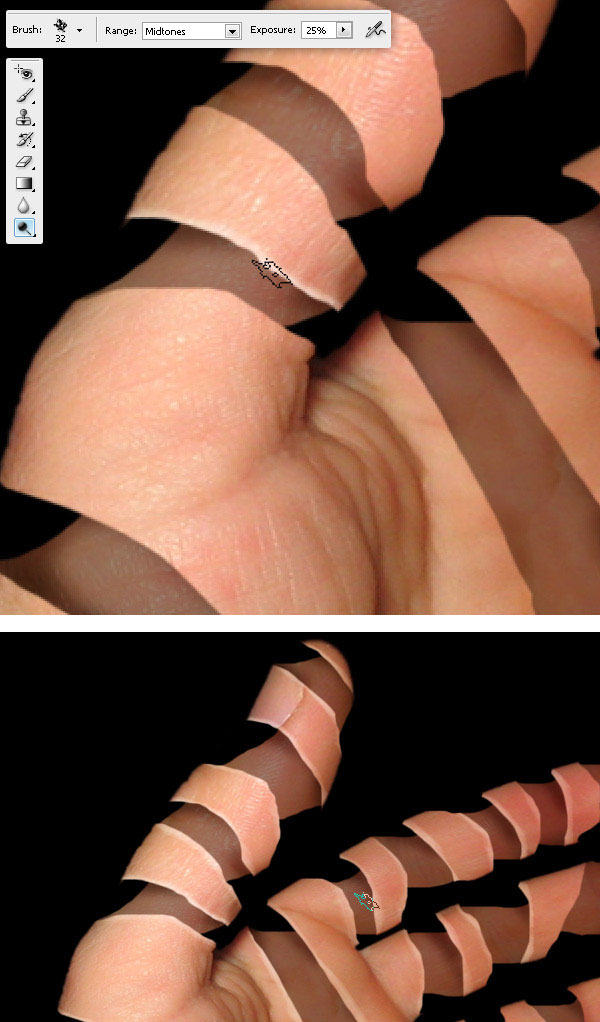
    Step 14

    To improve the torn sensation select the Dodge Tool, set an irregular brush and paint on “Hand” layer edges.
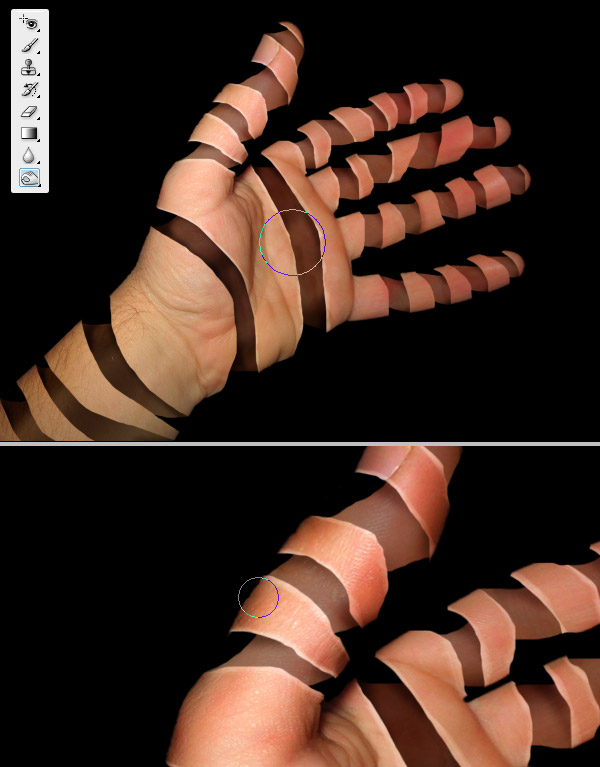
    Step 15

    Burn with a huge brush, the palm and fingers on “Hand copy” layer, also Burn the fingers and palm of “Hand” layer to increase the deep sensation.
    Step 16

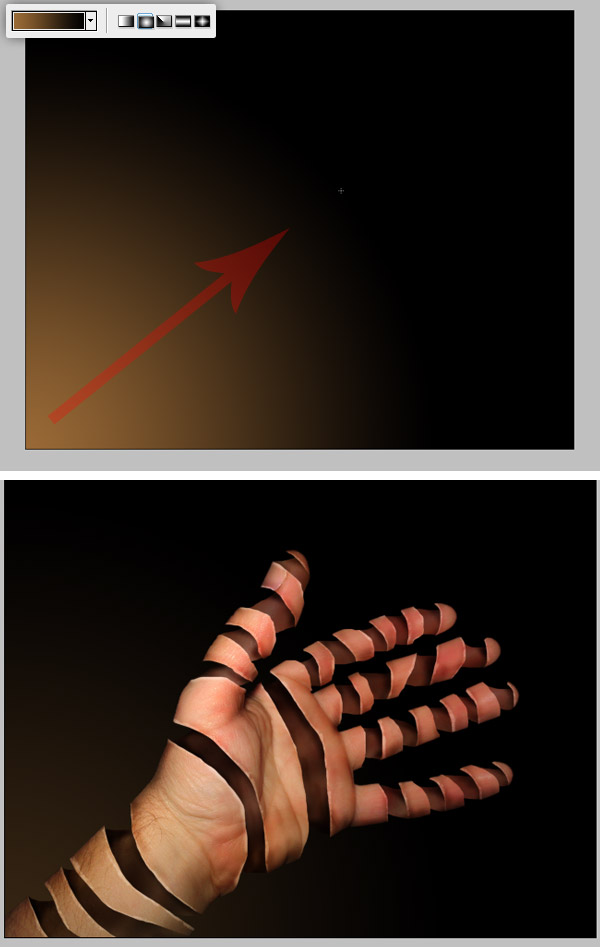
    We’re close to finish. After burning here and there you should have something like this.
    Step 17

    Now, draw a Radial Gradient background below “Hand” layer, use these colors (#996938 – #000000). Then change the “Gradient” layer Opacity to 35%.
    Step 18

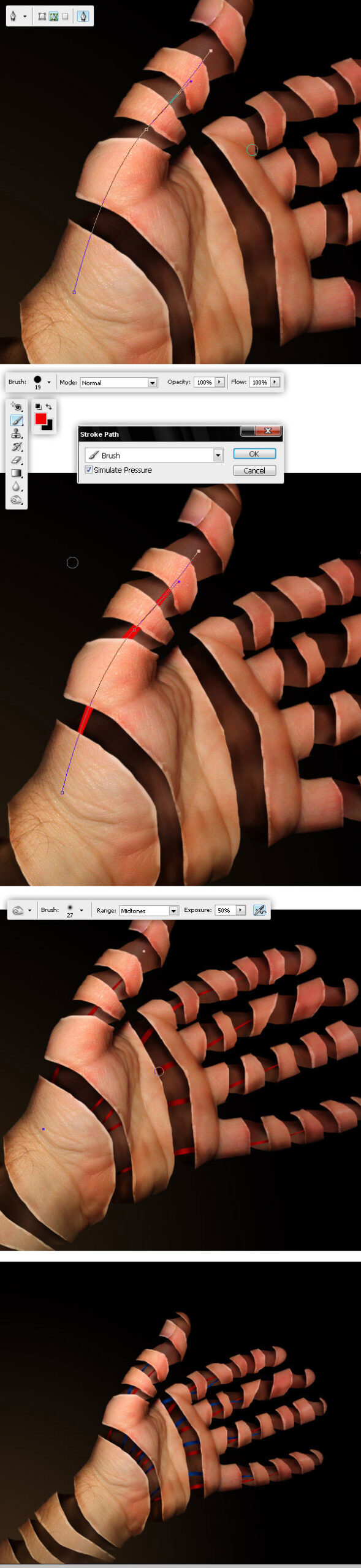
    These are optional steps. Create a new layer above “Hand copy” layer and name it “Red Veins”. Then with the Pen tool (just the paths), draw lines across the fingers. Then select a red Brush (Hardness 100%), hit the A key, then Right click (or Control Click on a Mac), click on Stroke Path option, select Brush – Simulate Pressure and then OK, do the same for all the fingers.

    As an additional detail, just Burn some shadows over the “Red Veins” layer.

    Finally Repeat this step but with “Blue Veins” this time.
    Step 19

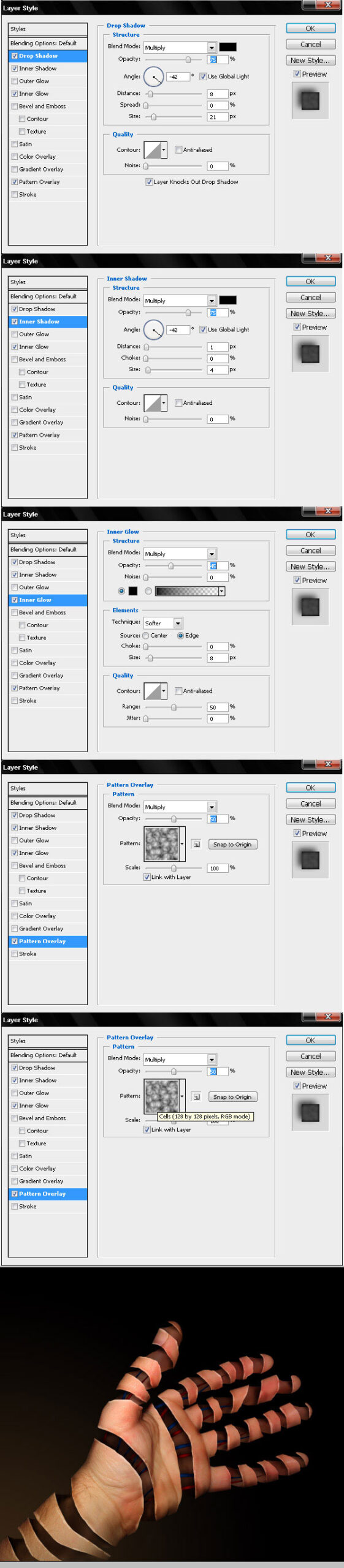
    Now apply the following layer styles to “Veins” layers.
    Final result

    And that’s it! just try peel another stuff, or add more interesting things inside a peeled object. Good luck!.

    DOWNLOAD PSD FILE

    Feel free to post links and examples of stuff you peeled and leave us some feedback. Thanks…


  • 45 Comments »

     
    #1
    Daniel Lopes
    November 21st, 2008 at 8:06 pm

    Cool.


    #2
    Andrew
    November 23rd, 2008 at 11:36 am

    That is amazing!


    #3
    The Floating Frog
    November 24th, 2008 at 3:35 am

    That’s truely amazing! You’ve layed the tutorial out brilliantly, thanks.


    #4
    sang mantan
    November 24th, 2008 at 2:34 pm

    great job. it must have took a lot of time :D


    #5
    rejidesigner
    November 24th, 2008 at 11:39 pm

    Fantastic tutorial


    #6
    insic
    November 25th, 2008 at 4:06 am

    nice technique.


    #7
    Nestor Otondo
    November 26th, 2008 at 4:58 am

    Lol, great tut, like a T-100 (Terminator)


    #8
    Andry
    November 27th, 2008 at 11:41 am

    Super


    #9
    JAvitto
    December 2nd, 2008 at 9:18 am

    Very nice, cool, visit my web, i coment for you.

    sorry my english, donst speack

    Javo.


    #10
    DJ München
    December 9th, 2008 at 2:25 pm

    Thank you very much for the lovely tutorial. I’ll show it to my partners.
    Greetings from Germany/Munich


    #11
    aroop
    December 18th, 2008 at 2:23 pm

    fantastic


    #12
    tika
    December 22nd, 2008 at 3:56 am

    unbeliveable!


    #13
    vimmy
    February 6th, 2009 at 1:14 pm

    nice


    #14
    Cosmin
    February 9th, 2009 at 3:39 pm

    nice….but not very realistic…


    #15
    DJ
    February 12th, 2009 at 1:31 pm

    Thank you very much for your work and your time!


    #16
    KD
    March 31st, 2009 at 10:28 am

    mind blowing techniques,
    good job


    #17
    Whizkid
    April 2nd, 2009 at 5:22 pm

    Wow this really inspired and i tried it on my hand.

    check it out
    http://i44.tinypic.com/29w5mif.jpg

    Let me know.

    Thanks a ton for this tutorial!!


    #18
    Zauberer Jan
    April 7th, 2009 at 11:59 am

    Wow, that looks like magic. I want to make a picture of a peeling rabbit, since I am a magician who uses a lot of funny pictures in his show. Great stuff. And I could think of other parts of my body to do this with.

    Best whishes from Germany

    Zauberer Jan


    #19
    FAEEM
    April 20th, 2009 at 5:01 pm

    It’s amazing …………
    Awesome, You can tryout some steel wires for roobotic view


    #20
    Unterhaltungskünstler
    April 26th, 2009 at 2:26 pm

    Hey, that looks extremenly entertaining.It took a bit of efford to follow – than again, things that don’t come easy, sometmes ar the more preshiouse ones.

    All the best and greetings

    Chris Lejeune


    #21
    Agung Hartanto
    April 28th, 2009 at 4:26 pm

    great and amazing job…thank you
    it’s make great inspiration to me

    All the best and greeting

    Agung Hartanto
    Indonesia


    #22
    Comedian Dr. Wegmann
    May 15th, 2009 at 11:42 am

    That is really great stuff or, as we say in Germany: Phantastisch. Please give us more like this!


    #23
    Florian Entertainer/Zauberer
    June 1st, 2009 at 12:50 am

    Wow, I’m amazed and I have to say that it reminds me a bit of Körperwelten (”body worlds”) an exhibition with similar sculptures.

    Greets Flo


    #24
    Zauberer München
    June 7th, 2009 at 11:25 pm

    I like those “magical” types of tutorial, very impressive.

    CU Florian Ilgen


    #25
    ចាបតូច
    June 17th, 2009 at 10:41 am

    Wow, I Just see it! it Like ghost!!!


    #26
    Sohbet Muhabbet
    June 20th, 2009 at 10:08 am

    nice technique.


    #27
    dj münchen
    August 10th, 2009 at 12:53 pm

    amazing-
    thank you very much

    Rainer


    #28
    Klavier
    September 5th, 2009 at 5:30 pm

    Wow this looks scary, Im gonna trie this with a picture of my head instead get some Brains going haha!


    #29
    Band Verzeichnis
    September 6th, 2009 at 9:14 am

    I am gonna try it with my Dog… The Picture i mean not really!


    #30
    Drums
    September 6th, 2009 at 10:20 am

    Wow or imagine a at with half a head like this.


    #31
    Film izle
    September 9th, 2009 at 11:58 pm

    Current Photoshop so beautiful wonders of the world really works is emerging picture of astonished people in the leaves. Thank you admin


    #32
    Zauberer Weihnachtsfeier
    October 5th, 2009 at 1:12 am

    Great tutorial – wow – eyeblasting things you can create with Photoshop…


    #33
    Marcel
    October 30th, 2009 at 9:05 am

    Cool stuff you guys


    #34
    Zauberer Hamburg
    November 30th, 2009 at 11:51 pm

    whow. easy – if you know how to do it – like magic….


    #35
    Travis
    December 12th, 2009 at 6:14 pm

    just tried it. worked great :) thanks!


    #36
    Alleinunterhalter Köln
    December 19th, 2009 at 8:18 pm

    Great work at photoshop and this tutorial works!


    #37
    Midhun VS
    January 3rd, 2010 at 10:01 pm

    wow kkooollll….that was awesome..!!!


    #38
    Werbeagentur
    January 7th, 2010 at 4:52 pm

    Nice step-to-step tutorial for Photoshop, thanks!


    #39
    Clown
    January 16th, 2010 at 9:04 pm

    Thank you, great halp.
    Regards
    Clown Murphy


    #40
    Manfred
    January 22nd, 2010 at 4:44 am

    Very nice tutorial. I tried it and it worked! Thanks for this great idea.


    #41
    aion gold
    January 27th, 2010 at 10:03 am

    Great tutorial!!!


    #42
    Elizabeth K. Barone
    February 2nd, 2010 at 12:03 am

    The technique is really cool, but the hand looks extremely funky and disproportionate in the final images. The palm is too small for the length of the fingers, and the pads of the fingers just look freaky. I would use the original image of the hand rather than skewing it. (:

    Anywho, thanks for sharing this very cool technique!


    #43
    Zauberer NRW
    February 3rd, 2010 at 3:20 am

    Awesome techniques !!! A good inspiration. Great job !


    #44
    Dirk Baumbach
    February 5th, 2010 at 12:31 am

    Great Job – Thank you for this tutorial – Regards from Cologne


    #45
    Bandverzeichnis
    February 7th, 2010 at 7:32 am

    Cool guys, it looks so funny

     
    Name (required)

    E-mail (required - never shown publicly)

    Web-site

    Your Comment (smaller size | larger size)

Home| Advertising| About| Contact

© 2010 All Rights Reserved