
• 13 Feb

    10 Writing Tips for Web Designers

    Freelancing, SEO, Writing

    Share


    Writing for the web is a skill set of its own. Website text, or “copy”, needs to be written in a different tone for the web than a brochure. It needs to be built around the target keywords for the site and be written for a lower literacy audience.

    Most web designers have a leg up on traditional freelance writers since they have their pulse on what the search engines like and don’t like to see on a site.

    While practice is the best teacher, these 10 tips should get you on your way to providing an extra service for your customers that they will appreciate and you will find very rewarding.

    Tip #1:  Do Not Copy the Print Brochure

    This is the most common web writing mistake made by web designers. Brochures and print marketing materials use sales language that does not scan well on a website. Any use of sales language on a website beyond the usual “order our products here” stuff will make your users click off faster than a Guitar Hero champion can shred the final level. Ditto with puffed up marketing claims such as being “the best” or “the greatest”. Brochures are riddled with this stuff as countless marketing studies have shown that such language does work in print marketing materials.

    Some clients will insist that you use their marketing materials since they are so heavily invested in them. It is your job as the web professional to explain to them that what works offline does not work online.

    Tip #2:  Write for a Low Literacy Audience

    Pfizer conducted an extensive study on web reading habits in order to ensure that they were communicating effectively with all web users. What they turned up is that 43% of web users are “low literacy” users who cannot understand a page written above a Grade 6 level. The upshot of the study was that top level pages should be written at Grade 6 level, while more in-depth pages used deeper in the site should be written at a Grade 8 level.

    How do you do that? Google Docs. Under the Tools menu, select “Word Count”. This will give you a host of statistics, including Flesch-Kincaid Grade Level. That figure should be at or around 6 for your top level pages, as suggested. If it isn’t, go back and change larger words that you have used until you’ve worked it down to where it needs to be.

    After you’ve tried a few exercises in whittling your language down, you’ll see that the result is clearer and more scannable than the version that you started out with. Most higher literacy web users know to drill down to the lower level pages in a site if they want more information; the only thing that you have to do is make sure that your site navigation allows for this.

    Tip #3:  Avoid Landing Pages

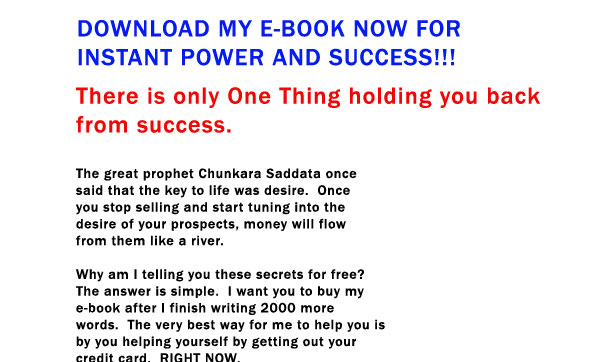
    There is a lot of internet noise on web writing that you have to tune out. The loudest noise comes from people who believe in “landing pages” as a proper online marketing technique. These pages do more to scare away customers than they do to attract them. While the following is a mock example, it isn’t far off what most of them look like:

    Landing pages are too sale oriented, gimmicky and way too long.

    If your website content can be described by any one of the above terms, you’ll want to pitch it out and start over.

    Tip #4:  Write to a Flowchart
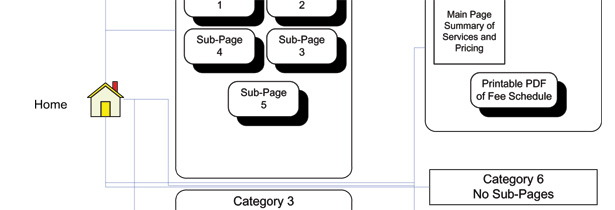
    Most of you already do these up in the form of a sitemap. Do one with writing the content in mind; you may be surprised at how your site navigation changes. Submit your chart to the client and get clearance from them before proceeding so that they don’t feel that you are missing anything when you deliver the final copy and site to them. Keep menu items interesting and engaging for the consumer, with snappy and short headlines.

    Click on the image above to download a sample flowchart.

    Tip #5:  Do Your Research

    Once you have your flow chart, creating the site copy is a matter of filling in the blanks. Do solid research on your client’s industry while writing these pages. Proper research will lead to factual copy that users will enjoy experiencing. Every sentence you write should be based on a solid fact. Think Twitter, not Great Expectations.

    Tip #6:  Keep It Short

    In general, no web page should be over 600 words or four paragraphs in length. If you need to have a larger page for any reason, consider creating a new category with a sub-menu and several lower level pages. If you must have articles in your site, create a separate blog section for them as your users are more likely to actually read them if they are done in a blog format.

    Tip #7:  Write for Humans First

    The more interesting you make your content, the more people will link to it and the better your search engine results will be. If you write for humans first and search engine bots second, you’ll end up with way more traffic.

    Tip #8:  Keyword Optimize for Search Engines

    Use keyword research tools such as Keyword Discovery from Trellian or Google Analytics to research target keyword phrases for both the entire site and each page. Make sure to place the site target keyword phrases on each page along with your page target keyword phrases. Keep it human readable and avoid repeating keyword phrases more than three times throughout the page. Don’t repeat them at all on shorter, top-level pages.

    Here are some examples of good and bad keyword writing:
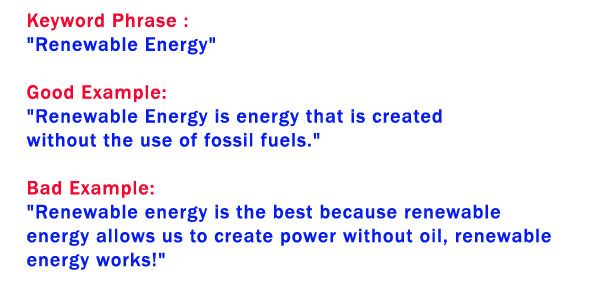
    Note the repetition of the keyword in the bad example. As some of you know, this will make the search engines frown on your rankings, yet it is still a method that many search engine optimization writers use. Most search engine optimization experts will agree that meta-tags have almost gone the way of the dodo and on-page content optimization is far more critical. Apart from the keyword research mentioned here, the best way to optimize is to make your copy interesting and human readable. Clunky mechanical text that is obviously meant for search engines will discourage humans and their valuable clicks that the search engines track.

    Tip #9:  Keep the Client in the Loop

    Submit the copy to your client for review. Do not consider it finished until the client has had a chance to look at it.

    If you don’t keep the client in the loop, you’ll be wasting a lot of time going back and doing rewrites. It isn’t possible for you to be an expert in their industry overnight and you have to accept their guidance.

    Make it clear to the client that you will change anything that they like, but some items such as simpler language and keyword phrases are there for a reason.

    Tip #10:  Hire a Pro

    If you aren’t comfortable with the prospect of writing website copy or you just don’t feel that you have the time, consider hiring a professional. The best way to do this is to put out an open call on Craigslist in your area for a freelance writer. You’ll get about a million responses, but this is really the only downside. Narrow them down by asking for ‘experience with web writing’ and a portfolio that demonstrates live links of their work. While most freelance writers are professionals and experts at what they do, some do not have the awareness of web writing that you are looking for.

    A good writer will cost you $50.00 to $100.00 per hour, depending on experience and how technical the writing is that you need them to do. Most writers are reticent about publishing their rates and will usually quote per project, but this puts you in the ballpark of what you should be paying.

    Let your writer work directly with the client. Have them carbon copy you on all communications, but don’t funnel communications through yourself as this may lead to mistakes and delays. Simply don’t hire someone that you do not trust to communicate directly with the client.

    Summary

    Website copy should be interesting and engaging. If you’ve fallen down on some of the other points but you’ve still kept this one, your site will need only very minor changes. Keep it simple, keep it short and keep it interesting. That formula will see you through all of the website writing that you’ll ever have to do.

    Do you follow these principles? Please share your comments with us…


  • 77 Comments »

     
    #1
    WPCult
    February 13th, 2009 at 7:55 am

    Thanks for this, it’s a very nice write up of how to: write. lol.


    #2
    insic
    February 13th, 2009 at 8:39 am

    nice read.. this will help me a lot.


    #3
    Sachin Sharma
    September 26th, 2009 at 2:00 pm

    I do agree with u and this article.
    Actually i am new to this field and working as SEO, now looking to make a website for self.
    I really impressed and learnt a lot. :)


    #4
    David Hallam
    February 13th, 2009 at 8:43 am

    Whatever the so-called copy you are suggesting might be called, it isn’t ‘writing’ in any sense that matters. Based upon what you say, it seems beyond argument that “web writing” is a truly thumping oxymoron. And by the way, “the more people that will link to it” under your Point 7 demonstrates my point rather well. First, “that’ is redundant. Second, it should be “who” not “that”.


    #5
    Zeb
    February 13th, 2009 at 11:10 am

    Very useful like tips, I forward to my network (if there is again people who don’t knows your blog!) ;-)


    #6
    Daryl Walker-Smith
    February 13th, 2009 at 12:00 pm

    Nice article! Will definitely come in handy, Thank You!!


    #7
    Patternhead
    February 13th, 2009 at 12:54 pm

    I think this is your most important point… “hire a pro”


    #8
    Klara
    February 13th, 2009 at 12:59 pm

    I don´t agree with you about always keeping it short.

    I find myself reading very long texts on the web once in a while and I don´t stop reading because it´s long. I keep scrolling because it is intresting.

    I think you should use short paragraphs and a lot och headings and make it easy for your readers to choose what to read and what to skip.

    So, your most important point is to keep it intresting I think.


    #9
    Luís Carmona
    February 13th, 2009 at 2:32 pm

    “Any use of sales language on a website beyond the usual “order our products here” stuff will make your users click off faster than a Guitar Hero champion can shred the final level.”

    Brilliant :)


    #10
    Jon
    February 13th, 2009 at 4:13 pm

    I disagree with points 3 and 6. Obviously, you shouldn’t design your landing page as your home page. But landing pages are all over the internet because THEY WORK. If you have a PPC ad that’s pointing to your home page, you’re losing a ridiculous amount of money.

    Secondly, the importance of the length of the content pales in comparison to the quality. If you have enough good content to fill 6 paragraphs instead of 4, of course you should do that.

    You really should have just skipped to point #10. Web designers should never, ever, ever write copy, except for their own portfolio site of course. If you go to any copywriting, SEO, etc conference, this is one of the major points that’s always made (and usually gets a good laugh as well).


    #11
    Harris
    February 16th, 2009 at 10:18 pm

    Hey, some web designers can write copy, too. It’s called versatility (or skill). Be sure to check for qualifications and experience.


    #12
    prozacy
    February 13th, 2009 at 4:15 pm

    This article succeeds in being somewhat offensive. Telling designers that they “have a leg up” on writers is ridiculous. Not all professional writers are tuned into web writing, but actually, MOST OF THEM ARE. Plus professional writers are trained to tailor copy to the target audience and medium, whether it be web or print.

    Also, writing for “a lower literacy audience” is an obnoxious phrase. Please, people, do NOT take that seriously. If your website is for kids, write in a way that kids can relate. But that does not mean dumbing it down. Likewise if you are writing for a big corporate website, write in a way that targets that audience. Again, don’t ever dumb down your writing to attract visitors that are not even approriate for your content.

    Telling us that you should write everything to target keywords and other infantile SEO strategies is also dumbing it down for us and offensive.

    Overall this post is full of cliches and sounds like the writer thinks that we are all reading at 6th grade level with hearts full of discrimination. Yeah, try talking down to people and see where that gets you. And PS, a lot of designers are not good writers, no surprise, and should either practice writing or get help from a professional writer.


    #13
    Zena
    February 13th, 2009 at 4:21 pm

    A lot of designers think they are good writers, i.e. they have an over-inflated view of their skills. Some are good but many have no substantial writing training. A college degree with substantial writing components (in any major) helps to train someone to be a good writer and communicator in general.
    Don’t dumb down the web as Prozacy said!


    #14
    Peter Cotton
    February 13th, 2009 at 4:28 pm

    This article targets the lowest common denominator of twits. Please let me know who agrees or disagrees. Agree means to concur. Disagree means to dissent. Yet I digress. Can I have my 3 minutes back?


    #15
    Chris Wallace
    February 13th, 2009 at 4:38 pm

    You hit on some good points. Well done.


    #16
    Ian Huet
    February 13th, 2009 at 5:19 pm

    First off, I applaud any article that promotes better web copy. However I genuinely take exception to the idea that pages should be dumbed down, as suggested in point 2. I, myself, am no expert in the finer particulars of written English (my first language) but surely reducing the lowest denominator will only reduce the overall experience for everybody in the end.

    By way of example, I have enjoyed reading the Harry Potter books. The are written for kids, yet I have yet to read any of those books without having to reach for a dictionary a few times. I find this only adds to the already engaging and enjoyable experience by adding an educational element at the same time. Of course, the copy that appears on the homepage of a website and what appears in a book are serving a different purpose but surely stripping language back to the blandest, most common (and typically cliched) vocabulary also reduces a web sites potential user engagement. Contradicting your point 7, “Write for Humans First”.

    Though the point “Write for a Low Literacy Audience” has merit, especially if you consider that many web users speak, and read, a language different to the authors. However, my question is this, would focusing on proper grammar, structured written communication and proper punctuation not serve everyone better in both the short and long-term?


    #17
    Peter Maraini
    April 1st, 2009 at 1:48 am

    I do not entirely disagree with your comment. Language should tempt us and cause us to learn more. The point though is that you read Harry Potter offline where one is minded to muse and explore what they read while on the web people tend to read so they can find and take away what they will latter read at length and over time. Clear and uncomplicated language is best for this purpose perhaps.


    #18
    Timothy
    February 13th, 2009 at 5:23 pm

    Good information. Good to consider.


    #19
    Big Slick Web Design
    February 13th, 2009 at 5:38 pm

    I especially like the tip that points to the literacy level of your readers. While I think it somewhat depends on the niche you are in, it definitely applies to everyone.

    I also didn’t realize google docs had a tool to check the level of reading required for the document, I’m going to give that a shot.

    Thanks.


    #20
    Aaron Irizarry
    February 13th, 2009 at 5:41 pm

    Thanks for the list… I know this will help alot of web designers in their approach to writing copy for the web.

    ~ Aaron I


    #21
    Marsca Ponee
    February 13th, 2009 at 5:55 pm

    not sure I agree so much with any points in this post
    a lot of designers should get help with writing and bringing everything down to 6 grade level can’t be right, depends on the web site I guess
    i also think actual flowcharts and sitemaps, except for very basic ones, are not good ideas and that they just waste time
    suggest author read “getting real” by 37signals and then revisit this
    most important is quality writing to meet needs of visitors, not 6 grade level stuff
    yes, we all know that brochures do not equal web sites and require different writing because web sites are more interactive
    landing pages are important and should be sales oriented if that is what the web site is selling, don’t waste people’s time with fluff pages


    #22
    Desizntech
    February 13th, 2009 at 6:16 pm

    Great info for designers! Keep it up


    #23
    IMer
    February 13th, 2009 at 6:46 pm

    You’ve obviously never marketed a product or service via PPC. Landing pages work like magic and have ALWAYS returned a greater ROI.


    #24
    Will McClellan
    February 13th, 2009 at 6:59 pm

    Although it’s a good idea to keep your writing simple, I think aiming for a lower literacy could lead to a tabloid-newspaper effect. People who read blogs will become dummed down reading such simple language.

    It might make for a simpler reading experience but it won’t be improving on peoples language and reading skills or pushing new boundaries.


    #25
    Alan Valek
    February 13th, 2009 at 8:04 pm

    Good article. If your leg’s broke you don’t try to fix it yourself or call a friend, you go to the doctor. If you need something written—hire a writer, that’s what they do and they do it very well. A writer wouldn’t try to build this website, they would call a web designer.


    #26
    David
    February 13th, 2009 at 8:54 pm

    While a year ago I would have agreed 150% on the landing page Diss, I have to say you are completely off on that one. It was hard for me to admit as well. I currently work for a multi million dollar a year company in Colorado, and much of the bread and butter around here comes in from these nasty landing pages. Don’t ask me how, but if written (and designed) correctly, they definitely bring it in.


    #27
    Josh
    February 16th, 2009 at 5:53 pm

    You couldn’t be more right David. As much as I hate landing on these pages, they work. Period.


    #28
    Marsca Ponee
    February 13th, 2009 at 10:36 pm

    @David Hallam
    yes, agreed, more please..

    “A good writer will cost you $50.00 to $100.00 per hour, depending on experience and how technical the writing is that you need them to do. Most writers are reticent about publishing their rates and will usually quote per project, but this puts you in the ballpark of what you should be paying.”

    ha, not even close to the rates that good writers charge that I have worked with. More like $150-$250 per hour

    i think a lot of designers get caught up with the “design” and not only are they not good writers, they actually do not always do well at designing something that visitors like, only what a designer would like, thats where designers need to be careful. yeah, great graphics and clever design, but will your visitors like or even care about that?

    “Some clients will insist that you use their marketing materials since they are so heavily invested in them. It is your job as the web professional to explain to them that what works offline does not work online.”

    ha, why don’t you tell us what works online and what doesn’t? please let us read some websites where you have written the copy so we can see for ourselves


    #29
    logo design guru
    February 13th, 2009 at 11:40 pm

    thanks for the advice. These are some really good tips that all web designers should follow. It seems like most people make the same mistakes, so it’s great to see them all mapped out so that no one makes them again, although it probably will happen. Thanks


    #30
    Martius
    February 13th, 2009 at 11:43 pm

    I love the 7th tip : I always try to explain that point to alle the SEO fans who are waiting any information from google to grow in the pages like the new bible !

    I hope it will be released a lot !


    #31
    Mat Packer
    February 14th, 2009 at 3:36 am

    Simple, solid advice. Good work.


    #32
    Shine
    February 14th, 2009 at 4:51 pm

    A webdesigner doesn’t write text… that´s the copywriters jobb…


    #33
    Chris
    February 14th, 2009 at 8:23 pm

    Point number 2 is rather sad, but since the aim of a good website is that it should be written for the users (and not as a platform for the writer), the point is well taken.


    #34
    Content writing
    February 15th, 2009 at 8:55 am

    Good artical.

    Franky speaking we where tying to get a book writer to complile content for our website. Now we know who we should be approch.

    Can you guys suggest some sites where I can get content writer to compile 10-15 pages.


    #35
    Rahul
    February 15th, 2009 at 12:39 pm

    I agree with most of the post except one.

    Regarding the “Landing Page” I do not agree with you. Given a well written landing page, a website can attract a lot of traffic and keep them.


    #36
    MsaNkadI
    February 15th, 2009 at 4:44 pm

    Nice collection of tips. I found the following two the best:

    1. Keeping the client in the loop is the best thing for both yourself and the client. It will be a waste of time and effort to write and rewrite as you have mentioned. It also goes a long way in building relationships which is vital for a professional.

    2. Also, about putting keywords in your post. Its more of an art and I have seen people making there sites useless just to get on Google, but its no use because finally its all about turning readers into subscribers.

    I have a post on how to get more traffic using SEO on my blog, and I have emphasized the same point.

    MnVn


    #37
    wiz
    February 16th, 2009 at 12:00 am

    I agree with the vast majority of the people here. This article was a waste of my time. Dont get me wrong, I love WDD and I enjoy reading most of the articles, but this one had me pissed off. Reading it made me feel like a 6th grader and I can honestly say I will never use any of the “advice.”

    If you could please do me a favor and let me know how you go about targeting a certain page/product without a landing page? And how much money you waste per month with PPC trying to send people to your homepage to wander around aimlessly, while you keep your fingers crossed that they see your product page, I would appreciate it.

    Also, the #9 tip is the stupidest tip ever. If anyone is dumb enough to make a site live without checking with the client to see if they approved the copy, that person deserves to be butchered. That would be like saying you should always put the car in park before turning it off. Would you ever make a site live without seeing if the client liked the mock-up? NO! So why would you think it was okay to do with the copy?


    #38
    Isabel
    February 16th, 2009 at 2:18 pm

    really really nice tips, thank you so much! nice post, like always! Keep going!


    #39
    Josh
    February 16th, 2009 at 5:52 pm

    Anyone suggesting that landing pages “scare customers away” has not done their homework. There’s plenty of data to support that landing pages, when done correctly, can tremendously increase your ROI and lower your PPC rate.

    I’m a web design who works with a company that never gave landing pages much thought until recently, but once we started using landing pages in our web marketing we’ve seen a ton of benefits. I hate to criticize anyone who’s taking the time to write an article on improving web copy, but telling designers to steer clear of landing pages is a huge mistake.


    #40
    Hernan Valencia
    February 16th, 2009 at 10:26 pm

    This was so good and SHORT, that I gave it to my copy writer. Good show!


    #41
    Paul
    February 16th, 2009 at 11:21 pm

    Is there anything that us web designers are not supposed to do these days?

    What with having to know some amount of PHP, Javascript, MySQL, AJAX, ASP, Print design and vacuum the office carpet, are we now suggesting that we can write?

    I think I need to reconsider my career path.


    #42
    josie
    February 17th, 2009 at 4:09 am

    great info, nice tips… i dont agree with telling designers not to have a landing page, they have proven to be useful for many many sites.


    #43
    Kristof
    February 17th, 2009 at 8:18 pm

    I agree with @Jon and @Rahul regarding #3 – more so that they shouldn’t even be included in this list.

    Landing pages are a marketing tool (and very effective one at that if done right). They are supposed to be written in a very sales oriented manner because that’s their purpose – to sell a product or capture a lead.

    My thinking is your intention was make a point that they shouldn’t be used as the only page/means to attract customers. I can understand that, but they should not be avoided.


    #44
    Gareth Plummer
    February 17th, 2009 at 8:36 pm

    aha finally someone is saying not to use landing pages – they creep me out. Those tacky ebooks look like I’m paying to download a virus. If I wanted to buy an ebook of a website I would buy it through Lulu.


    #45
    Michael
    February 17th, 2009 at 9:02 pm

    Okay, okay, cut the guy some slack. Obviously when someone clicks on a ad or a search result, they have to land somewhere. Yes, it’s called a landing page. That doesn’t mean it has to be a tacky page. I suspect that a lot of “landing page” testing means finding what copy gets the most sales from the relatively few people who aren’t turned off by tacky pages. If someone ever finds out what copy appeals to the majority who don’t like tacky pages, they will become seriously wealthy.


    #46
    Darren Shafae
    February 17th, 2009 at 10:44 pm

    You have presented some good advice. I especially like tip number two. It is important to keep the information succinct and straightforward. Website Grader (http://website.grader.com/) gives Web designers a quick way to score the readability level. I have found it very useful. You can alter the content to reach your target audience.

    One thing you forgot to mention is to have your content edited. Proofreading of written material is the final and essential step that must be taken before a document can be considered complete. You may want to send your content to a professional editing service such as Papercheck (http://www.papercheck.com).


    #47
    Jon-Mikel Bailey
    February 18th, 2009 at 1:02 am

    Great points. So many people do not realize that there is definitely a difference between web copy and print copy. As a web design firm we would certainly love it if more of our clients went with #10 on this list. But #9 can be very effective as well. Again, thanks for charing this!


    #48
    Shawn
    February 20th, 2009 at 5:33 pm

    Tip #10: Hire a Pro – do you have any recommendations?


    #49
    Walter
    February 26th, 2009 at 7:04 am

    Sorry Shawn, but I don’t want to endorse anyone publicly at this point. There’s lots of good talent out there, though… ;)


    #50
    Frea Drik
    February 27th, 2009 at 7:42 am

    wow,
    very nice info for designers.


    #51
    Cheryl
    February 28th, 2009 at 11:52 pm

    I’d really love to see a more concrete example of #4. How exactly to you make a flowchart with writing the content in mind? How would that be different from a “normal” method of creating a flowchart? How would one expect a site navigation to change as a result of that thinking process? With the generic flowchart example provided, I’m just not grokking what you mean.

    If you have the time to clarify, thanks in advance.


    #52
    marcus falden
    March 18th, 2009 at 7:25 pm

    This article is based on such ancient internet biased that’s not even funny. Write smart not dumb-down. As Simple as that.


    #53
    John Faulds
    April 6th, 2009 at 12:35 am

    Brochures are riddled with this stuff as countless marketing studies have shown that such language does work in print marketing materials.

    It is your job as the web professional to explain to them that what works offline does not work online.

    So there’s been countless studies into what works in print, but what do you have to back up that what works offline doensn’t necessarily work online? Yes, it is a web designer’s job to explain to the client what works and what doesn’t, but a client is going to want to have some explanation as to why or why not, and your first point seems a bit light on in that area.


    #54
    Ron McBride
    April 6th, 2009 at 6:31 am

    I think the greatest challenge is how much content to put in, and is it speaking to my audience. It seems every day I work hard on the copy to speak to the people. Thanks for the info.


    #55
    Barbara Tallent
    April 11th, 2009 at 2:24 am

    Thanks for the good article! I especially like the point about a flow chart for the copy. We all do this for the site, but when you think in terms of the flow of the copy, it is very different.

    I don’t completely agree on the landing page statement. You probably want people to hit different parts of your site based on the search terms they use. You need to consider each page that may be an entry point to your site and think of it in terms of a landing page – what is your introduction and where you take people from there.

    I have added your article to my collection of resources on writing great web copy:
    http://www.livebinders.com/play/play?id=162


    #56
    overrated designer
    April 15th, 2009 at 2:40 am

    Reading the replies to the post I think the biggest question here is what you call a “landing page”. I myself wouldn’t call a 1000 mile long design-less text going downward with a “buy my e-book” or “sign up free to receive my e-book” at the bottom (after 30 seconds of scrolling. That’s a squeeze page!!!
    I think a landing page has every information, call to action imagery and fields in one screen without the need of scrolling. Maybe this is the basis of the misunderstanding? And since you can have a navigation at the top the landing page, why shouldn’t it be the “home page” since every product is trying to sell a product?


    #57
    seo services
    May 27th, 2009 at 2:34 pm

    Thanks for this useful information. This is very helpful in web designing and web development. I recommended everyone this website.


    #58
    http://rachelkovacs.blogspot.com
    July 1st, 2009 at 9:55 pm

    Thanks for the article. Very helpful. I’m a publisher myself and I always like to read articles like yours.


    #59
    Aaron
    July 8th, 2009 at 12:36 pm

    If you want an ideal home for you which has a perfect interior design and great structure then it would be the time to contact some reliable individuals to build your house for you.


    #60
    Mark
    August 27th, 2009 at 8:19 pm

    I get the request to put what is on their brochure on their website a lot. The points you made against that were very thought provoking. You are right print does not translate well to web. Brochures are wordy. I will consider this the next time the request is made.


    #61
    fleacool
    September 2nd, 2009 at 7:19 am

    nice share, I like your post :)


    #62
    Projektowanie Stron Warszawa
    September 2nd, 2009 at 10:08 pm

    Thanks for this useful information. This is very helpful in web designing and web development. I recommended everyone this website.


    #63
    Projektowanie Stron Warszawa
    September 7th, 2009 at 3:24 am

    thanks for nice tips. Keep going!


    #64
    Web Design Lebanon
    October 16th, 2009 at 1:23 pm

    Thanks for the tips but landing Pages should not be long sales letters. It can be optimized to communicate a value offer to the visitor with a clear call to action. It does not have to be too commercial or too cheesy such as the “gurus” “get rich quick” stuff.


    #65
    photoshop restoration and retouching
    November 2nd, 2009 at 6:46 am

    Splendid post and useful tips. Thanks.


    #66
    Blogspot templates
    November 7th, 2009 at 10:22 am

    Good stuff


    #67
    Used RVs
    November 12th, 2009 at 9:20 am

    these are awesome!!
    thanks for putting in the effort to get this list together all tips are too important for anyone who the start their carrier in Web design.


    #68
    Budget Website Design
    November 13th, 2009 at 8:35 pm

    By far, you should keep it short, however, it needs to give enough information to convey a message to your audience as well as give info to the search engines for crawling and indexing.


    #69
    web design companies
    November 14th, 2009 at 5:06 pm

    Really useful tips for web designers. And also you had mentioned for keyword optimization. Its worth. Keepup the good work.


    #70
    David A
    December 19th, 2009 at 11:23 pm

    The “Good Example” in Tip #8 is good?? “Renewable Energy is energy that is created without the use of fossil fuels.”

    For the sake of clarity, brevity, and just plain following your own advice, leave out “that is.” The sentence becomes, “Renewable energy is energy created without the use of fossil fuels.”

    A still better example might be, “Renewable energy is created without the use of fossil fuels.”

    What was Tip #10 again?


    #71
    Finance
    December 23rd, 2009 at 2:35 pm

    Great Article.

    thanks for sharing these tips.


    #72
    Bathroom Glasgow
    December 30th, 2009 at 2:40 am

    Very nice info for designers, thanks


    #73
    Kaplang
    January 13th, 2010 at 1:37 pm

    great post :) you forgot do not copy other websites, this is also very annoying.


    #74
    Ron Arts Web Design
    January 22nd, 2010 at 2:38 pm

    This article has some really good points and useful tips for web designers. Good stuff!!!!


    #75
    Webby Design Guru
    January 29th, 2010 at 2:02 pm

    Great stuff for the designers. Well done.


    #76
    Mary
    February 6th, 2010 at 11:52 pm

    Thanks for your advise. Helps much.


    #77
    Web Design Argentina
    February 12th, 2010 at 1:55 am

    Tips 6 and 7 are the more important for me, the rest comes later

    thanks!

     
    Name (required)

    E-mail (required - never shown publicly)

    Web-site

    Your Comment (smaller size | larger size)

Home| Advertising| About| Contact

© 2010 All Rights Reserved