• 17 Jun


    As web design and design in general have evolved, rules have been established to ensure consistent and usable designs.

    Some of these rules were created simply because website creators abused certain principles without regard for their users.

    But these rules are not enforced by anyone and should be broken when necessary, especially when breaking them would lead to a stunning design.

    In this article, we present 10 rules that you can break if it suits your design needs.

    Rule #1: Do Not Display the Horizontal Scroll Bar

    A significant number of mice don’t have a horizontal mouse wheel. This makes it awkward to scroll left or right when a web page’s content extends past the sides of the browser.

    It can be annoying to have to bring the mouse cursor down to the bottom of the window and drag the scroll bar over just to see a word or two that lies beyond the viewable area of the page. That said, here are some well-designed sites that put the scroll bar to work in effective ways.


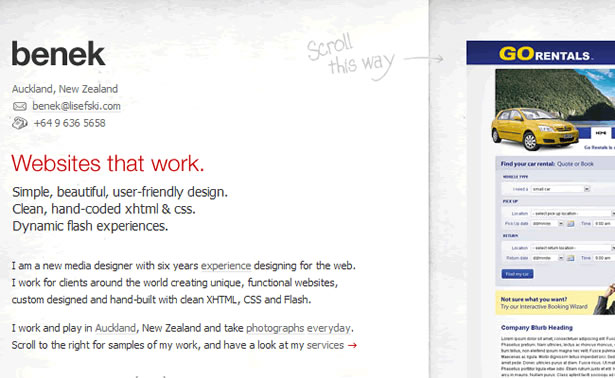
    Benek

    Benek uses JavaScript to change the scroll direction of the mouse wheel from vertical to horizontal. Each item in Benek’s portfolio is separated into its own column. The site has a surprisingly fresh feel and flows smoothly.
    Benek


    Shoe Guru

    Shoe Guru gets away with horizontal scrolling because it takes advantage of the way people look at shoes. People look at most products from top to bottom, but shoes are different. People’s eyes usually move across the length of the shoe. Using this habit to its advantage, Shoe Guru makes its website’s design flow in the same direction, making the motion feel natural.

    Shoe Guru


    Stephane Tartelin

    Stephane Tartelin uses the horizontal scroll bar to make his artwork look like it’s in an art gallery. Although the vertical mouse wheel doesn’t function like it does in the examples above, the effect works surprisingly well. You could even argue that the effect would be diminished if the mouse wheel were re-coded to scroll horizontally.

    Tartelin


    Graphic Therapy

    While Graphic Therapy doesn’t display a horizontal scroll bar on its page, it still allows horizontal scrolling by clicking and dragging around the screen. Graphic Theory used horizontal navigation because all of its images are the same height but not the same width. The horizontal navigation helps the site flow smoothly.

    Graphic Theory


    The Horizontal Way

    The Horizontal Way is a showcase of websites that use horizontal scrolling. The grungy graphics are beautiful, and this site is unique as far as CSS galleries go.
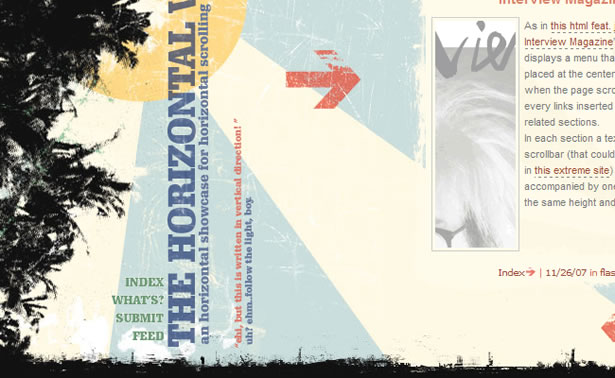
    The Horizontal Way


    Rule #2: Use a Minimal Number of Font Faces

    Too many fonts usually conflict with each other and overwhelm the viewer. Each font has a personality, and too many personalities can create disorder.

    To effectively use more than just a couple of fonts, a design has to be very text-oriented, and the rest of the design needs to be relatively quiet. Here are some examples of sites that use this sense of conflict and disorder to engage the user.

    Links LA

    Links LA uses many fonts in a non-linear layout to create a sense of energy. The page is difficult to read quickly but draws the user in. It’s also worth noting that none of the fonts are overly decorative; each word is legible, keeping the design crisp and clean.

    Links LA


    Geo Elements Design Studio

    Using a variety of fonts usually conveys a sense of energy and chaos, but Geo Elements Design Studio’s website is very open and clean. Each font is given its own space so that the viewer doesn’t associate it with another font. The image of the sky in the background helps reinforce the sense of openness.

    GeoElements Design


    Richard Stelmach

    Unlike the last example, Richard Stelmach pushes his different fonts close together. The design works because only one font doesn’t look hand-drawn, and the other two work well with the illustration. Hand-drawn fonts usually work well together, even when there are many different font faces.

    Richard Stelmach


    Satsu

    Satsu seems to have a lot of different fonts but actually only has three (not including the Sports Council portfolio item). By spacing everything carefully, Satsu associates certain lines of text with each other, even though the text may be in different fonts.

    The logo title is in one font, and the two sub-titles each have their own font, but the viewer naturally groups these three text items together. Satsu is able to create energy without overwhelming the page with personalities.
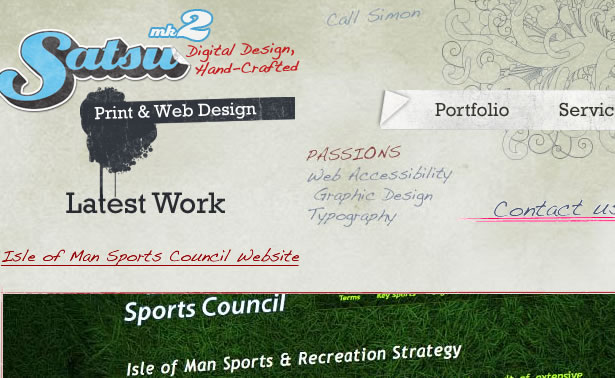
    Satsu Design


    Rule #3: Do Not Use Too Many Colors

    The fear of going too far with a design is what separates professionals from rookies and rookies from the oblivious. The oblivious try to make their designs as extreme as possible, with words on fire, blinking text, and as many colors as possible.

    Rookies want to keep their designs subtle and easy on the eye, but in the end their designs can sometimes look lifeless. The following eye-pleasing designs are by some true professionals who are pushing boundaries.


    Matt Mullenweg

    Matt Mullenweg’s beautifully colored design looks like a watercolor painting (site has been updated since this article was written). All of the colors in the background would grab anyone’s attention.

    Generally, good designs with a ton of colors will have these colors in the background, with a simpler palette up front. Reading text is very difficult when too many things are going on.

    Matt Mullenweg


    Travic Isaacs

    Travis Isaacs’s design has a colorful vertical gradient in the background that makes the design seem colorful throughout. This website has bright pink as its link color, which is a great choice for designers who want to create a colorful effect.
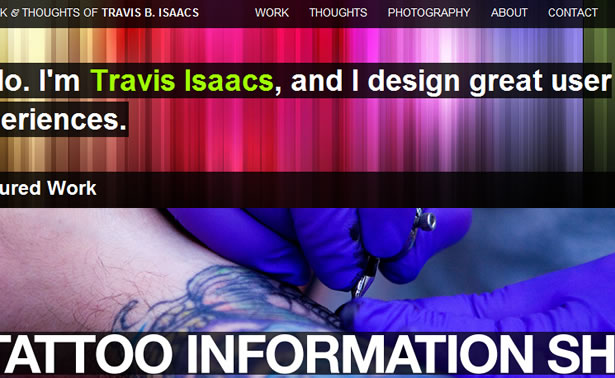
    Travis Isaacs


    James De Angelis

    James De Angelis’ website shows that text can be colorful without coming across as rookie-like. The design is very spare, and the tagline is certainly given center stage.
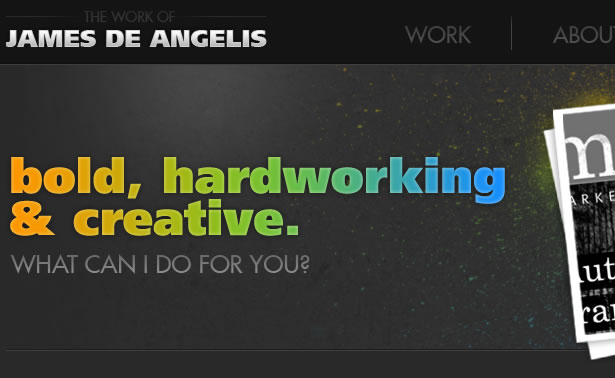
    James De Angelis


    Rule #4: Make Your Site’s Goal Obvious

    Something that really gets crammed in the ears of young designers is that a design should instantly tell viewers what they are looking at before they read any text.

    Brand recognition is important for large corporations, but sometimes the smaller guys need to be a bit more clever to get the viewer’s attention. Holding back information can intrigue the viewer and “tease” people into wanting to learn more.

    Applying this technique to web design can greatly increase the time that users stay on your site.


    Cetrotrees

    On most portfolios today, the freelancer or company usually introduces themselves and explains their work. Cerotreees instead puts some vaguely labeled links on the left and samples of its work on the right, but nothing explains the idea or person behind it.

    The air of mystery surrounding the site entices the user to stay.

    c e r o t r e e e s


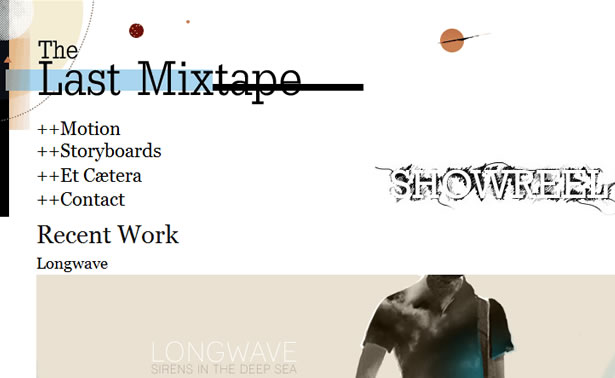
    The Last Mixtape

    The Last Mixtape is another portfolio that shows its work and nothing more. Such designs exude a feeling of extreme confidence. They never try to sell themselves; they just expect the user to be blown away and come begging for a contract.
    The Last Mixtape


    Peter Pearson

    Using a splash screen is a good way to slow the user’s thought process and inspire them to dig deeper. The splash page’s goal is usually to explain the site quickly with photos or a short bit of text.

    But in Peter Pearson’s case, its goal is to evoke a feeling. The big sky and splattered text effect do a great job at evoking curiosity because these things don’t usually appear together. This site also does a great job at continuing the emotion created by the splash page into the actual content.

    The side-scrolling motion and animated lines that follow the user are really effective.

    Peter Pearson


    Piepmatzel

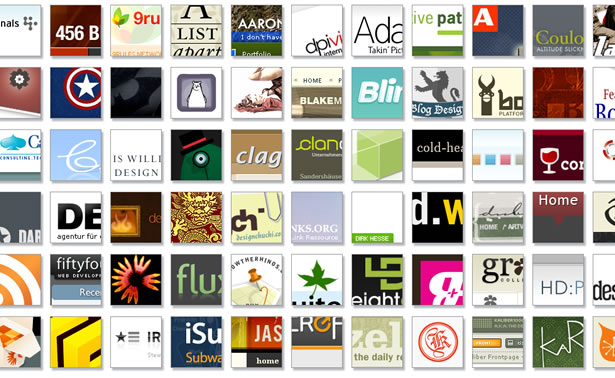
    A great way to get around the language barrier is to not use any words. Piepmatzel is a CSS gallery, and people who have seen a CSS gallery before will likely recognize it as one right away.

    Those who haven’t may be intrigued enough to give a few of the thumbnails a click in the hope of figuring out the pattern. The small amount of text at the bottom of the page helps with sorting and is superfluous.
    Piepmatzel


    Rule #5: Navigation Should Be Easy To Figure Out

    Navigation should not be the bottleneck of a site. Users should be able to find what they want quickly. Sometimes, though, unintuitive yet engaging navigation can help the user feel connected to the site and what it is promoting.


    Alvin Tang

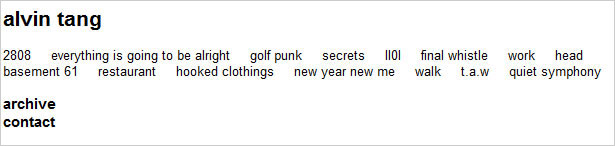
    As mentioned in the previous section, an air of confidence is conveyed when a portfolio doesn’t spell itself out. This is the case in Alvin Tang’s photography portfolio. When first arriving on the site, the user does not immediately recognize the words they see as links.

    This uncertainty should prompt them to poke around a bit. Moving the mouse over a word reveals that it is indeed a link, and upon clicking it, a gorgeous photo loads. The photo will entice users to continue browsing.

    To see more photos, users have to click the “Back” button on their browser (something most people understand to do) and then click another link. There is no hand-holding in the design, and it works extremely well. This isn’t a conventionally “gorgeous design,” but it delivers exactly what it needs to.
    alvin tang photographer


    Kasulo

    Kasulo’s navigation isn’t terribly hard to figure out, but the average user may not know exactly what to do upon arriving on the site. After the first click, though, everything becomes obvious.

    The user navigates the portfolio pieces in 3-D style, and the latest items appear closest to the beginning. Using the mouse wheel is even more fun.

    Kasulo


    Marcio Kogan

    Marcio Kogan’s site is another example of great navigation that isn’t immediately obvious. The instruction “Drag me” is hard to resist, and once the user does that, they’re on their way to cruising the portfolio items. The mouse-over previews are a small detail but really impressive.

    Marcio Kogan


    Ceranco

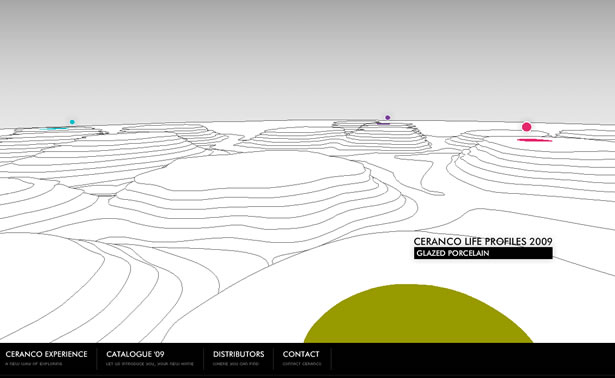
    If a client were to ask a designer to make their site in 3-D, like a first-person shooter video game, most designers would silently laugh to themselves, take a deep breath, and then slowly explain why that would be a bad idea.

    While the website for Ceranco isn’t exactly a 3-D shooter, it could easily be confused for some sort of indie computer game. Sites like this are great at engaging users. While the long loading time and poor search engine optimization make this less than ideal for most projects, it’s definitely worth a second thought.
    Ceranco


    Rule #6: Use Different Colors for the Text and Background

    This rule perhaps isn’t written all over the place, but many rookies are so afraid of making text unreadable that they don’t consider using the same base color for both the background and font itself. You can follow some simple techniques to make the similar colors work.


    Linksys

    The Linksys site is neat because of how it has one blue for all of its links, even though the background color is various shades of blue. While a risk and maybe not the greatest color decision, it does work.

    Linksys


    Brad Colbow

    Brad Colbow’s design is similar to Linksys’ because of the blue text on blue background. Blue on blue is difficult to pull off nicely, especially with so many different blues throughout the site.
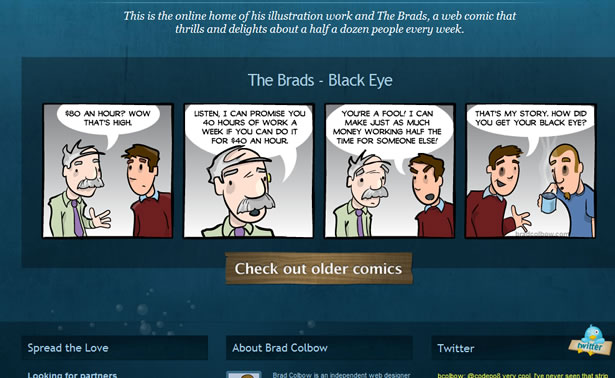
    Brad Colbow


    Powerset

    So far in this section we’ve seen only blue websites, because blue text is hardest for the human eye to read, and so legible blue type is always impressive. If a text effect works in blue, it will most likely work in any color.

    Powerset uses a letterpress style for its font to create a 3-D effect that effectively separates the text from the background.
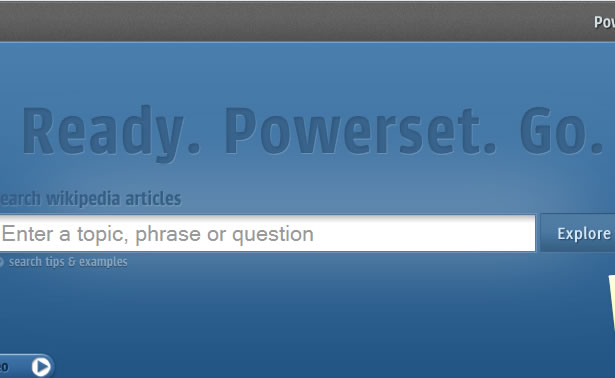
    Powerset


    Artist In Design

    Artist In Design not only has green text on a green background and yellow/beige text on a yellow background but has text directly on top of a photo.

    While some individual letters may be hard to read, the words as a whole remain legible. This type of effect should almost always be center stage in a design.

    Artist-In-Design


    Horacio Bella

    Horacio Bella uses another 3-D effect on his portfolio. In this case, the letters appear to pop out rather than be dented inwards. Without this effect, legibility would have been greatly reduced. Another good effect used here is the tight kerning of letters, which further improves legibility.
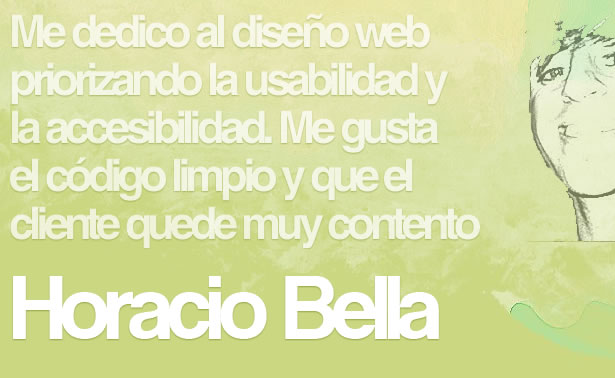
    Horacio Bella


    Rule #7: Don’t Put Animation in the Way of Your Content

    Seriously, don’t pop up little Flash ads right where the user is reading. Same goes for those survey boxes that show up whenever the user is in the middle of a sentence. Users do not enjoy being distracted when they’re halfway through a sentence. Unless…

    It’s really hard to not be enthralled by the little spider on ABA’s site. The design is clean, and although the spider is a distraction, it’s okay. So far, this site I think is the only exception to the rule.

    aba.bg


    Rule #8: Stick to Web-Safe Fonts

    Although font face replacement techniques are still young, they’re already making a big splash. sIFR was the first, and recently Cufón and Typefasce.js have emerged.


    Diseñorama

    On the Diseñorama website, the red “Recientemente” text is selectable. One downside is that if the site doesn’t load instantly, the user will see the original plain font briefly.

    Another downside is that if the user has either JavaScript or Flash disabled, they would only see the original font. All things considered, it’s still pretty cool. Hopefully it’s a preview of what’s to come in the next few years.
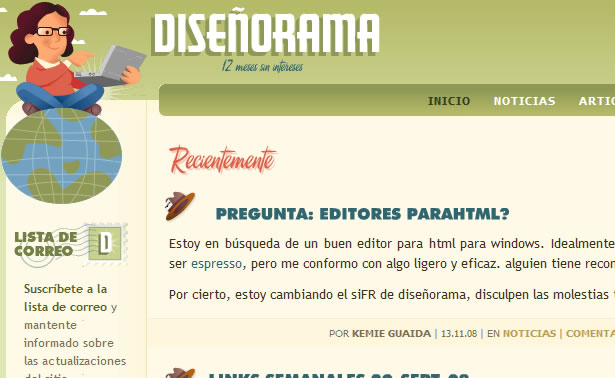
    Disenorama


    Cactuslab

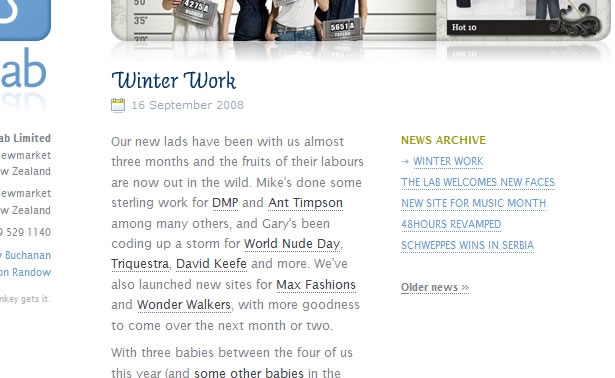
    Cactuslab also uses sIFR for the blue sub-headers (such as “Winter Work”). Although sIFR is the most complicated of the font-replacement techniques, text can be copied and pasted, giving it a big advantage over the two other techniques.
    Cactuslab


    Rule #9: Don’t Have a Splash/Landing Page

    Many designers have had that same old discussion with their clients about why a splash page is not a good idea. Google tends to rank such pages lower, and they slow down the user from getting the content that they’re after. But they can be incredibly beautiful and inspiring if done right.


    Gloss Postproduction

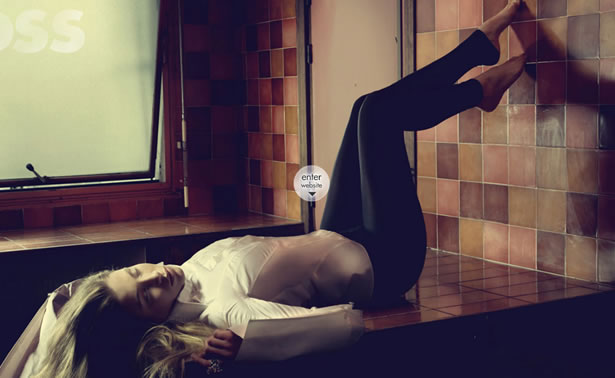
    The purpose of the portfolio sample that appears on the splash page of Gloss Postproduction’s website is to elicit an emotional reaction from the user.

    Upon each visit, a random photo from the portfolio is loaded. Clicking on the photo scales it down and puts it in its place among the other portfolio pieces on the site. The scaling and motion effect provides continuation and helps carry over the user’s emotion to the rest of the company’s work.
    Gloss


    Issa London

    When a site is completely done in Flash, the loading bar can serve as a splash page. When a user sees a loading bar, they will either close the page and go somewhere else or switch to another tab and browse elsewhere while they wait.

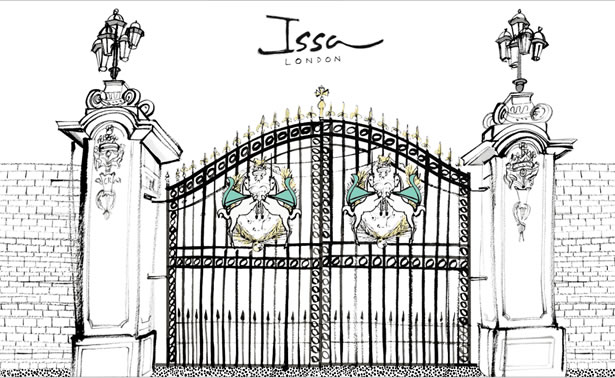
    Once the page loads, it’s best to wait for the user to return before starting up. In Issa London’s case, the gate is a perfect metaphor to say that the site is ready and the user may enter.

    When the user clicks on the gate, the gate opens and various illustrated models appear. Using the gate on the splash page is a great design idea because upon entering, the user feels engaged.
    eyessaiditbefore


    Rule #10: Don’t use Tables

    Any web designer who uses tables in their designs will instantly be called a rookie by experienced designers. Tables don’t display the same in all browsers, and they can make the source code look messy, but at the very least you’ll know what you’re getting with them. Here are some examples of designs that incorporate tables.

    This table is slightly hard to see but is tucked in there between the two chairs. It’s a nice little side table but sadly doesn’t contribute much to this site’s design.

    Abba Salon


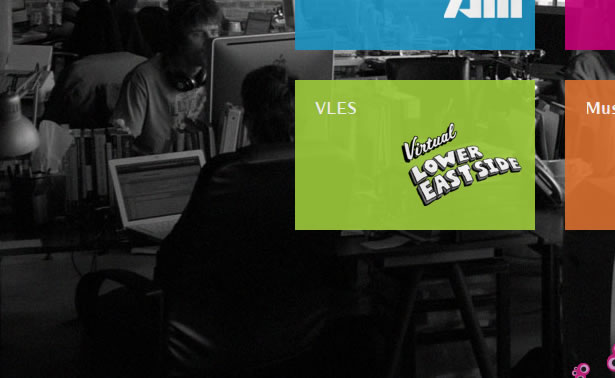
    Tables are way in the background of this design on Work at Play, but they keep the workers’ laptops and other items within easy reach. Without these tables, the room would feel much emptier, and the background photo wouldn’t have the same effect.
    Work At Play


    Although this design mostly features chairs, a nice little table appears in the top-right of the thumbnail. Looks like a pot is sitting on it.

    Fiberon Decking


    As far as designs with tables go, this is one of the best. With two tables featured in this Flash animation, the design gives them a lot of attention. This site should be on every designer’s list of great designs that use tables.

    LevelTen

    Break the Rules!

    Breaking the rules is okay when a design calls for it. Many of the design choices reviewed here would not be considered by the average designer. This is what separates great designers from average ones.

    Those brave enough to go against what they’ve been taught always stand out.


    Written exclusively for WDD bt Eli Penner. He runs his own website at SleepyHero.com

    Do you break any rules in your web designs? Why or why not? Please share your views with us…


  • 157 Comments »

     
    #1
    ninique
    June 17th, 2009 at 04:21

    I couldn’t stop laughing at your table examples. Indeed, tables can hold laptops and coffee cups way better than they can hold layouts.


    #2
    DT
    June 17th, 2009 at 04:33

    The last one takes the cake! Love it and the tone it sets to encourage designers not to be so serious all the time!


    #3
    Timothy Armstrong
    June 17th, 2009 at 04:38

    An interesting article (with some great examples), but I’m not sure I’m down for breaking some of these rules. Yes, some of them can be safely broken, but, in the name of accessibility and usability, I don’t think that unobvious forms of navigation or tables for layout should be used…


    #4
    Joshua Russell
    June 17th, 2009 at 04:45

    good post.
    totally agree with #5 Navigation.


    #5
    Joel Vardy
    June 17th, 2009 at 04:47

    Very nice list of rules you should follow. I generaly agree with all of these, although you have pointed out the sites which ‘work’ even when contradicting these rules!

    I personally have used the same colour for backgrounds and text in the past and providing you use light and dark colours it works very well.


    #6
    Oreana
    June 17th, 2009 at 04:55

    #10 is most useful. Thanks~


    #7
    Alex
    June 17th, 2009 at 05:20

    Love the table joke :L :L


    #8
    Gabe
    June 17th, 2009 at 05:22

    Excellent examples, thanks for the post. Web safe fonts can go jump off a bridge with IE6, please and thank you. I <heart> breaking rules.


    #9
    Mikaela Lily
    June 17th, 2009 at 06:15

    Nice article :D

    sometimes we have to break the rules to make an outstanding web design
    without forgetting the points of using the website it self ;p


    #10
    livz
    June 17th, 2009 at 06:18

    it tooks me a while to figure out what’s rule #10 about ^^||


    #11
    div
    June 17th, 2009 at 07:34

    Very Useful Info……..


    #12
    insic
    June 17th, 2009 at 08:08

    Nice article and great sites that is being featured.


    #13
    Tristan Kurniawan
    June 17th, 2009 at 08:24

    LOL at #10.. :D


    #14
    Veronica Wong
    June 17th, 2009 at 10:01

    HAHAHA … your table examples were gold. Thank you my friend for that.


    #15
    PixelStudioWorks™
    June 17th, 2009 at 10:27

    Hi

    Ten rules that you have explained in this article are so impressive and useful.
    I think it is definitely useful in designing excellent websites and it has worked for me.

    These rules made my job easy.

    Thanks for post such a wonderful article.
    It really helped in all aspects.

    Thanks again.


    #16
    Mars
    June 17th, 2009 at 10:56

    hahaha! table ha. good example


    #17
    SJL Web Design
    June 17th, 2009 at 11:23

    Number 10 was great! I really liked the idea of using a horizontal scroll in a design too.


    #18

    Love the tables example, will probably refer to that when design gurus start being dogmatic about tables being the worst sin of web design.
    It’s great to push the envelope in these ways but my difficulty is that a lot of this is counter to good web accessibility, for example colour contrast between text and backgrounds and intuitive navigation. It’s a dilemma I haven’t resolved as I do think most of these work well if accessibility is not an issue.


    #19
    bart vermijlen
    June 17th, 2009 at 11:45

    concerning the tables: I once did a presentation on email etiquette, and talked about the fact that the use of capitals equals shouting. Reaction from the public: “can we use other cities without problems?”


    #20
    Ferdy
    June 17th, 2009 at 11:46

    The table joke was good, but I do have a problem with your abuse of the word “rookie”. Your article strongly implies that rookies are rookies for NOT breaking the rules. The opposite is true. Everyone, rookies or not, should follow the rules and only break them in exceptional cases, of which you demonstrated a few quite well.


    #21
    James
    June 17th, 2009 at 11:50

    “Breaking the rules is okay when a design calls for it”

    I wonder what Jakob Nielsen would say to that…

    In reference to #5, if I can’t figure out a website’s navigation then I do one thing, and one thing only: leave!


    #22
    Walter
    June 17th, 2009 at 19:51

    It’s all about finding the right balance I think. And usability remains an important factor of course…. I don’t think Jakob will like this article, though ;)


    #23
    aravind
    June 17th, 2009 at 11:52

    haha… awesome post :D
    but let me say, using tables is always nasty!.. don’t use tables.. lol!!


    #24
    2lip
    June 17th, 2009 at 11:53

    great article and an even greater joke at #10!


    #25
    Om Ipit
    June 17th, 2009 at 11:53

    if we want to create great design, we must feel free…
    yess.. break the rule…


    #26
    jojo
    June 17th, 2009 at 11:54

    haha.. fantastic post!!!!


    #27
    Yaili
    June 17th, 2009 at 12:13

    When I first started reading #10, my thought was “Oh boy, here we go…” :)

    I agree, tables are absolutely awesome and I use them all the time both at home and at work. I’m a big tables advocate!

    About #1, I usually don’t like horizontal scrolling, but it’s true some sites know how to do it properly. However, I would advise against dual scrolling, it’s just plain annoying.


    #28
    Adam
    June 17th, 2009 at 12:15

    Hi;

    Well Benek’s a nice guy and a good designer, but he’s broken that rule and many others, his telephone number does not stand out one bit, and he has no links directly to his services or a propper contact page, so poor. And using javascript to basically change how I control my PC is annoying, nearly as bad as resize’in my window.

    ShoeGuru, not bad but the footer text is badly thought out, it’s nearly unreadable.

    “Breaking the rules is okay when a design calls for it. Many of the design choices reviewed here would not be considered by the average designer. This is what separates great designers from average ones.”

    Riiiiiight, ok then…

    And some of these just seem, well quite frankly lol, you include a site selling tables for using tables…

    “As far as designs with tables go, this is one of the best. With two tables featured in this Flash animation, the design gives them a lot of attention. This site should be on every designer’s list of great designs that use tables.”

    Sorry are you on crack?

    I have a sense of humor but the table joke is just an epic fail. Oh well better luck next time.


    #29
    Elizabeth Kaylene
    March 15th, 2010 at 21:55

    I thought the table joke was lame, too. Sometimes, designs need a table and you just have to suck it up, rookie or not.


    #30
    David Hamill
    June 17th, 2009 at 12:31

    OK your tables example is funny, but some of the advice you’re giving here is really quite poor. You’re actually using an example of a site that takes over the user’s mouse and rearranges the control. For what? A pretty design.

    Your advice on Rule 4 is way off the mark. Only designers are ‘intrigued’ by designs that aren’t instantly obvious. So just because you like to explore a design to work out what it is and how it works, doesn’t mean real people will. Remember you’re designing for the user not to impress your peers.

    There’s a fundamental difference between your reason for being on these sites and real people’s. You’re there to critique the design, they’re there to find something.

    If all you want to do is make designs that are pretty then knock yourself out, but design is more than just ’snazzy making’. You are designing an experience and your users are not there to be wowed by how clever you’re being. They’ll be wowed by a beautiful design that gives them what they want.


    #31
    jolypop
    June 17th, 2009 at 19:44

    Comment of more value than the article itself.
    Thanks David Hamill!


    #32
    Elizabeth Kaylene
    March 15th, 2010 at 22:02

    If you’re designing just to impress your peers, you’re in big trouble!

    I agree that some of the advice in this article is bad. My jaw pretty much hit the floor when I read the part claiming that you can break the “navigation should be easy” rule. I fight with myself all the time when a site requires the use of a dropdown menu. If they have more than two levels, they can be very frustrating.

    Animation and splash pages should be used at very minimum; I usually leave sites built entirely in Flash, because they tend to have splash pages that take forever to load and load slowly in general. Don’t get me wrong, the use of Flash can result in some fun stuff. I think it should be used strictly for ads and games.

    There are many “rules” that we can break, but we should not sacrifice usability for any design, EVER. To me, navigation, fast load time, and minimal animation are huge components of usability.


    #33
    Oliver
    June 17th, 2009 at 12:33

    Great post. Loved the Kasulo site. lol at the last post though. Cracks me up :D


    #34
    r_jake
    June 17th, 2009 at 12:40

    Rules #4, #5, #7 and #9 can be broken for personal portfolio sites, where a more creative approach might be appropriate, but not so much for commercial or corporate sites methinks.

    Surely#6 should be ‘Use Contrast between Text and Background’, not different colours. Most of the examples here use variations of the base colour, and use contrast to make the text readable, just like you should.

    #8 I’m really getting into using Cufon and Typeface.js, they offer a great solution in terms of progressive enhancement (much better than sIFR), and think this is one area where the old rules no longer apply.


    #35
    Si
    June 17th, 2009 at 13:33

    Im sure you could prob find a site which breaks any rule to give an example. These shown here are more like general practice recommendations than rules. The only one of interest was the horizontal scrolling rule.


    #36
    Jeremy
    June 17th, 2009 at 15:42

    Most of these rules have been put in a place for a reason.

    Horizontal scrolling can cause issues for people with impaired vision using a text reader. And in the first example the scroll redirection was not working in Safari.

    Unless you’re going for a cluttered look too many font faces makes your site look disorganized. You’re either using a lot of images and hurting SEO, or creating longer load times by making tools like sIFR load 10-15 fonts.

    And did you honestly say you should hold back information to “tease” the visitor. If you have quality information and present it nicely the user will come back. A suggestion like yours only serves to annoy people.

    I realize these “Rules you should break” or “Standards you shouldn’t follow” articles appeal to everyones rebellious side, thus generating traffic, but please be a little more thoughtful. Most of these rule can be bent, but breaking them? You’re asking for a sub par site.


    #37
    pamela leong (Singapore)
    August 25th, 2009 at 05:24

    oh great, i like everything you’ve said here.
    I’m still on my journey into mastering web designing
    you might have just saved me from breaking the rules:D thanks Jeremy!


    #38
    Elizabeth Kaylene
    March 15th, 2010 at 22:04

    Agreed. I was not impressed with this article, at all. If not being rebellious in my design makes me lame, then I don’t want to be cool. I’d prefer to make the site look aesthetically rebellious than break rules that are in place for a reason.

    Glad I’m not the only one who didn’t like this article. I was going to leave a standalone comment and worried that I’d be the only one not wowed!


    #39
    Ray Gulick
    June 17th, 2009 at 15:52

    Tables: funny. Great way to make the point.


    #40
    Chris Sloan
    June 17th, 2009 at 16:00

    Hey thanks; we love tables too! Unfortunately that design has since been changed to a table-less design.


    #41
    Jonathan Wagener
    June 17th, 2009 at 16:29

    Cool article. #10 is great :D


    #42
    Ted Goas
    June 17th, 2009 at 16:33

    Nice post! You bring up some good points. Your idea about navigation might be a slippery slope to some, though. If I’m navigating around the web looking for something (read: not looking at creative sites for inspiration) I don’t really want anything to get in my way, you know. When working on a site, one might consider its purpose before designing any bleeding-edge, atypical function into it.

    Great ideas overall!


    #43
    Adam
    June 17th, 2009 at 17:19

    Good post and list


    #44
    Manchester
    June 17th, 2009 at 17:28

    With my beautifully functioning eyes and relatively long attention span I can see how many of these sites are marvellously pretty, however not everyone has eyes as good as mine or as long an attention span.


    #45
    p()thesis
    June 17th, 2009 at 17:36

    Great article. I also liked the tables joke. As someone else put it, it’s a good reminder to not take things too seriously all the time.


    #46
    web2000
    June 17th, 2009 at 17:43

    I enjoyed your article 10-web-design-rules-that-you-can-break. Thanks!


    #47
    richard andrew lee
    June 17th, 2009 at 18:13

    funny!.. fun post. like the sections about type/fonts and the tables was hilarious.


    #48
    Catherine Azzarello
    June 17th, 2009 at 18:14

    Very witty. So glad I read the entire post!


    #49
    Ben G
    June 17th, 2009 at 18:35

    Rule #10 = awesome.


    #50
    Eli Penner
    June 17th, 2009 at 18:42

    Thanks everyone for all the wonderful feedback!


    #51
    aledesign.it
    June 17th, 2009 at 18:43

    Fantastic post.. Really important some rules..Thanks a lot!! See you!! :D


    #52
    G F Mueden
    June 17th, 2009 at 19:00

    My laptos doesn’t have horizontal scrolling. I think it has vertical but I have never sed it. If my right arrow doesn’t work, I leave.
    ===gm===


    #53
    G F Mueden
    June 17th, 2009 at 19:02

    Wish this website ad a more legible font in the text entry box. I can’t see mu errors. ===gm===


    #54
    Walter
    June 17th, 2009 at 19:50

    Which website do you mean?


    #55
    Samson
    June 17th, 2009 at 19:22

    I disagree with all this. These are all rules you shouldn’t break, but have the freedom of different options within these rules. Think about that.

    Breaking these rules creates bad usability and information architecture. There’s no point or reason users should have difficulty finding the information they want. There’s just no point to that. Why would you make something a user is looking for harder to find?

    Visual design is important to convey credibility, but certainly, not that much is needed. People go overboard with visual design and throw on layers of ostentatious graphics and colors in the name of “being creative”, when all your doing is complicating the design because you don’t have the knowledge on how to simplify.
    All visual design is important for is credibility. A simple logo, textured buttons, consistent link and heading colors is all that is needed to convey credibility. Apple.com as a good example. The reason Apple is so good is because they are so consistent with their styling. The links are blue, the copy color is dark gray and headings are black bold. This is what good design is, not the breaking of rules and order.

    The logic of this article doesn’t make sense. Is it that if other websites break these rules, then that makes it ok? What if all the sites that did break these rules are just badly designed sites? Wouldnt the article then be titled ‘10 Web Design Rules Many Websites Are Breaking.”


    #56
    Eli Penner
    June 17th, 2009 at 20:05

    Most of the designs I included in the list are from companies or individuals who offer design as a service and I would argue that it’s important for them to make their site with examples of their creativity and a sense that the designs that they offer will stand out. Although horizontal scrolling wouldn’t work on Apple.com or another site that needs to be accessible, I believe that it works for these sites as it offers a unique option for standing apart from their competition. I don’t think it’s fair to group Apple’s site with sites that have a different goal.

    The logic of the article is that the basic goals made for web design don’t apply when the goal of the party behind the site contradicts it.


    #57
    Samson
    June 17th, 2009 at 23:23

    First, I want to clarify that I am not saying I dislike your post or anything, but it raises a lot of issues that Information Architects battle with. In essence, all websites have one goal and that is to communicate or receive information. This may be oversimplifying things, but without simplification it is difficult to narrow things down to objective truth.

    I agree that websites that offer web design services need to show their creativity and such, but you cannot compensate consistent order and structure for that. Simply put, a website is not a canvas for art. A website is a tool to display canvas art. It’s a tool. It’s useless to get creative with a tool. Sure, you can decorate it like putting stickers on a hammer, but you cannot change the structure, or it defeats the purpose of a hammer.
    The real creativity is in the content that you display for your services. Your portfolio. That is the bulk of it. (80% content and 20% visual design)

    In terms of usability, what good is amazing content if it’s hard to find, or hard to read? This is the key here. While Apple may serve a different function as a business, it does not server a different function as a site, which is to communicate content and information. Do more people WOW at Apple’s visual graphics (albeit there is very little) or their products they display online?

     
    (Comments won't nest below this level)
     
    #58
    Elizabeth Kaylene
    March 15th, 2010 at 22:12

    Replying to your second comment:

    If I were a potential client instead of a designer, and I went to a designer’s site that made it hard for me to find what I wanted, made me wait for it to load because of a splash page, and had frustrating navigation, I would leave.

    Just because we are designers, doesn’t mean we have to show off every single trick we know in one design. Of course we want our portfolios to look good; we wouldn’t keep upgrading our personal sites’ designs if we didn’t care about how we presented ourselves. But I agree that there are certain rules that absolutely should not be broken, no matter who you are designing for (unless, of course, you’ve got a client who just doesn’t care and you’ve tried to explain it to them many times).

    We don’t have to be flashy or bend over backwards to show how creative we are. If you are a good design, this will come naturally. But usability should never, ever come second to aesthetics, and I’m really disappointed in WDD for this article, because it seems to imply that heavily, all for the sake of being rebellious. We aren’t punk rockers; we’re professionals offering a service.


    #59
    Arlene
    June 17th, 2009 at 19:37

    The tables joke was tooo funny! LOL! I’m gonna send this link to my clients who still want tables in their design!


    #60
    Joe McCann
    June 17th, 2009 at 19:38

    I believe this massively fails in regards to accessibility. If you just want a real “artistic” website, then NO rules apply. But I believe the reason some of the “rules” (practices) exist is for a better experience for the MAJORITY of users.


    #61
    Eli Penner
    June 17th, 2009 at 20:54

    Websites don’t “need” to be incredibly accessible depending on what they’re trying to achieve. If someone is trying to show off some illustrations, then their market isn’t the visually impaired or users on cell phones.


    #62
    Elizabeth Kaylene
    March 15th, 2010 at 22:14

    Your market is anyone and everyone who can access the web. It’s awfully presumptuous of anyone to ignore accessibility, no matter what you are trying to convey with your site. We are professionals and should act accordingly.

     
    (Comments won't nest below this level)
     
    #63
    Walter
    June 17th, 2009 at 19:49

    The essence of the article is to show how breaking design rules can sometimes improve a design. It doesn’t mean that you always need to break every ‘rule’ out here.

    And yes, usability is a very important factor, and we’ve covered usability extensively in WDD.

    That being said, breaking a design ‘rule’ will not necessarily ‘break’ the usability of the site. It’s important that you use your common sense as to what’s right for your site.

    Take for example the horizontal scroll bar examples at the top of this article. If the mouse is coded correctly so that the wheel triggers horizontal scrolling instead of vertical scrolling, most users will quickly figure this out and be a bit more engaged than usual, and at the same time more likely to stick around a bit longer.

    The longer someone stays on your site, the better opportunity you will have for making a sale on an e-commerce site for example, or gaining more subscribers or comments on a blog.


    #64
    Umm
    June 18th, 2009 at 05:35

    “most users will quickly figure this out and be a bit more engaged than usual, and at the same time more likely to stick around a bit longer.”

    Because if there is one thing web surfers love, it’s unconventional navigation schemes! I would file most of this stuff under “How to murder your hit counter in 1 month or less.” For god’s sake, don’t do any of this on production sites, kids. Leave the experimenting for your design school projects.


    #65
    Tim
    June 17th, 2009 at 20:06

    Most of these rules concern some form of accessibility or usability. For example, the horizontal scroll is a bad idea because it is inaccessible and goes against the basic convention that pages expand down.

    This article gives, for lack of a better word, lousy advise to webdesigners all around the world. It will hurt their customers who sell less, it will hurt the users of those customers who grow frustrated in the loss of time.

    But, by all means, break these rules if you wish. It’s the reason why agencies like the one I work for make money…


    #66
    Elizabeth Kaylene
    March 15th, 2010 at 22:15

    Agreed. I’m very disappointed in this article. It astounds me.


    #67
    Billco
    June 17th, 2009 at 20:06

    The biggest problem I have with this article is the gross misinformation. I would have titled this post “10 ways to act like a pretentious web-ignorant designer”. Go ahead, make it illegible and confusing. The true skill in web design is to combine the utilitarian nature of information structure with pretty graphics and styling to make the end result a little less boring.

    The only people who visit an overly prettified site are there to look at pretty pictures. The rest are seeking information, raw data, which these “broken rules” purposely obstruct. You can do whatever the hell you want, but don’t go calling it web design because this is print design clumsily thrown on the internet.


    #68
    Nicole Seiffert
    June 17th, 2009 at 20:15

    “Although this design mostly features chairs, a nice little table appears in the top-right of the thumbnail. Looks like a pot is sitting on it.” That one almost put some coffee on the laptop!

    Your post is a great example of how to lighten up and still get the job done.


    #69
    madbadcat
    June 17th, 2009 at 20:24

    great examples- and justification for many of the designs ideas that have gotten shot down for not following the rules. thank you.
    cheers.


    #70
    Praful
    June 17th, 2009 at 21:21

    Wow..Awesome! I’ve never seen a tutorial like this before. Thanks


    #71
    G F Mueden
    June 17th, 2009 at 22:29

    Far too many of the examples use low contrast. Young designers with good eyes do what looks good to them without realzing (or caring?) that old people who still make decisions and spend money, may have acceptable visual acuity but lack sensitivity to low contrast.

    If you love me Baby, make me know it !!

    ===gm===


    #72
    bigyaz
    June 17th, 2009 at 22:35

    The exceptionally talented can break the rules and get away with it. The rest of us should tread very carefully.


    #73
    cyberick
    June 17th, 2009 at 22:46

    Good one.


    #74
    Cezz
    June 17th, 2009 at 23:32

    I Have to give you 10 out of 10 for that one, the whole post is informative, but you have ended it on a good note, making me not only strongly consider where to next break a rule but also that light heartedness is good in design…

    Thanks for the inspiration…


    #75
    evan
    June 17th, 2009 at 23:33

    You can’t “break” these rules per say, simply because it’d be a bad user experience. You can bend them however if designed really well. A website can have as many font faces, colors, contrasting elements, horizontal scrolling, effects, etc. as long as it’s all designed well and still makes sense to the user.

    Going outside of that you enter the realm of art where user interpretation of the site is left wide open.

    As for technical issues like #8 and #9… you can use any font you’d like to as long as it renders on all browsers you’re developing for. As for having or not having splash pages – that all depends if you’re willing to impact your site’s search results. Search engines give huge weight to that main index page, and if that page has very little content and entry points into the site, then your results might tank.


    #76
    Uncle_zed
    June 17th, 2009 at 23:54

    show me HOW to make the SPIDER??

    it’s amazing.


    #77
    David Miller
    June 18th, 2009 at 00:08

    Good article. ONe of your readers has a good point about accessibility issues. I guess for some sites design innovation will also mean user exclusion. Other than that, great way to lighten things up with the tables joke. I still like them myself. They will expand ro contract with the addition or subtraction of content.


    #78
    Amos
    June 18th, 2009 at 00:21

    Funny bit about the “no tables” rule…


    #79
    Michal
    June 18th, 2009 at 03:25

    In comparison how dumb the advice is in points 1-9 (as stated by numerous posts before) using (actual) HTML tables sounds like a great idea – saves time money and reduces the risk of a heart attack.


    #80
    Nakia
    June 18th, 2009 at 06:22

    Love the post! made me laugh!


    #81
    JustChris
    June 18th, 2009 at 06:30

    I once tried my attempt at a horizontal-scrolling site. There was one fan-made online anime magazine called The Ramen Bowl and it was very ambitious in design and execution. Only problem was that it was made to only work in IE 6 (this was in 2003-4) and the Javascript-enabled slider buttons that made it scroll totally broke the layout in other browsers.

    Well, it was ahead of its time and only ran 3 “issues”, but it was still a nice sight for the eyes.


    #82
    Ian
    June 18th, 2009 at 07:20

    Nice post, but what’s with giving us a horizontal scrollbar on 1280×1024 when viewing your blog? You can’t possibly have a design rationale for that…

    ;-P


    #83
    Jens Meiert
    June 18th, 2009 at 10:10

    Quick question, did you—the author—test any of the layouts with users? Alternatively, what data are there backing your claims up?


    #84
    Eli Penner
    June 18th, 2009 at 15:54

    I did not test the layouts with users. All the claims are not backed by solid data but rather interpretations of how I believe users feel based on my various studies of psychology and user interfaces.


    #85
    TomA
    June 18th, 2009 at 12:00

    Seems to me you made up most of these “rules” yourselves.

    Then, you didn’t do any testing (or report on any) to see if any of it actually works beyond a pretty picture and ended with the “tables” joke to deflect any criticism – although you seem to have a serious point to make.

    Isn’t it always the case that there are exceptions to such “rules” and that one sign of mastery of a medium is knowing when breaking the general rules is appropriate?

    Unfortunately though, it seems to me, the last thing anybody needs is to give more fuel to the purely visually-oriented designers who know nothing of good Information Architecture and Interaction Design and care nothing about best-practices with regard to accessibility, but think that if it looks great from their perspective (on their system with their understanding of the design) then people who complain are just whiners who don’t understand the exigencies of the aesthetic (that is, who would not appreciate the value of “a stunning design”).

    All-in-all, nice eye-candy — but I would have received it much less grumpily if it had been framed by some appreciation for the basis of the so-called “rules” and offered as what is possible in terms of variations once one has mastered the basics.

    - Tom


    #86
    Eli Penner
    June 18th, 2009 at 19:29

    The rules included in the list are unofficial rules that I’ve seen, usually from people who I’ve asked to criticize the designs that I’ve created.

    Your second paragraph is bang-on. This article is intended to stir the reader’s mind a little and hopefully designers will feel that they have more options and they won’t be as closed-minded when making design-based decisions.

    I also appreciate your points that I haven’t focused enough on only breaking design “rules” if it creates more value for the website. I wrote this article hoping that users would’t it as permission to throw away all the rules and do whatever they thought looked pretty.


    #87
    TomA
    June 19th, 2009 at 11:36

    Well, you certainly assembled an impressive array of sites which make the point well that “rules” are really “rules of thumb” and can – and should – sometimes be broken without it being a mistake.

    Two things concern me about the discourse around “rules”:

    1) It’s really hard to generalize to the extent that most people would like to in these contexts. In other words, there are very few one-size-fits-all “rules” in Web UI design. Maybe it would make more sense to talk about “aims” or “design goals” or something that abstracts away from specific layout or technology choices. Cross-browser, cross-platform, cross-device and cross-variously-abled-user considerations can make Web UI design a real challenge. The temptation to reduce the complexity to easy-to-repeat/easy-to-remember lists of things-to-do and things-to-avoid is strong. That said, I seriously doubt you want anybody reading your post to decide that there is no need to pay attention to the constraints* that are far from obvious when one is sitting in front of one’s own computer screen generating ideas for a site.

    *Cross-browser, cross-platform, cross-device and cross-variously-abled-user compatibility

    2) The activity-of-design and the paying-attention-to-constraints. These two modes of thinking/acting are often in real and important conflict. I think this is where a lot of this churn comes from and why many more visual-design-oriented folk end up seeing a concern for “rules” as the enemy. I think there really has to be room for both in a Web design process. To be a good designer, you have to make room for free-style, *unconstrained-by-technology/implementation-constraints* design “thinking” (it’s a very strange sort of thinking that is hard to pin down, hard to articulate, often under siege by a bottom-line, rules-governed mentality on the part of others) — BUT to be a *responsible* designer — a citizen of the system in which your design is going to live — fundamentally to have social integrity as a designer — not to mention ultimately to be successful from a business perspective — you have to then move through a phase where you subject your ideas to the constraints in which your design is going to live and breathe. This is the phase where “rules of thumb” about layout and do’s and don’t’s of various design elements should enter the fray. Too many designers get obsessed with insisting on the validity of the first of these two phases and lose sight of the importance of the second. Actually too few can’t see how these two phases can possibly live in harmony – and so either feel they’re being forced to “sell out” for a living or continue to produce broken UI’s for unsuspecting, not-well-informed clients.

    Your post is very cool and garnering lots of attention. I just wish you’d add some sort of disclaimer that nothing you say here should be viewed as license to ignore the need for wide compatibility and accessibility, but is rather an exploration and reminder of the approximate nature of any design “rule” and suggestion of what is possible in advanced Web design practice.

     
    (Comments won't nest below this level)
     
    #88
    TomA
    June 19th, 2009 at 11:40

    Interesting. My “” closing tag didn’t render, above — I wonder if the quotes will do the trick?

    - Tom


    #89
    TomA
    June 19th, 2009 at 11:49

    OK the cute little tag was supposed to be: open-angle-bracket forward-slash “windbaggery” close-angle-bracket.

    Hmm — it was intended to poke fun at my potentially overly serious, long-winded commentary – but now I’m kind of defeating that purpose by obsessively pursuing the rendering of the tag, itself. My, what a meta-world we inhabit when first we practice to mark up. :)


    #90
    Barbara
    June 18th, 2009 at 12:36

    Thanks for a great laugh! The part about the tables is so funny :) Of course, the rest of the article is great too. Too many rules hinder creativity, that’s very true. But remember, don’t use tables ;)


    #91
    Dylan Barber
    June 18th, 2009 at 16:35

    After years of being told not to use tables its nice to see someone who says its okay sometimes to use tables!

    JK – Great article and really inspiring examples!


    #92
    ilkut
    June 18th, 2009 at 16:37

    still laughing at number 10 : ), the seriousness got me. wonderful post


    #93
    Peter Pearson
    June 18th, 2009 at 20:43

    Thanks for the feature! Glad you like the site.


    #94
    Tyler
    June 18th, 2009 at 20:58

    The article was interesting however I would NEVER break the Navigation rule!
    I am sorry but if a website requires the user more than two seconds to orient themselves, they’re gone in one!

    The too many font rule is also another that I am weary about and quite frankly the examples chosen were not quite exemplary. I’m open to this one but it depends on the typefaces used.


    #95
    Sarah
    June 18th, 2009 at 21:27

    I find some of the conversation about treating “the rules” with more respect a little amusing. There’s a reason that nearly all art/design teachers always say that it’s important to know the rules and the limitations so that you’re educated enough to know when it’s okay to break them. I don’t think I’ve ever met a designer who disagreed.

    Sometimes breaking the rules creates something new and interesting. Sometimes it causes a design to fall flat on its face. I think the examples given demonstrate that– some look really great and some seem to be floundering. In the end, it all depends on who the website’s audience is and what the goals of the design are.


    #96
    Jordan Willms
    June 19th, 2009 at 02:36

    LOL.

    You got us with that crack about the tables ;)

    Great post!

    Jordan @ http://www.workatplay.com


    #97
    Jon Phillips
    June 19th, 2009 at 03:06

    haha, tables rock! :)


    #98
    tangyong
    June 19th, 2009 at 03:33

    so cool.


    #99
    Livia
    June 19th, 2009 at 04:45

    Rule #10: Don’t use Tables” Hahaha. Funny!


    #100
    Kevin
    June 19th, 2009 at 14:02

    hahahaahahahhahahaha seriously it is!


    #101
    marl
    June 19th, 2009 at 08:02

    i give the link to my friend =D d’ designer. i like all pics :)


    #102
    Web designer
    June 19th, 2009 at 23:47

    I wonder why does anyone in their right mind will use a splash page designed in flash. The concept of splash pages are so nineties. I personally would never visit a website which has an annoying splash page.


    #103
    G F Mueden
    June 20th, 2009 at 02:59

    All this is frightening to an old geezer who would like to have a website devoted to Low Vision and Legibility, that would be universally accessible. My needs demand simplicity and a professional appearance.
    Nothing I have seen here gives me confidence that this group could do the job without the thrat of being flogged at the first sign of cleerness. Above all its legibility must be without exception. E.g., here is a site devoted to good (?) design whose text entry box has a font of particularly poor legibility compared to the rest of the text.

    So much for my dream. At 92 I am unlikely to achieve it, but still I dream. There are four things I would like to see in it. @1, a public message board, somewhat like this, but with the opportunity to send private messages to other participants, #2, an Assissttive Technology (AT) database with links to users of the products listed so that others can ask about their experiences, #3, Avocates, an experts who can critique bad examples (printed or on screen) and try to get the publishers to shape up, and #4, a census of the population’s ability to read different combinations of font size, colors and contrast so as to create minimum standards of legibility.

    [#4 is a real killer and the pros in the field have told me, with good reason, that the factors are so many and hard to deal with as to be overwhelming. I accept their reasons, but not their conclusion; I think I have a way to do it.]

    Should I continue to hope? Suggestions?

    gfmueden@verizon.net ===gm===


    #104
    Lou
    June 20th, 2009 at 08:39

    Good points. It really boils down to the purpose and client for the site. The tables example is funny.


    #105
    rocky
    June 20th, 2009 at 08:59

    nice post. i am very happy to read it


    #106
    Jordan Foutz
    June 20th, 2009 at 19:33

    #10 scared me for a sec. I thought for a second that perhaps some of the furniture tables were put in website tables, but then I said to myself, “whoa, those sites look way to nice for internet tables, thats mighty interesting how they could have put those really nice table images into a table on the websitel.” I was also anxious to scroll down to the comments.

    I agree w/ safety in pulling rank on colors, web safe fonts (sifrflash is a good way of bypassing that), horiz navigation, but the site’s purpose should always be abundantly clear once you arrive on site. Great sites in here.


    #107
    sonichtml
    June 21st, 2009 at 06:02

    nice~ thank you for shared…


    #108
    Chian
    June 21st, 2009 at 07:40

    great :D totally amazing


    #109
    Jared
    June 22nd, 2009 at 21:08

    I was like wtf is he talking about the tables…. I had to keep re-reading it, cause I thought I was missing something. Good stuff


    #110
    joel k.
    June 22nd, 2009 at 23:32

    ha ha “tables”
    took me five minutes to get it


    #111
    James De Angelis
    June 24th, 2009 at 06:46

    Very humbled to appear amongst some of the other really strong designers here. Otherwise a quality post too, web design needs this sort of activity to be pushed forward!


    #112
    Jason King
    June 24th, 2009 at 08:43

    My next website will have black text on a black background with huge animated coal miners. You have shown me the way! Seriously though, I enjoyed playing with some of these websites and thank goodness not everyone follows the same rules.


    #113
    Madeline Ong
    June 24th, 2009 at 09:14

    Rule #1: Do Not Display the Horizontal Scroll Bar

    It’s okay to break this rule on artistic sites, personal sites, and sites targeting the youth. But for large commercial sites with a broad user base, or for sites targeting middle-aged people or seniors, we should probably stick to the standard.

    Rule #2: Use a Minimal Number of Font Faces

    Links LA might not be a good example to give; the different fonts are more art than text, so it doesn’t count.

    Rule #3: Do Not Use Too Many Colors

    Yes, this rule should be broken more often… but carefully. :)

    Rule #4: Make Your Site’s Goal Obvious

    It’s hard to break this rule without annoying and/or confusing visitors. Isn’t design about communication, after all?

    I think the reason why we (web designers) think it might be okay is that we’re used to web design. We know when a design element or user experience is uncommon, and if it’s particularly sleek, we appreciate it. And we know a portfolio site or CSS gallery when we see one. But regular visitors might not get it, and then bounce away.

    Rule #5: Navigation Should Be Easy To Figure Out

    It SHOULD be easy to figure out. See above.

    Rule #6: Use Different Colors for the Text and Background

    I didn’t know this was a rule. :)

    Rule #7: Don’t Put Animation in the Way of Your Content

    The spider is adorable. And yes, this is probably one of the few ways you could break this rule gracefully.

    Rule #8: Stick to Web-Safe Fonts

    Perhaps the rule should be changed to “Stick to Web-Safe Fonts in Body Text,” since using custom fonts for headers is all the rage these days. Two other downsides: 1) AdBlockPlus places a little Block button next to sIFR headings. 2) bad web designers are now free to choose fonts that are very hard to read.

    Rule #9: Don’t Have a Splash/Landing Page

    I remember circa 1999 when so many sites had splash pages. Oh, how the world has changed.

    Rule #10: Don’t use Tables

    LOL! Thank you for adding a little fun to an otherwise serious article. :)


    #114
    leandro
    June 24th, 2009 at 23:34

    benek and Tartelin website scroll doesn’t work on Chrome… :/


    #115
    TND webdesign
    June 24th, 2009 at 23:57

    That is great, thanks!


    #116
    Adam Hermsdorfer
    June 29th, 2009 at 08:40

    Appreciate the table joke as well. Great article. Rules are meant to be broken as long as you can fully justify their means.


    #117
    CSS Gallery
    July 2nd, 2009 at 06:25

    Great list. I have to second the idea about not having splash pages.


    #118
    Alisa Rogers
    July 2nd, 2009 at 14:06

    A good collection. I would say that just use the one that you need, I think the author not really want you to use everything here, we all know that we have our own style, we use different tools to design those tools we are comfortable using. This is just a variety of tools that maybe one of these are your must-have-tools


    #119
    http://www.inowweb.com
    July 6th, 2009 at 02:01

    Thanks for the information. Very helpful. I have been looking for an article like this!


    #120
    Patricia Vandivort
    July 6th, 2009 at 14:37

    Interesting information – thanks. I am just starting to try to find out about internet marketing and am a print designer trying to learn about web design.


    #121
    swapnil
    July 8th, 2009 at 12:03

    LOL the table joke was the best one. I agree with most of these – but I really don’t think it’s a good idea to use dynamic text embeds.

    Otherwise, this post is truly very very helful.


    #122
    Yo
    July 10th, 2009 at 01:21

    So with #10 you’re saying that tables should never be used right, since there’s no good example of where tables are used.

    If that’s not what you’re saying (which some comments seem to indicate), then there’s absolutely no good reason to use tables. Anything that can be done with tables can be done with CSS if you know what you’re doing.

    Rule #5: Navigation Should Be Easy To Figure Out
    If you’re trying to express something artistic , you can break this to an extent. But even on art portfolio pages, you need to make the contact information obvious.

    If I can’t figure out how to get what I want from a site, I’m not going to stick around to be ‘intrigued’.

    Rule #6: Use Different Colors for the Text and Background
    Since when is that a rule? Most sites I’ve done use the same color for the text and background, just lighter and darker shades. I’ve seen it done all over the place. As long as it passes the validator that checks if it’s readable by the visually impaired, you’re good to go.


    #123
    Luke Jones
    July 28th, 2009 at 21:12

    Niiiiiiiiiice :-)

    The table one made me lol.


    #124
    Shiva
    August 9th, 2009 at 20:12

    Tables..! Wow, they are amazing


    #125
    Ginni the web designer
    August 26th, 2009 at 14:10

    I upgraded my house long time ago and we’ve been eating our dinner on a div, sometimes a span, for many years now. But seeing this article, I must say that a little bit of that old fashioned table charm wouldn’t hurt. I might get us a small table again.


    #126
    Sheffield Web Deisign
    November 7th, 2009 at 19:59

    interesting about the horizontal scroll and how we look at shoes!


    #127
    apexfreelancedesigner
    November 17th, 2009 at 09:11

    wow… thanks for sharing this very informative article… God bless and more power…


    #128
    michaël
    December 3rd, 2009 at 18:49

    ahahahah… being a webmaster for furniture-selling websites, your #10 really cracked me up

    nice article too ;)


    #129
    Rupen Sharma
    December 7th, 2009 at 11:05

    This article is interesting. I agree with your take on #2 and #3.

    I strongly disagree with the horizontal scroll bar and the relation between how people browse for shoes in a shoe store. People have always read from left to right, unless you are catering the audience in the Middle East. In shoe stores, even though people browse from left to right, they also look down. In web world, people have already been trained to scroll down. Even if I forgive that, I just don’t like people taking control away from me. Don’t play with my mouse and I will stay for awhile.

    The Navigation bit is also a bit hard to believe. Unless, of course there has been some usability analysis conducted that supports the claim.

    Lastly, Sleepyhero.com hurts my eyes…it’s low on readability.


    #130
    Eli Penner
    December 18th, 2009 at 18:36

    Yes, I agree with you that sleepyhero.com is not a very nice site. I’m hoping to redesign it soon. I’ve learned a lot since I created it.

    Thank you for your thoughts. My hope is that people will challenge these “rules” but also that people will challenge me. Comments like yours are definitely my favourite. They definitely add to the article.


    #131
    Web Development
    December 9th, 2009 at 08:28

    This looks great! Thanks for sharing this information.


    #132
    Web Development Services
    December 10th, 2009 at 11:46

    Thanks for the information. Very Helpful! I have been looking for an article like this!


    #133
    GB
    January 11th, 2010 at 18:05

    Interesting (and yes, the tables one is very funny-ish). However, on some of these, the “different colour for background and font” and the “mystery navigation” for example, you claim “it works”. But it what sense does it “work”? In a design sense or a usability sense? You imply it’s the latter, but where’s the evidence that unintuitive navigation doesn’t just get in the way or that people with disabilities find poor colour contrast manageable on sites like Linksys?


    #134
    logo design crowdsourcing
    January 26th, 2010 at 16:48

    any insight on how to effectively use CSS? what about writing CSS that degrades gracefully? it will be a great way to designing SE Optimized pages that will rank higher in SERPs.

    nice post.


    #135
    badrun
    February 13th, 2010 at 20:53

    Yeah right. Break The Rules … Thank you for this post .. I have adopted one of the examples above … Guess which one is?


    #136
    Ian Devlin
    February 21st, 2010 at 22:05

    Great article and loved the tables comments. Very original!

    I do like the spider on ABA’s site too. As you say, it’s distracting, but not too much so.


    #137
    Web Design Agency
    March 2nd, 2010 at 10:19

    I like Graphic Theraphy personally. Thanks for sharing and I have already bookmarked the page so I could further analyze the rest of the designs.


    #138
    Michael
    March 8th, 2010 at 07:58

    Just like nearly everyone else, I couldn’t stop laughing at the tables bit.
    Sometimes you just have to use tables, use colour and try and find unique ways to keep people intrigued with your own/client web site….. YEAH!! :P


    #139
    Icon collections
    March 8th, 2010 at 17:02

    very very meaningful post. but i am somewhat disappointed as the horizontal scroll bar and the relation between how people browse for shoes in a shoe store. People have always read from left to right, unless you are catering the audience in the Middle East.


    #140
    Elizabeth Kaylene
    March 15th, 2010 at 22:25

    I’m so glad that I’m not the only one who was not impressed by this article. It’s been said plenty of times in the comments above, but most of these rules exist for a reason. I don’t care how long you’ve been a designer, how good you think you are, or what you think your priorities should be when building a website, but accessibility and usability should always, always, always come first.

    There is nothing wrong with showing off your skills or lightening up, but a web designer who disses usability is not truly a web designer at all. This article heavily implies that in some cases, usability doesn’t matter, and I’m pretty disappointed in that message. There are great web designers out there who create stunning websites and still put usability first. If you want to see someone who is one of the best at this, go check out Nick La’s work at http://www.ndesign-studio.com/ He is incredibly talented and creative, and yet never fails to build websites that are mostly intuitive to use.

    Just because we are designers doesn’t mean we can do whatever we want.


    #141
    Boobalan
    March 31st, 2010 at 12:51

    Good for a beginner…
    Gr8..


    #142
    Javier Mateos
    April 6th, 2010 at 00:57

    Hahaha! Really amazing about the tables point I was like trying to guess, wtf with the tables there? I think it’s pure CSS. Cool one made my day!


    #143
    Tommy
    April 6th, 2010 at 02:03

    No. 10 is definately the best advice. I’m redesigning a clients site soon and I’m going to have to figure out a cool place to put in some tables. :P


    #144
    Sebastián
    April 6th, 2010 at 08:31

    i think the joke is not only with the TABLES example; it’s ALL a joke.
    but it seems everybody agree with the other 9 broken rules.

    and that is really dangerous.


    #145
    Steve F
    April 6th, 2010 at 13:59

    I think its rather curious that – in an article dealing with permissible offences in design – you have broken two serious ones:
    1) Do not create a very long page without inserting links back to the top of the page at regular intervals, and
    2) Do not create a page full of links to external sites, where the user is likely to be interested in following many or all of them, without making those links open in another tab/window.


    #146
    Steve F
    April 6th, 2010 at 14:02

    What Elizabeth Kaylene said +1 :)


    #147
    mauco
    April 8th, 2010 at 13:00

    very interesting. Thanks for sharing.


    #148
    Ben Stokes
    April 18th, 2010 at 01:27

    Nice article, there are some very valid points here. . I think when designing a website just use your common sence and put yourself in the shoes of a user not a designer/developer. Or seemingly daft ask your Mother to look at the sites you have designed and ask her opinion :)


    #149
    Chicago Web Design
    April 20th, 2010 at 00:02

    Splash pages are very annoying; They are pointless and just put one more barrier between the user and the pages actual content; Also, I HAAAATE tables.


    #150
    Anne
    July 29th, 2010 at 13:24

    It depends on the type of site you’re designing – splash pages are usually not recommended, but if done right, for the right reasons, it doesn’t have to be another ‘barrier’. Think outside the box.


    #151
    Ardi Imawan
    April 21st, 2010 at 12:26

    Nice picture..!


    #152
    xRommelx
    May 20th, 2010 at 21:43

    i don’t support rule number 10


    #153
    Alex
    July 2nd, 2010 at 06:17

    Horizontal scrolling with the mouse wheel doesn’t seem to work in Chrome.


    #154
    badrun
    July 2nd, 2010 at 13:54

    @ Chicago Web Design,
    If your visitors come from search engines, then they will not find the splash page. The visitors who opened your site through a splash page, I think are the people who came as official/special guest, So, let us welcome with a welcome page.

    @ Alex,
    I have a website with a horizontal scroll (based on THW template, thanks to THW), it really does not work in chrome to scroll by mouse, but I can add a button to scroll.


    #155
    Anne
    July 29th, 2010 at 13:18

    A refreshingly different topic! So tired of the gazillion list posts that are all the same regurgitated stuff over and over and … you get my point. You actually have something of substance to share, and you share it well, so much so I read it all the way through! ;)


    #156
    Justin
    July 29th, 2010 at 14:13

    Very clever for the tables. lol


    #157
    Web Design Company Maksoft
    August 13th, 2010 at 17:20

    Very Helpful but 100% agree with the comment regarding tables . . .

     
    Name (required)

    E-mail (required - never shown publicly)

    Web-site

    Your Comment (smaller size | larger size)

Home| Advertising| About| Contact

© 2010 All Rights Reserved