• 18 Jan

    CSS Transitions 101

    CSS, Code, Programming

    Share


    Despite people’s expectation of change and movement on the screen, CSS and HTML have few controls that allow you to design interactivity, and those that exist are binary.

    A link is either one color or another. A text field is either one size or another. A photo is either transparent or opaque. No in-betweens from one state to the next. No transitions.

    This has led to most web pages feeling abrupt, with elements shifting and changing ungracefully.

    Yes, we can use DHTML and leverage the jQuery library for transitions, but this requires a lot of code for something that should be very simple.

    What we need is a quick and easy way to add simple transitions to the page and in this article you’ll find useful information about CSS transitions and how to use them.

    A few months back, I stuck my foot in my mouth by suggesting that designers should start using the new CSS 3 techniques that allow them to do some of the basic styling that they’ve been pleading for. The only issue: none of them worked in Internet Explorer. Nope, not even IE8.

    Some readers felt that suggesting techniques that around 75% of audiences would not be able to see was imprudent.

    To those readers I say, ‘Hold onto your hats’, because I’m going to introduce you to another new CSS property that allows you to add transitions to any element with only a couple of lines of code.

    CSS transitions are being introduced right now in CSS Level 3 but have already been added as an extension to Webkit. Right now that means they work only in browsers based on Webkit, including Apple Safari and Google Chrome.


    Where CSS Transitions Come From

    Transitions have been a part of Webkit for a while and are the basis of a lot of the cool things that the Safari UI can do that other browsers cannot.

    But the W3C CSS Workgroup resisted adding transitions to its official specs, some members arguing that transitions are not style properties and would be better handled by a scripting language.

    But many designers and developers, myself included, argued that these are in fact styles— only dynamic styles, rather than the traditional static styles that so many of us are used to.

    Fortunately, the argument for dynamic styles held the day. Last March, representatives from Apple and Mozilla began adding the CSS Transitions Module to the CSS Level 3 specification, closely modeled on what Apple had already added to Webkit.


    A Brief Note on Design Enhancements

    Before we continue, let me emphasize one point: never rely on styles for website functionality if the styles are not browser interoperable (i.e. available on all common browsers).

    One more time for those who missed it: never rely on styles for website functionality if the styles are not browser interoperable.

    That said, you can use styles, such as transitions, as design enhancements to improve the user experience, without sacrificing usability for those who cannot see them. This is okay as long as you could otherwise live without the transitions and users can still complete their tasks.


    First, a Few Transition Ideas

    CSS transitions will not replace all uses of DHTML, but here are a few ways to enhance your design in browsers that support transitions, without ruining it for the rest of your audience.

    You will need to view this page in Apple Safari 3+ or Google Chrome to see these transitions work. Both browsers are available in Mac and PC flavors.

    Roll-Overs

    The most obvious use for transitions is to highlight elements (whether links, tables, form fields, buttons or something else) when the user’s mouse hovers over them. Transitions are a great way to give the page a smoother look.

    Example #1

    Drop-Down Menus

    Pure CSS menus are easy to accomplish, and transitions let you give menus slide-down and highlighting effects.

    Example #2


    Animation

    You can move an object between two points on the page and use transitions to animate its movement.

    Example #3

    Click & Hold!



    Transitions, States and Actions

    But hold on a minute there, Tex. Before diving into transitions, we have to understand the various states to which an element can transition.

    States define how a particular element currently interacts with the user or the page, and they are specified in CSS using the pseudo-classes. For example, when the user hovers over an element, that element would be styled with the hover pseudo-class.

    Dynamic Pseudo Class

    Elements Affected

    Description

    :link

    Links only

    Unvisited links

    :visited

    Links only

    Visited links

    :hover

    All elements

    Mouse cursor over element

    :active

    All elements

    Mouse clicks element

    :focus

    All elements that can be selected

    Element is selected

    None

    All elements

    Default state of all elements

    Transitions work by changing a style over a period of time between different element states. For example, the color value of the default state of an element will pass through intermediate colors in the spectrum before appearing as the color value for the hover state.


    A Simple Transition

    Let’s consider a simple transition from one color to another when the user hovers over a link. Like any other CSS property, transitions are added directly to the selector that it is to be applied to. The property can then take one of following four values.

    CSS property
    The property that is to be altered (for example, color). See the table below for a list of all of the CSS properties that can be transitioned.

    Duration
    How long the transition will last, generally in seconds (for example, .25s).

    Timing function
    Allows you to control how the duration is timed. Rather than using a simple linear count, you can speed up or slow down the transition or even specify a beat or count (for example, linear). More on this later in the article.

    Delay
    How long to wait between the action and the beginning of the transition, usually expressed in seconds (for example, .1s). This value can be omitted if you don’t want a delay.

    Because the transition property started out as a Webkit extension, we have to include both the transition and -webkit-transition properties for backwards compatibility.

    Let’s first add both of these properties to the :hover pseudo-class:

    a:hover {
       color: red;
       -webkit-transition: color .25s linear;
       transition: color .25s linear;
    }
    

    Now, when a link is hovered over, rather than jumping from blue to red, it will transition for a quarter of a second through the intermediate colors.
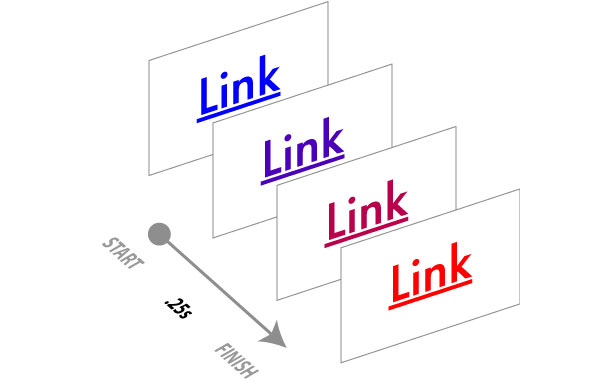
    Of course, we also want to transition back to the default link color, so we’ll add a transition to the :link (and probably :visited) pseudo-classes, with just a very brief delay (one-tenth of a second) before it fades:

    a:link, a:visited {
       color: blue;
       -webkit-transition: color .25s linear .1s;
       transition: color .25s linear .1s;
    }


    Adding Multiple Transitions

    Because a transition is a CSS property, if you add multiple instances of the transition property in the same rule, then the last one will override previous ones, rather than add to them. So in the following rule, the only transition would be the background color:

    a:hover {
      color: red;
      background-color: rgb(235,235,185);
      -webkit-transition: color .25s linear;
      transition: color .25s linear;
      transition: background-color .15s linear .1;
    }
    

    Multiple transitions are added as a comma-separated list in the same transition property definition:

    a:hover {
      color: red;
      background-color: rgb(235,235,185);
       -webkit-transition: color .25s linear, background-color .15s linear .1s;
      transition: color .25s linear, background-color .15s linear .1s;
     }
    

    This will create both a color and background-color transition.


    What Can Be Transitioned?

    Almost any CSS property that has a color, length or position component, including many of the new CSS 3 properties, can be given a transition. One notable exception seems to be box-shadow.

    Straight from the W3C’s Transitions spec, here is a list of CSS properties that can be given a transition, along with the aspects that are transformed. I’ve highlighted a few of the more useful properties.

    CSS Property

    What Changes

    background-color

    Color

    background-image

    Only gradients

    background-position

    Percentage, length

    border-bottom-color

    Color

    border-bottom-width

    Length

    border-color

    Color

    border-left-color

    Color

    border-left-width

    Length

    border-right-color

    Color

    border-right-width

    Length

    border-spacing

    Length

    border-top-color

    Color

    border-top-width

    Length

    border-width

    Length

    bottom

    Length, percentage

    color

    Color

    crop

    Rectangle

    font-size

    Length, percentage

    font-weight

    Number

    grid-*

    Various

    height

    Length, percentage

    left

    Length, percentage

    letter-spacing

    Length

    line-height

    Number, length, percentage

    margin-bottom

    Length

    margin-left

    Length

    margin-right

    Length

    margin-top

    Length

    max-height

    Length, percentage

    max-width

    Length, percentage

    min-height

    Length, percentage

    min-width

    Length, percentage

    opacity

    Number

    outline-color

    Color

    outline-offset

    Integer

    outline-width

    Length

    padding-bottom

    Length

    padding-left

    Length

    padding-right

    Length

    padding-top

    Length

    right

    Length, percentage

    text-indent

    Length, percentage

    text-shadow

    Shadow

    top

    Length, percentage

    vertical-align

    Keywords, length, percentage

    visibility

    Visibility

    width

    Length, percentage

    word-spacing

    Length, percentage

    z-index

    Integer

    zoom

    Number


    Transition Timing and Delay

    With transitions, you can vary the count rate, counting slower at the beginning and speeding up at the end, vice versa, or anything in between. CSS transitions come with five keywords for transition timing and allow you to specify values for your own timing curve.

    Name

    How It Works

    cubic-bezier(x1, y1, x2, y2)

    X and Y values are between 0 and 1 to define the shape of a bezier curve used for the timing function.

    linear

    Constant speed

    ease

    Gradual slowdown

    ease-in

    Speed up

    ease-out

    Slow down

    ease-in-out

    Speed up and then slow down


    A Universal Transition?

    Transitions will quickly become standard operating procedure for all websites, enhancing user interface feedback.

    To add ubiquitious transitions across your entire website, one option is to add a transition to the universal selector, similar to a CSS reset. This applies a default transition to all elements on the page, allowing you to keep a consistent transition:

    *:link, *:visited, *:hover, *:active, *:focus {
       -webkit-transition:
         color .25s linear,
          background-color .25s linear,
         border-color .25s linear;
       transition:
         color .25s linear,
         background-color .25s linear,
         border-color .25s linear;
    }
    

    One argument against a universal transition, and indeed against using the universal selector for CSS resets in general, is that applying a style to every element on the page may slow down page rendering. However, I’ve never found any evidence that this is the case. Anyone know different?


    Jason Cranford Teague is the author of more than 13 books on digital media, including Speaking In Styles: The Fundamentals of CSS for Web Designers. For more information on CSS and web typography, check out Jason’s new book, Fluid Web Typography. Follow Jason on Twitter: @jasonspeaking.


  • 61 Comments »

     
    #1
    Rahul - Web Guru
    January 18th, 2010 at 10:21 pm

    OMG… looking @ this, I can’t but just image what will CSS be able to do in the near future. This is simply superb.


    #2
    Design Informer
    January 18th, 2010 at 10:21 pm

    Great in-depth article. I like the list of things you can transform. Very useful.

    My personal ones are on hover, different border color, and also a text shadow on hover.


    #3
    designfollow
    January 18th, 2010 at 10:43 pm

    very useful, thank you very much my Friend


    #4
    Lam Nguyen - AEXT.NET
    January 18th, 2010 at 10:58 pm

    Great article about CSS. I found it useful for anyone who want to make up the HTML document sexier and more attractive. Thanks for this useful stuff.


    #5
    Cubanoid Designs
    January 18th, 2010 at 11:06 pm

    Very well explained.
    Thnks.


    #6
    saurabh shah
    January 18th, 2010 at 11:18 pm

    I have to try it our now… its awesome …


    #7
    BigM75
    January 19th, 2010 at 12:49 am

    das ist so cool


    #8
    Kevin Zurawel
    January 19th, 2010 at 1:28 am

    This is some really useful information. I can’t wait for browser engines outside of Webkit to pick up support for transitions, because then I could have CSS-only solutions for the majority of things I do now with jQuery.


    #9
    Lee Nelson
    January 19th, 2010 at 1:35 am

    Good info, but I’m viewing this on a Mac w/Safari (version 4.0.4, OSX 10.5.8) and your second example; Drop Down Menus isn’t working.


    #10
    Jason Cranford Teague
    January 19th, 2010 at 7:03 am

    There was a problem when the article got updated to fix a link, but the issue has been resolved now and everything should be working hunky-dory.


    #11
    Website Design Maidstone
    January 19th, 2010 at 1:38 am

    Just imagine how cool everyhting will be in another year or 2 when the populace catches up!


    #12
    JP
    January 19th, 2010 at 2:28 am

    Cant wait till the tool box just opens up comepletly


    #13
    h1brd
    January 19th, 2010 at 3:00 am

    Pretty nice article. Good to add some nice CSS effects, the link fade transition is especially simple and pretty effective in a visual way. Awesome!


    #14
    Jonath Lee
    January 19th, 2010 at 3:13 am

    Finally, transition with just simple pure CSS. It here, wish all other browsers would support it….especially *ahem *ahem….IE8 and 9.


    #15
    DesignLovr
    January 19th, 2010 at 4:25 am

    IE9 is going to support css transitions (that’s what microsoft says now at least).

    I think CSS3 transitions are a great thing and will allow web designer to use pure html/css in even more situations, but I think we have to be careful what css and html are becoming!


    #16
    KayroseDesign
    January 19th, 2010 at 4:22 am

    I’m liking the new transitions in CSS, however i hope that CSS won’t make jQuery effects obsolete. Obviously not yet but in the near future :)


    #17
    Jordan Walker
    January 19th, 2010 at 5:30 am

    A very well put article.


    #18
    Jay
    January 19th, 2010 at 6:24 am

    These will be fantastic once we can actually use them. Once again iE ruins everyones fun. For now, jQuery does handle all of these effects. I guess an alternative would be to have it done in jQuery for iE only and CSS3 in modern browsers, but that would get a bit counter-productive :]


    #19
    Laura
    January 19th, 2010 at 5:11 pm

    I think Jason tried to make the point of ONLY using CSS3 were functionality was not affected – the page should still work perfectly in browsers which don’t support CSS3. In other words, only using it for the extra “WOW” factor for those of us who use a decent browser. So I disagree with you that it would be counter-productive because it should not affect usability. Where this is important, by all means, use jQuery.


    #20
    DesignFellow
    January 19th, 2010 at 7:31 am

    Nice tricks with pure CSS.. Very useful.. Thanks :)


    #21
    Alex Flueras
    January 19th, 2010 at 8:10 am

    Great stuff, this is future. Thanks for sharing.


    #22
    Arash
    January 19th, 2010 at 11:00 am

    Greate Article.
    Wish it has some demoes too,or may be some link to demo!


    #23
    haa@naanh
    January 19th, 2010 at 11:44 am

    not bad .


    #24
    Mr.MoOx
    January 19th, 2010 at 11:46 am

    You forgot Opera (10.5) and Mozilla (3.6)
    -moz-transition and -o-transition work !!


    #25
    Jason Cranford Teague
    January 19th, 2010 at 8:05 pm

    Thanks for that note! I was trying these out when I wrote this in december and running into difficulties. I’ll try again!


    #26
    Damir
    January 19th, 2010 at 1:25 pm

    You forgot to mention the 3D transitions on offer.

    I checked them out once but found them hard to grasp. Could you perhaps do a beginner’s guide or tutorial on them?


    #27
    dewa m widyakumara
    January 19th, 2010 at 1:39 pm

    you can also put the transition rule on the element’s normal state, giving the similar animation effect in reverse. eg:

    a { color: blue; -webkit-transition: color .25s linear; transition: color .25s linear; }
    a:hover { color: red; -webkit-transition: color .25s linear; transition: color .25s linear; }


    #28
    Milos Milikic
    January 19th, 2010 at 2:34 pm

    Cool article! Thanks!


    #29
    Jack
    January 19th, 2010 at 2:40 pm

    Nice one! Is this still browser dependant?


    #30
    Maverick
    January 19th, 2010 at 2:47 pm

    hey this is soooo coool

    thanks for the post.


    #31
    Johnny Soo
    January 19th, 2010 at 4:12 pm

    very useful, Thanks for sharing.


    #32
    jzane
    January 19th, 2010 at 5:01 pm

    Nice link color-transition infographic.


    #33
    Tim
    January 19th, 2010 at 5:08 pm

    Great article.
    I’ve been using CSS3 transitions for a while (I run a site where most visitors use Sarfari) but I’m still looking for a solution to filter these styles so the CSS validates correctly.
    The best solution I’ve seen so far is to use jQuery to inject the CSS3 styles which simply fools the validator into not seeing the CSS3 and browser specific styles.
    Is there a better solution? I’m really hoping to find something like a CSS3 conditional comment or CSS hack to hide the CSS3 from the validator.
    Any ideas?
    Thanks,
    Tim.


    #34
    Tim
    January 19th, 2010 at 9:31 pm

    I forgot to add a link to a CSS3 rollover example I put together a while ago;
    http://www.freewayactions.com/test/css3-rollovers/
    Again, great if you are targeting a Mac (Safari, Chrome) or iPhone audience.


    #35
    Inside the Webb
    January 19th, 2010 at 5:14 pm

    This is a really interesting article! Nobody really covers CSS this in-depth, but it’s exactly the quality of posting I’d expect on Web Designer Depot


    #36
    Laura
    January 19th, 2010 at 5:17 pm

    Wow I’m looking forward to CSS3 becoming standard. I think it’ll make so many websites run faster, no need for extra scripts to complete simple tasks.

    I agree that CSS3 should not affect functionality but be an addition to current standards. It should be the extra WOW factor, not something that could break the site in a none compliant browser.

    I loved the spaceman btw! =D Looking forward to giving some of this ago myself :)


    #37
    Noel Wiggins
    January 19th, 2010 at 5:24 pm

    I have been in love with css for a while now and love the flexibility of the design but I have to admit I miss the wow factor and agree that jquery doesn’t help with all the extra code you have to add and trouble shoot.

    I love the effect of the navigation and can’t wait to try it.

    Thanks and Regards

    Noel


    #38
    Alysia Robertson
    January 19th, 2010 at 6:28 pm

    Thanks for this article. This is awesome info. Very useful.


    #39
    Peach
    January 19th, 2010 at 6:42 pm

    Those are some new tricks I really wanna learn when I have some more time. Thanks for sharing.


    #40
    Darrell Estabrook
    January 19th, 2010 at 6:49 pm

    Neat, but I think it’s a mistake. The whole point of CSS was to separate structure from presentation, but this is mixing presentation with interaction. All three should remain independent. It might be cute to click and drag the astronaut in the example above, but when applying these interactions it in the real world, we will want to “do” something with it (i.e. update some data) and that will require an interaction layer (like Javascript).

    It’s a slippery slope…tread carefully, my friends!


    #41
    Jason Cranford Teague
    January 19th, 2010 at 8:14 pm

    I don’t think anyone is suggesting that we don’t need JavaScript, but why should we rely on Javascript to make changes to make dynamic style changes. They are still styles, they are just are changing over time rather than instantaneously. Right now, making these simple dynamic style changes requires more consideration than most designers are willing to give them if it means using Jquery some other dynamic framework. More importantly, CSS transitions takes the burdon off of Javascript to perform these simple tasks, allowing it to work on the more data intensive tasks, thus speeding the performance of the site.


    #42
    Nicole Foster
    January 19th, 2010 at 9:00 pm

    I don’t think it’s a mistake necessarily, but I agree with your point. Most coding languages are to separate structure from presentation.

    Nonetheless, I think it’s beneficial sometimes to mix those two together. Compared to using an image, you can save your loading time by adding a few lines of CSS. I say it’s worth it in certain circumstances.

    The one I thing I worry about is abusing CSS3. CSS3 is amazing in every way, but it will be overused, I know that for a fact.


    #43
    Alvaro Hernandorena
    January 19th, 2010 at 8:45 pm

    thank you


    #44
    Web4half
    January 19th, 2010 at 9:30 pm

    Superb resources. Thanks for sharing


    #45
    Smashing Share
    January 19th, 2010 at 9:30 pm

    Excellent article in detail. Very helpful. Thanks


    #46
    web design miami
    January 19th, 2010 at 9:37 pm

    wonderful ! well explained , thanks for sharing !


    #47
    Miguelito
    January 19th, 2010 at 11:43 pm

    The page gives me a JS error when loading which prevents me from seeing some of the examples using IE8. I have attached the error details below. Otherwise it’s a great article!

    Webpage error details

    User Agent: Mozilla/4.0 (compatible; MSIE 7.0; Windows NT 5.1; Trident/4.0; .NET CLR 1.1.4322; .NET CLR 1.0.3705; .NET CLR 2.0.50727; .NET CLR 3.0.04506.30; MS-RTC S; InfoPath.2; MS-RTC LM 8)
    Timestamp: Tue, 19 Jan 2010 20:40:03 UTC

    Message: ‘FB.Loader’ is null or not an object
    Line: 15
    Char: 1
    Code: 0
    URI: http://static.ak.fbcdn.net/connect.php/js/FB.Share


    #48
    Frederik Højlund
    January 20th, 2010 at 1:27 am

    Transitions are great. The welcome animation which appears the first time you open Safari 3+ is made using CSS transitions only and it really shows the potential of transitions: http://www.apple.com/safari/welcome (it only works using Safari 3+).


    #49
    kok aan huis
    January 20th, 2010 at 2:55 am

    very good article, thanks!


    #50
    riebelle
    January 20th, 2010 at 3:06 am

    Was just wondering if any one has tried this stuff in IE?


    #51
    David Mikucki
    January 20th, 2010 at 4:20 am

    IE8 makes example #1 look like a normal link hover, butchers example #2, and does absolutely nothing on example #3 (shows the image, no movement on click).

    …It’s really depressing…


    #52
    KayroseDesign
    January 20th, 2010 at 5:05 am

    We all feel your pain, on a good note, pretty much every government hates IE :)

     
    (Comments won't nest below this level)
     
    #53
    neer
    January 20th, 2010 at 3:37 pm

    it’s really nice info for a css developer and for designer as well.


    #54
    gh0st_preacher
    January 20th, 2010 at 11:48 pm

    I just viewed this in Firefox 3.5.7, and all of the examples seemed to work just fine. Maybe Firefox is all ready recognizing some of these?


    #55
    Adam Hermsdorfer
    January 25th, 2010 at 7:22 am

    These CSS3 transitions are solid! You are seeing transitions more prominently with normal UI interactions. It will be nice to apply them with CSS.


    #56
    Eisberg
    January 25th, 2010 at 12:43 pm

    Is this the new -Tag? I’m not keen on seeing it in action without a solid concept.


    #57
    Joe
    January 26th, 2010 at 6:21 pm

    I wish more brands would recognize the benefits of more native technology like CSS transitions instead of trying to shoehorn Flash into their websites. This is a great primer for designers and anyone looking to add some style to their site.


    #58
    Ste
    January 31st, 2010 at 6:00 pm

    Considering IE is one of the most used browsers, Microsoft aren’t half behind with the technology. They should either scrap IE altogether, or get their act together & implement these new features, along with a new rendering more consistent with Firefox, etc engine to save developers time on implementing cross browser compatibility.


    #59
    Nikhil
    February 1st, 2010 at 3:19 pm

    Wow thats really superb article and in very detailed.
    I just opened my code editor to try these out.
    Thanks for amazing info.


    #60
    David Ingledow
    February 10th, 2010 at 4:56 pm

    Going to use these tips to fade the colour of the links on my page.

    Another great post!


    #61
    Jason CranfordTeague
    February 10th, 2010 at 9:51 pm

    I recently relaunched my personal Web site (www.JasonSpeaking.com), incorporating CCS3 transitions, including links, form fields, and buttons. I also added a transition effect to the body tag, to create a simple fade up effect to the pages.

    Let me know what you think.

     
    Name (required)

    E-mail (required - never shown publicly)

    Web-site

    Your Comment (smaller size | larger size)

Home| Advertising| About| Contact

© 2010 All Rights Reserved