• 31 Aug


    thumbDo you browse the internet often? Are you amazed at how many internet web pages there are in the world today? Don’t you wish you could get a piece of that action?

    You’re probably thinking that in order to build an internet web page, you have to be some kind of computer genius. You probably think you have to go to college for at least one year to learn to make internet web pages.

    Well, that used to be true, but not anymore. I’m going to show you how you can create an internet web page today in just a matter of minutes — even if you’ve never been trained in any kind of electronic technology. That’s right — you don’t have to be a 1-year college graduate or any other kind of electronic genius.

    Just follow the step-by-step instructions described in this article, and you’ll have your very own internet web page for everyone to see.

    Create Your Internet Web Page File

    To create your first page, here’s what you should do: At the bottom of your computer screen, you should see a symbol that looks like the one shown below, on the right:
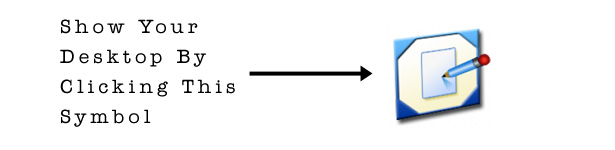
    Show Your Desktop

    That’s the “show desktop” button.

    (Important note: If, for some ungodly reason you’re using a computer called a “Macintosh Apple”, then you won’t see that button. In that case, you’ll have to ignore this entire tutorial, because there is no way to go through these steps on a Macintosh Apple. In other words, there is no way for you to create an internet web page.)

    After you click the “show desktop” button, you should see something similar to this:
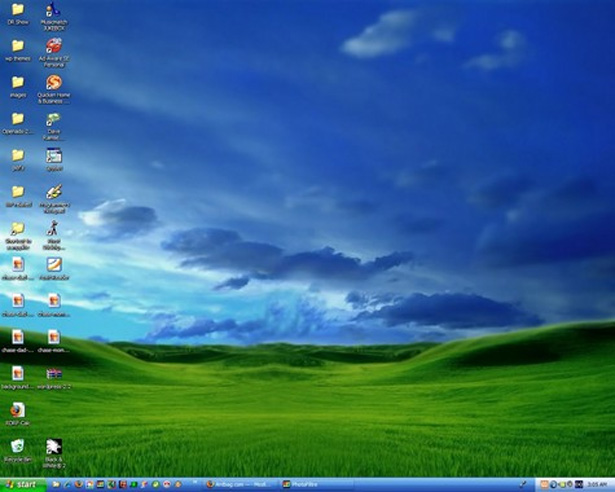
    Your Desktop

    On your desktop, move your mouse to a space that is not occupied by one of the graphic symbols (i.e. “icons”), then click the right button on your mouse (i.e. do a “right-click”). You should see a “menu” appear. In that menu, choose the “new” option, to make another menu appear. In that “new” menu, choose “Text Document”:
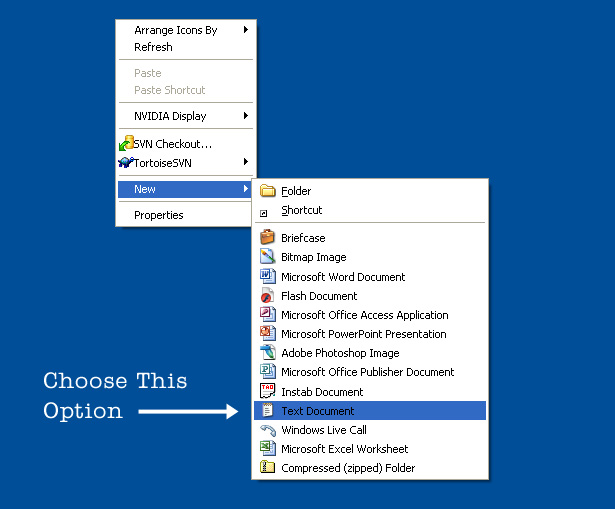
    Create a New Text Document

    This puts a new text file on your desktop, and you can name that file whatever you want. But hold on — this is not an official internet web page; it’s just a text document (also called a text file). In order to turn this file into an internet web page, you need to change the last three letters of the file name, and also give it your own custom name.

    So, select the file, right-click on it, then choose the “rename” option from the menu. Now type “internet-web-page.html” in place of the existing name. This is a cool name because people will immediately recognize it as an internet web page.

    (FUN FACT: The reason it needs the “html” at the end is so that it becomes an official internet web page. The letters “html” are the four consonants used in the name of the best internet website in the world: Hotmail. The people that own and run the internet chose the letters “html” because they wanted to pay tribute to this amazing and useful internet website that everyone uses.)


    Edit Your Internet Web Page

    Now that you’ve created an official internet web page, you want to add some things to it by editing your internet web page. To edit your internet web page, click the “start” button in the bottom left corner of your computer screen. Then choose the “Run” option, as shown in the image below:
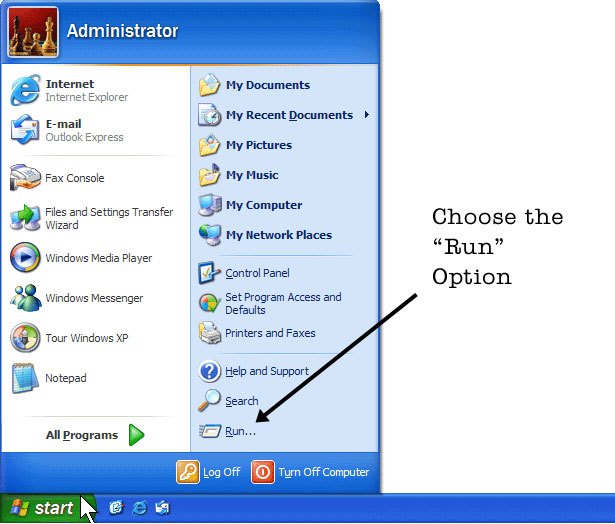
    Start -- Run

    Now the “Run” box should appear. In this box, type the word “notepad”, and then click “OK”:
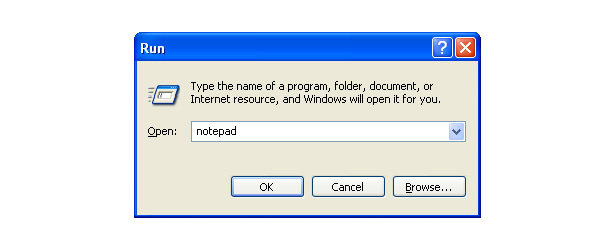
    Type Notepad in the Run Box

    This will automatically open a Windows computer software program called “Notepad”. It is exactly like a real-life notepad that you use to write grocery lists, except unlike a real-life notepad, this Notepad (notice the capital “N”) creates and edits internet web pages.
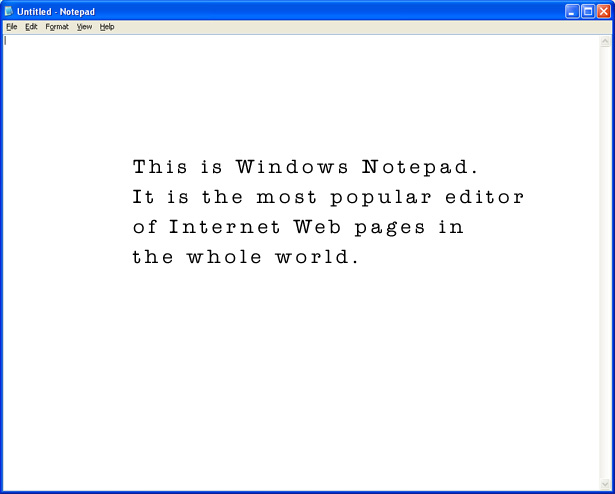
    Notepad

    Now that Notepad is open, you need to open your internet web page inside of Notepad. At the top of the Notepad window, choose “file” then choose “open”. Now just navigate to the location of your file, which is on the “desktop”. Select the file called “internet-web-page.html” and you should see the empty internet web page opened in Notepad.

    Now you’re ready to create the stuff that goes on your first internet web page!


    Add Some Stuff to Your Internet Web Page

    Unfortunately, creating an internet web page using “computer programming” is very hard. But there is an easy way for you to make your internet web page look fancy without learning anything about the hard computer programming stuff. In your empty web page, type the following exactly as shown:

    <PRE>
    </PRE>

    On the first line, you can see the word “PRE” inside of pointy brackets. Then on the next line you again see the word “PRE” inside of pointy brackets, except this time there is a “slash” in front of the word “PRE”. You don’t have to know what that stuff means. All you have to do is put lots of words and pictures in between those “PRE” pointy-bracket things, and you don’t have to worry about any hard programming stuff.

    Here’s an example of something you might put inside of the “PRE” pointy bracket things:
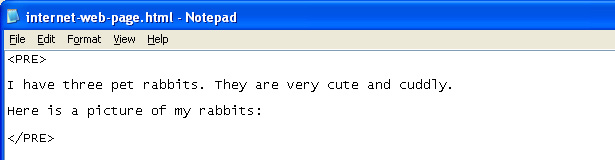
    Example rabbits

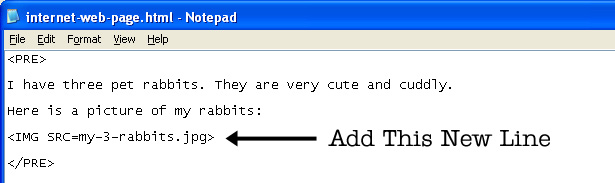
    It’s that easy! Now, since you’ve introduced your pet rabbits inside your internet web page, you also want to include an actual picture of your pet rabbits. If you have a picture of your pet rabbits, just put the picture file on your desktop next to your internet web page, then add the following line to your internet web page inside Notepad:
    Add a new line

    Don’t worry about what that line means. You don’t have to understand it. All you have to know is that now that you’ve put that line inside your internet web page, your rabbits will appear for everyone to see. You just have to make sure that the picture of your rabbits on your desktop is called “my-3-rabbits.jpg”.


    Test Your Internet Web Page on the Internet

    Now it’s time to test your new internet web page. To test your internet web page, just do what you would normally do to connect to the internet: On your desktop, click on the image of the big blue “e”. That “e” stands for “Internet”, and it looks like this:
    The Big Blue e

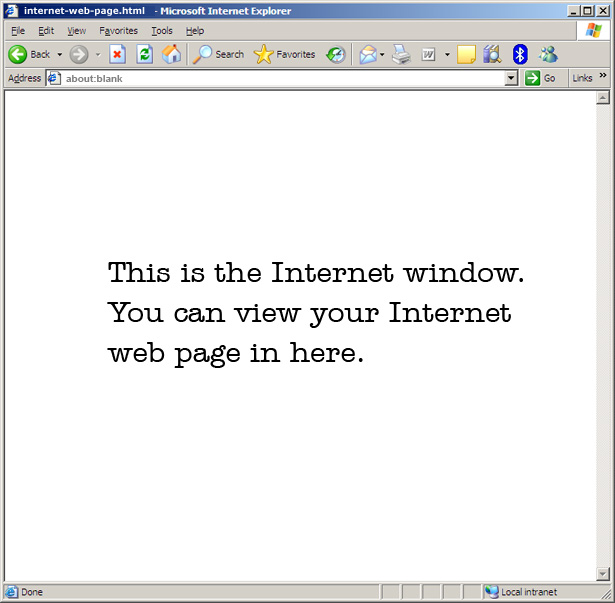
    After you click the big blue “e”, you’ll have to wait about one or two minutes for the internet to load. Once it loads, you will see the internet window. It should look like this:
    The Big Blue e

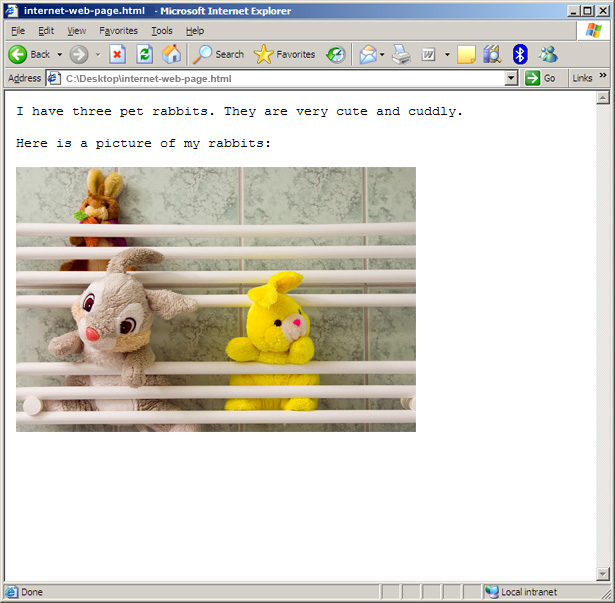
    To see your internet web page on the internet, all you have to do is open your internet web page using this internet window. At the top of the internet window you’ll see the word “File”. Click on that word, and it will open a menu. Inside that menu, choose the option “open”. Now, navigate to your desktop and select your internet web page, then click “OK”. Then your internet web page will load into the internet window. When your internet web page finishes loading, it will look like this:
    Your rabbits on the internet

    Presto! Like magic, your new internet web page is on the internet (and so are your rabbits)! It’s that easy.

    But there’s more stuff you can add to your internet web page. For example, you can create “hotlinks” to your favorite internet web sites like AOL and Hotmail. Go back to your Notepad window, and add the following lines:
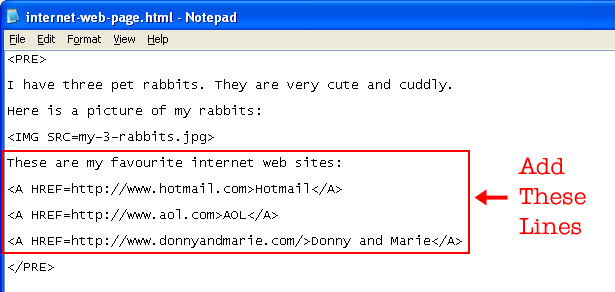
    Favourite Internet Web Sites

    These new lines are using a special secret code that creates “hotlinks” to other internet web pages. This code is called “A HREF”, and it’s pronounced “Eh, Harreff”.

    (IMPORTANT NOTE: You might be tempted to pronounce it “Eh, Aitch Ref”, but that’s not the correct way to say it. The correct way is “Eh, Harreff”. Just pretend you’re a person from Canada and you have a friend named “Harreff”. You might say something like: “Eh, Harreff, how boot that hockey game last night?”)


    View Your Changes in the Internet Window

    Now save the changes you made and go back to your internet window. Of course, you want to update the internet web page in the internet window so you can see the changes. To do this, press the key that says “F5″ on your keyboard.

    (FUN FACT: You can also update the page by clicking the green “recycle” button that appears near the top of the internet window.)

    This will update the internet web page, and it should look like this:
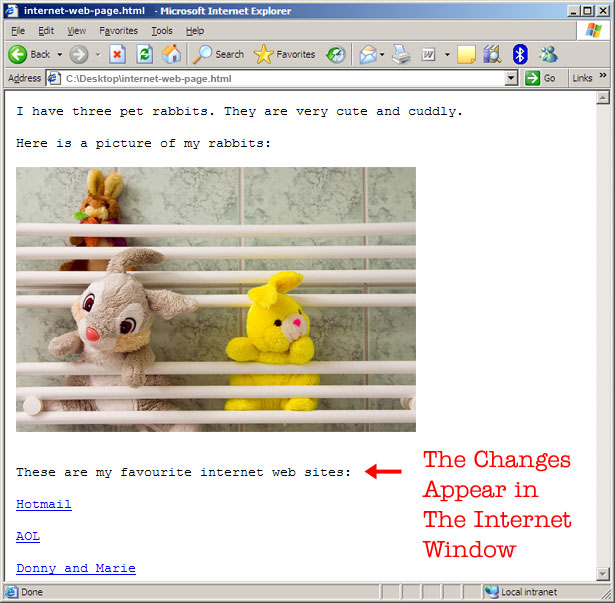
    Your Favourite Links

    Now your three favourite websites are listed on your internet web page, so others can visit them by clicking on the “hotlinks”.


    Email Your Internet Web Page to Your Friends

    Since your internet web page is complete, all that remains is that you share this internet web page with your friends. Then your friends will share it with their friends, and it will snowball. In a matter of months you could have as many as 35 people visit your internet web page. Here’s how you can get the “snowball” started:

    In the internet window, you’ll notice there is a white box called “Address”. The current “address” of your internet web page is “C:\Desktop\internet-web-page.html”. Put your mouse cursor inside that box, and select the entire address. Then, on your keyboard, push and hold down the “CTRL” button and then push the letter “C”. This will “copy” your internet web page address into your computer’s memory.

    Now go to www.hotmail.com in your internet window and log in to your Hotmail email account. If you don’t have a Hotmail email account, you can create one on this page.

    (IMPORTANT NOTE: If you currently don’t have a Hotmail email account, then you are a very very stupid person.)

    After you log in to your Hotmail email account, create a new email message and make it look like the message in the image below:
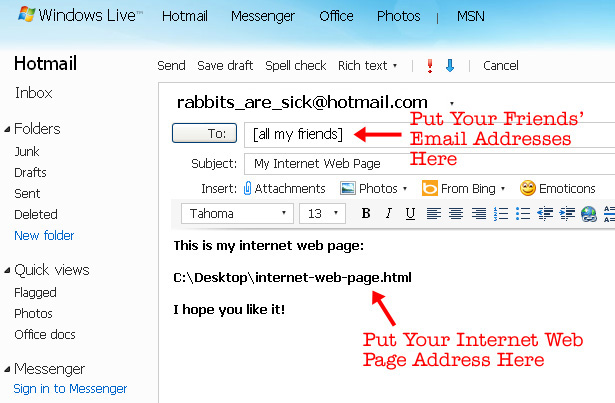
    New Email in Hotmail

    The only problem now is that your friends don’t have the internet web page and the picture of your three rabbits on their desktop. So you have to send it to them with the email. You can do this by clicking the “Attachments” button in the new email message. After you attach these two files, you can add an extra note in your email to tell your friends what to do with the attached files. Your email should now look like this:
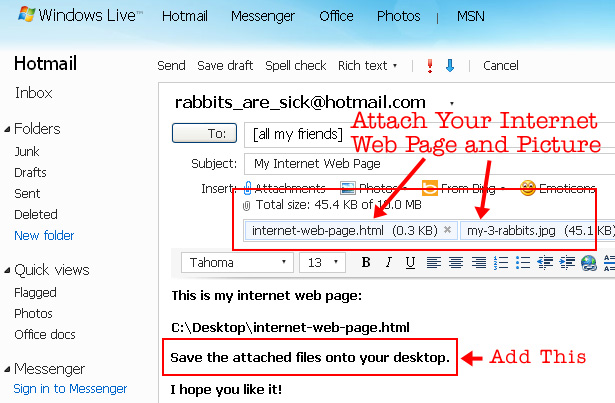
    Two Attachments

    Now just click “Send” and everyone who reads your email will be able to view your internet web page. Who knew internet web design was so easy?


    Final Tips and Reminders

    There are so many more things you can learn about internet web page creation, but I can only include so much of them here. While the most important tasks are described above, there are some other things you can do to improve any future internet web pages you make. Here are some things you might want to do extra research on:

    • If you want to create extra space between stuff on your internet web pages, you can use something called a “spacer GIF”, which is a transparent image that can be sized to any size you want
    • To create a grid for your internet web page, you can use special <TABLE> code with the “BORDER” set to “1″
    • To make search engines like Lycos and Alta Vista recognize your internet web page, you can include popular internet keywords like “Regis and Kathie Lee” or “Golden Girls” (or any other hot pop culture subject)
    • You can make your internet keywords invisible to humans but visible to the search engines by using white-colored text on a white-colored background (this would be useful, for example, if your internet web page is not about Golden Girls but you still want to cash in on their popularity)
    • There are objects called Applets that you can include on your internet web page, to make your internet web page look colorful and fancy
    • You can put a “hit counter” that looks like a speedometer on your internet web page, and this will tell you how many people have viewed it
    • Every time you change or update your internet web page, you can send an email to your friends to remind them to “press F5″ so they can see the changes in their internet window

    It has been fun revealing to you the secrets to creating an internet web page. Internet web design is not just reserved for computer geniuses anymore. Now anyone can make an internet web page and share it with the world!


    This post was written exclusively for Webdesigner Depot by Louis Lazaris, a freelance writer and web developer. Louis runs Impressive Webs where he posts articles and tutorials on web design. You can follow Louis on Twitter or get in touch with him through his website.

    Do you have any other tips for creating an internet web page? Share your comments below.


    • http://www.wearecupcake.com James Boyce

      DON’T TELL THEM ALL THE SECRETS!

    • http://icecoldwebdesign.comli.com brian

      This is the really old school way to create a website. Not very special

    • Anriëtte Combrink

      Yes, you wouldn’t be able to do this on a Mac, because firstly you would need a brain, and secondly, Mac provides iWeb to create much nicer webpages, and these nicer webpages actually resemble a standardised web page.

      No wonder the internet is full of such low quality, non-valid pages, look at what you are showing people, where the hell is the tag or the or even the tag?

      And to the author, Hotmail sucks, it’s terribly slow.

    • http://www.soulstyled.de Michl

      There are only four letters, that can describe this read:

      ROFL

    • arsen

      check out my web page! =)

      c:\desktop\internet-web-page.html

    • http://www.hazardawareness.co.uk PatrickHazard

      lol?

    • http://www.robertolage.com Roberto

      Advanced tutorial!

    • http://ondoordachtblog.nl/ Thomas

      Interesting read! Is there some way I can post the files online, so I can share my website on Twitter as well?

    • http://www.andywhitehead.com Andy Whitehead

      Tremendous

    • http://twitter.com/fakeSystem fakeSystem

      I like it ;)

    • http://hollisbartlett.com Hollis

      lolwut

    • Alexandre D’

      Very good! I missed some =P

    • http://www.designmango.com Designmango

      really?

    • http://semmu.net Semmu

      aprils fool or what? an article like this on designer depot. very awful…

      i think who browse this site knows how to make a webpage. and not with notepad, and not publishing with email. its a bad start for newbies… and the worst article here.

    • pesho

      nice tutor 4 beginner
      lol ^-^

    • Jimmie Lin

      Please also note that you should always use the big blue E to view the internet. The blue globe with a weird, orange creature on it will burn your computer, and never click that Pokemon Ball because it will fill your computer with Pikachus.

      You shouldn’t trust that thing called “Internet Explorer 8″ either. It will make your Web Page look very strange and it will also break the internet like the big globe and the Pokeball.

      :)

    • Marcel

      Made my day! xD

    • http://twitter.com/savthecoder SavTheCoder

      back to basics eh?

    • http://cenix.co.uk/blog/ Daniel

      I was in tears all the way through this! Genius stuff. Though I have to admit some of the tears were from the massive amounts of TRUTH underlying this article. Was there something specific that prompted you to write this? Or just this entire… phenomenon in general?

    • http://www.daylerees.com Dayle Rees

      LOL.

      I worry that HTML5′s ‘anything goes’ approach to mark up will take us back this way!

      Great show :)

    • http://www.skix.pl SkiX

      hahahah best tutorial ever!!

    • http://azabani.com/ Delan Azabani

      Oh… wow.

    • http://www.mysweetdesign.com Mike

      You forgot you can even make the words blink with something called a ‘blink tag’

      Wow

      Great for catching catching viewers eyes.

    • Jeremy

      I bet you copied this tutorial from Microsoft’s website! ;-)

    • http://www.ehhwhat.co.uk Ben

      Interesting stuff, a real eye opener lol

    • http://www.kumailht.com/ kht

      I don’t have a rabbit picture, can I use any picture for my super-epic-internet-page or does it have to be a rabbit?

    • Lukhasz

      That’s the ultimate tutorial!

    • http://flavor-of-success.com Edward

      Is this tutorial really suitable on the webdesign blog? Is this a 1st April joke?

    • http://www.afdeling18.dk Søren Sprogø

      ROFL!
      Just had a flash back to 1999 :-)

      Here’s an additional tip: Use something called MS Frontpage. It has some neat hover effects on buttons, and even a hit counter!

    • sn

      in this post: humor for people over 30 ;)

    • http://legilimenssoph-.tumblr.com Soph-

      I really, really hope this is a joke…

    • revive

      Is this April 1st?? This has got to be an April fools joke!! Seriously.. the posts on WDD are great.. with the exception of this one. First, the CAPS in the code examples is simply bad teaching,..Second, sending a ‘web page’ to someone with a local link will only work IF they save it to that location using the same OS (won’t work for a recipient with Mac, etc. since there is no ‘Desktop’ location) Lastly, stating that anyone without a Hotmail account is a ‘very, very stupid person’.. is, in and of itself, an ignorant comment (this is coming from someone with multiple Hotmail accounts.. but making non-internet-savvy users feel bad about their use of the internet, or lack of use is counter-productive and speaks leagues of the immature nature of the writer.)

      WDD staff, do yourself a favor.. either school this writer, so they write something worth posting on your blog.. or can them. You’ll both be better off (you not having their writing on your blog, and them simply not writing!).
      Cheers

    • coxychap

      Mind-blowing tutorial about this World Wide Web thing, however I don’t have 3 rabbits – only a slightly smelly dog. Can I still create an Internet page as awesome as yours or will you do another tutorial for dog pages?

    • http://bounteo.us/ Rob

      I usually pronounce it “eh, [hissing sound which cannot be represented in text]“

    • http://semmu.net Semmu

      ohh, sorry. i didnt see the tags :D now i understand… :)

    • http://www.vagrantradio.com Jason

      I always wondered how this was done, now i can share my kitteh photos with the internets and make those wonderful spinning icons all over the page.

      Great article!

    • http://www.geekandhype.com Joffrey

      Thanks for sharing!
      Check my first try: C:\Desktop\facebook.html

    • http://www.francescociabatta.it Francesco Ciabatta

      LOL, It’s fantastic! :D

    • Deirdre

      (Important note: If, for some ungodly reason you’re using a computer called a “Macintosh Apple”, then you won’t see that button. In that case, you’ll have to ignore this entire tutorial, because there is no way to go through these steps on a Macintosh Apple. In other words, there is no way for you to create an internet web page.)

      The above is a lie and if you don’t know how to create a web page on a mac it doesn’t say much for your skills :)

    • Klaus

      That is to complicated. Aren’t there easier ways to get an Internet Web Page?

    • http://www.web-designmiltonkeynes.co.uk/ Website design bedfordshire

      Nice post………..with lots of info…………..I will definitely bookmark your site for future reference!!!!!!!!

    • I. van der Wiel

      Priceless :D

    • Stu Green

      I can’t believe I nearly fell for this until I saw the category… very funny indeed. :-)

    • http://www.freshness.hu freshness

      HAHA :D

    • Chris

      I can’t see the point of this story. It’s neither funny nor helpful. Besides that it’s not even accurate.

    • http://laroouse.com piyanistill

      very very usefull article thanks a lot

    • http://jamesduncombe.com James

      Ahh!! So that’s how it’s done!

      Cheers ;-)

    • Arto

      Ermm lol?

    • http://www.wattscreative.me wattscreative

      Wow!

      Fantastic article, I’m an internet professional and have over 7 years experience within the industry but this article shows that I’ve still got a lot to learn!

      Can’t wait to start looking further into applets! They sound like the future for sure!

      P.S. Excuse my inexperience and I know everyone has a different opinion but you don’t have to use a border of ’1′ for your table. Personally I prefer to use a border of ’10′ pixels for maximum impact!

    • Janko

      Tank you! I have create my first webpage with your help!!
      Can you write more lke this?

    • Paul

      Cool! Just the right article to send to some of my clients!

    • Alex Kilian

      Haha, awesome…
      15 years ago i might have mistaken this for a serious post :D
      but you forgot to show how to make frames and post a lot of animated gifs onto the page!

    • http://www.jonathanpthomas.com Jonathan Thomas

      What?

    • http://lekevicius.com Jonas

      I love this! Thanks to this tutorial, I might be able to make Internet Web Page myself!

      Oh, wait. No. I use that… Macintosh Apple or something. damn.

    • http://www.fishboneproductions.com/blog/item/1-30-free-high-quality-social-bookmarking-icon-sets.html Micah

      That was too hilarious! Brings back a lot of memories of the old school “tutorials” on creating web pages in the mid to late 90′s.

      Hope Lycos and Alta Vista index this page, lol!

    • http://krike.cmstutorials.org krike

      the sarcasme :D nice post. I already thought the title was weird

    • http://www.blogtycoon.net/ Chip

      What’s that operating system you’ve got in that screenshot? Is that XP? I made the jump from Windows 98 to Windows Millennium and I’m really glad I did.

      Can I build a web page using your tutorial on Windows ME? And should I upgrade from IE 5.5 to IE 6.0?

      Back to 2010, it was a very refreshing article which reminded me of my early web design work, thank you.

    • Daniel

      LOL, Fantastic

    • http://www.bigdotmedia.co.uk James

      This article is very informative and will revolutionize the way people make internet web pages.

      I did not know that the internet web page official extension was created in tribute of hotmail, they really lucked out that it could also stand for HyperText Markup Language.

      It is sad that there is no way to make an internet web page on a “Macintosh Apple”, they should really look in to this on their next update.

      Thank you for many chuckles!

      James

    • http://www.evolutiondynamics.com David Adorno

      Holy crap, someone invented a time machine and took us back to the 90′s! AHHHH! I need to buy stock and sell before the internet bubble bursts!

    • http://interactivestudios.blogspot.com Paul S

      This is awesome! I’ve got to try this. I’ve always wanted to have my own Internet Web Page!

      Please go to my page on: C:\Desktop\internet-web-page.html

      I found this great visitor counter with an alarm clock like digital display! It’s awesome!

    • http://www.embed-design.com/ Oliver

      Ummmm….

      OK! :P

    • http://www.icedeb.com.br Icedeb

      WTF!! HTML = Hotmail??? :O How? Why? Nooooooo It can’t be!! D:

    • hollsk

      I want those 60 seconds of my life back.

    • http://www.thegooddesigns.com Mary

      Well this is just silly. Everyone knows that ‘e’ stands for ‘evil’.

    • David

      oh dear

    • http://simey.me Simon Goellner

      Really?
      I’m concerned this post will be picked up by google and ‘budding new designers’ (read: my grandad). And unleash a shedload of misinformed people on the world of internet web pages! :O

    • JT

      do I detect a hint of sarcasm?

    • http://twitter.com/z0r z0r

      Uhm.. I dont get it, wrong techniques, Windows propaganda, hit counter.. What’s next – picture of dancing Bill Gates?

    • http://www.corydbrown.org Cory

      If you’re currently using Hotmail, then you are a very, very stupid person!

    • http://taprootstudios.com cielo

      I always make sure to use the largest photo possible when building a web page. Who knows what all those numbers mean anyway? Better safe than sorry!

      lol awesome!

    • http://www.underworldmagazines.com julio

      I hate the E browser. I tell you the E doesn’t stand for easy to code, Maybe it stands for evil.

    • http://www.designcrumbs.com jake

      Is this in HTML5?

    • http://www.alexandrupitea.ro Alexandru Pitea

      …seriously?

    • http://www.theprofitchef.com J. Warren Elias

      Wowsers! This is an action packed lesson and I thank you for it.
      For your next one, can you show how they make the images move on some of the more popular internet pages? This one looks particularly difficult, but I’m sure its worth the work!

    • http://brettjankord.com Brett

      Haha, reading this was like traveling back in a time machine, lol.

    • http://www.michael-smedley.co.uk Mike Smedley

      Great tutorial – how do I get text to move from left to right though? It looks like a kind of marquee effect…

    • john doe

      WTF ?!

    • http://www.peexl.com Tim

      WTF? Is this a joke?

    • Russ

      Excellent!

      I’ve been looking for the best way to start building web pages as all the other books I have read are so difficult to read.

      I’m going to try this later.

      Thanks so much.

    • http://twoseventydesign.com twoseventy

      Thank you so much for this tutorial! It was very helpful. I can’t wait to share my Internet web page with you guys! Keep up the good work!

    • http://www.webdesigner-michigan.com Kevin Mist

      This may be the longest smart assed blog post I have read this year.. nicely done

    • Unbeaten 49

      Please, can you make a less technical tutorial ? this is so hard to follow ;)

    • http://fernandomarcosdesign.com Fernando Marcos

      HAHAHA! You better state somewhere this is just a practical joke, or someone will definitely take it serious!
      I almost missed the “Humour” tag at the top and was getting ready to start the flaming.
      Awesome 80′s tutorial, especially the Alta Vista and Lycos part!

    • teebee

      There are so many things wrong with this article I would be ashamed to post it! This has got to be a spoof.

      When I got to the part that HTML is used as the extension for webpages because of the popularity of “Hotmail”?? I almost stopped reading right there!

      Also…how old is this article?! Popular search engines like “Lycos” and “Alta Vista”?? What happened to “Google” and “Bing”, have they fallen by the wayside?

      And (quoting now): include popular internet keywords like “Regis and Kathy Lee” or “Golden Girls” (or any other hot pop culture subject) … (this would be useful, for example, if your internet web page is not about Golden Girls but you still want to cash in on their popularity). Ya, this is a good practice…right?!

      Same some face! Either put a disclaimer at the top of this article or pull it!

    • http://madebyblaze.com Blaze Pollard

      Haha. This made my day.

    • http://thunemedia.no Torstein

      Hahaha, though strangely familiar to how I actually started to learn HTML in the first place (switch Notepad for Geocities ;P)

    • http://idsandclasses.tumblr.com Dusan

      Funny and depressing at the same time

    • http://www.thedesigngnome.com Max Luzuriaga

      When I was in 7th grade, my computer’s teacher tried to teach us a little html. Using only ‘s for structure and ‘s for styling. It was disgusting.

    • Ryan

      This probably seemed a lot funnier in someone’s head.

    • http://www.renesebastian.nl Rene Sebastian

      Is this a joke or something? Please, do not give people a reason to just start making websites with Notepad. And what’s the deal with “Notepad is the most popular editor of the world”. Uuuhm, yeah, maybe Notepad ++, but not Notepad.

      You guys often have really good articles, but this one? I hope it’s a joke…

    • Dominic

      A bit “basic” for the target audience of this site…don’t you think?

    • http://www.jc-designs.net/blog Jeremy Carlson

      Wait a second……what version of Notepad should I be using?? Also, can you explain how I might know if I have a Macintosh Apple or a Personal Computer?

      Thanks for explaining all that! I thought designing an Internet Web Page would be difficult. After this article, I believe I can start a business! I’ll just move my computer into the basement, and convert it into an office…

    • http://www.tombradshawdesign.co.uk Tom Bradshaw

      spacer gif! off course it’s so simple!

    • Sean

      Frickin Genius

    • http://www.tim-online.nl Marien

      Lolll, this makes my day ;)

      brilliant m8 !!!! This is some good stuff !!!

    • http://www.webdesign-podcast.de Pascal

      HTML = Hotmail – okay, allright – i need a hotmail account.

    • Eigil Hoeyrup

      And that’s how “Impressive Webs” was made…

    • Ben

      What the heck is this? Come on now. I know it’s humorous, and mildly funny, but there are those people out there who might find this and take it seriously. We don’t need anymore crap out there on the web then there already is. What if this link is found and passed on, especially because it comes from what I like to think as a reputable website. I’m only barely upset, but really guys, you should know better.

    • Chris McD

      This is brilliant.

    • http://peacock.st Wernah

      the only thing going against my train of thought that this is a joke is the drawn out execution that makes it not funny at all

    • http://www.eastdevonit.co.uk Dan

      Wow

      I never knew it was this easy to create an internet web page!

      I’m glad I don’t have one of those awful Macintosh Apple computers, otherwise I would not be able to create a page!!!

      One question though, I don’t have any rabbits, am I still allowed to make an official internet web page???

    • foxicek

      Almost choked myself before realizing it was in the “Funny, Humor” category.

    • http://www.spicydesign.ca Alex

      seriously?

    • http://www.xdee.net xDee

      nice joke :-) I love that he’s using Windows XP and Editor ^^

    • Comedy?

      This is a joke right? If not this is the ABSOLUTE WORST “first web page” tutorial ever.

      First of all, if someone is using a Mac they can use TextEdit (http://support.apple.com/kb/ht2523) to make your crappy page or get software such as Dreamweaver and make websites on any platform.

      Second, how is telling people (when you inserted the image) “Don’t worry about what that line means. You don’t have to understand it.” going to help them? How will they learn? How will they improve on this beautiful design? Also, no DOC, Head, or Body tags? Really? Just PRE?

      Third, doesn’t the “E” stand for Explorer? As in Internet Explorer…the name of the program being launched? If it stood for “Internet” don’t you think the icon would be an “I”?

      Fourth, you’re going to email it to everyone? You’re not going to show everyone how incredibly easy it is to upload it to a server? I can’t even say that’s a ’90s thing. That’s just ridiculous.

      Who OK’d this article?

    • http://mynameisjay.com Jay

      I CRINGED when I read “On your desktop, click on the image of the big blue “e”.”

      Good stuff ;p

    • http://www.davejanes.com Davinder376

      Oh my…

      But how could you snub the Apple Macintosh? I have a Motorola Starmax 3000 603e Mac clone overclocked to 180mhz running Apple Macintosh Operating System 7 and I can make Internet Web Pages in Simpletext and run it on Netscape Navigator. It doesn’t get any better than that!

      :)

    • knico

      This tutorial sucks. No burning rotating gifs, no midi files playing in the background? Go to geocities.com to see what cool and modern sites look like!!

    • arfmoo

      Wow, valuable advices you gave. Many thank yous! SXSW, here I come. I can be next Zeldman.

    • http://pixelcreate.co.uk Andy

      lol

    • http://www.info-mac.org Dan

      Thank you for teaching me to make an iNternet web page. I will go and make one now to test my learning skills.

    • http://www.antylope.com.ar Antylope

      wtf?? email you webpages to your friends?

      xtrange article

    • http://www.diallohudgins.com Diallo

      This is the greatest Tutorial EVER written! And on a real internet page!

    • Msk

      … irony?

    • http://espopmama.es eρHedro

      Man, this is the biggest revelation of the decade.
      You may even win something, for there are only a few months left and no one will discover any more important stuff.

    • Jack

      I hope Louis Lazaris paid Webdesigner Depot to put up such a poor and biased tutorial. Normally Webdesigner Depot has such great articles. It’s a shame he didn’t write how to get a free host, download a free template, change it to your content and upload it. It would be more useful than this.

    • http://www.truenorthe.com Courtney

      Eh Harref! Wow, how things have changed over time.

    • http://www.engiguide.com engiguide

      really awesome post …

      nic nic :)

    • Yongning Liang

      really nice tutorial for novice, LOL

    • John

      Is this post some kind of joke?

    • bazilio

      amazing! that’s what i searched for so long time!!!

      i’ll put it into my new cms right now… :lol:

    • Jeremy

      Yo dude, check the tags underneath the blog post title… ;-)

    • http://www.ktsart.com Kyle

      Thats how its done! Here I am doing it the long way…

    • http://www.webdesignerdepot.com Walter

      Alright guys, yes, for those of you that didn’t get it, this is supposed to be a funny post. It makes fun of some misconceptions people have and I’m glad that most of you got it. ;)

      Putting a disclaimer on top would have been killing the article from the start, so I decided not to, and let people work it out (even though you can see ‘funny’ and ‘humor’ in the categories right under the title).

      Life’s too serious, let’s have some fun ;)

    • botrait

      Now look at the top of the post in the tags of the post… funny, humour, web design

      Evidently not God’s gift to intelligence eh?

    • http://www.jacob-fox.com Jacob

      I dont know whats funnier, the article or all the comments of people who took it seriously

    • http://www.icanreadcanu.com icanreadcanu?

      Categories: Funny, Humor, Web Design

    • http://espopmama.es eρHedro

      I have to say that this seems to me a very anglosaxon thing: not understanding sarcasm at first sight and needing it to be framed somehow.
      Cultural differences exist, and they make life worth living!

    • Jen Smith

      I don’t know how people didn’t figure out that this was a joke after seeing “internet web page.” I mean, who seriously talks about the internet that way?

      Great article. I really brought me back to my early HTML days/middle school. :) Well done.

    • http://www.level2d.com Philip

      April fools is coming a little late this year. This has to be a joke.

    • http://www.coferadams.com Chase Adams

      Read the tags under the title of the post…and you will be enlightened. :)

    • SlowX

      The “blink” tag is great, AND easy to use.

      Sure beats the “animation” that those fancy, big-money Hollywood-types produce…

      (freakin’ Hollywood types…)

    • Andreas

      No, really?

    • http://www.truenorthe.com Courtney

      The funniest thing here are all the people who thought it was a real article! It’s also sad, though…

    • http://luissalvador.net Luís Salvador

      LOL ?

    • http://www.jc-designs.net/blog Jeremy Carlson

      Some of these comments are mind bottling! How could you seriously NOT know this was a joke? For the love of everything, he says AOL!!

      Anyone else shaking their head right now at a few of these that are actually correcting Louis?? A bunch of these comments actually make this more funny than it really is!

    • http://hollisbartlett.com Hollis

      You forgot a big part of putting up an Internet Web Page; promotion.

      1. Make awesome Internet Web Page
      2. Buy an ‘email list’, you can get these with over 3,000,000 doctors!
      3. Import your list into hotmail. I think it’s just a button or something.
      4. Email everyone on your list with your Internet Web Page.

      5. Profit!

    • Some Dude

      You need to look up the word “sarcasm”

    • http://sixrevisions.com Jacob Gube

      Great tutorial* but I’d like to point out some issues, Louis:

      1. You should have saved your Internet Web Page (IWP) using a .htm file extension.

      2. It would have been better to test your IWP live by uploading it to Geocities before emailing the URL (which is, in this case, C:\Desktop\internet-web-page.html).

      3. You should have put the text inside a tag.

      4. What about DHTML? No mention of the tag?

      5. Why didn’t you use MS Word instead of Notepad, for syntax highlighting? Or better yet, FrontPage. Using Notepad just seems old-school to me.

      Other than that, it all looks pretty solid.

      *Don’t take life so seriously.

    • http://m2ew.carbonmade.com m2ew

      Quick… Open Netscape! LOL

    • WebGuru

      amateur at best…plus who would build a website on pc to begin with… Love for the Apple.

    • http://lowgravity.pl kamil

      Now we know how come we have so big amount of terrible websites… they are made by all stupid guys above my comment which dont know what a “joke” or “sarcasm” is…

    • Amanda

      Not to mention, SEO…. what’s the point in having a website that no one is going to find or that will never be indexed by google because it does not comply with w3 standards and cross browser compatibility???

    • http://tojoshan.com.ar Tojoshan

      i can’t found this software called notepad on my new win 3.1. help me! :(

      good post!

    • http://www.sigaspot.com/ SiGa

      Will IE5.5 be fine for this? Or do I have to switch to IE6 to be up to date and have a modern website like you?

    • John

      How about a link to a place you can buy a sense of humour from?

    • http://www.whyte-art.com Martino Palladini

      Those were the days…

    • Nathan

      Nuts.

      My computer only came with two “w”s. How do I get the third?

    • http://www.mainattack.com Gabrielle Aizenberg

      HAHAHAHAHAHAHAHA!

    • http://bggopal.blogspot.com aka Balu

      Wow.. I never Thought Web design would be this much easy.. LOL.

    • http://www.cogocreative.co.uk COGO

      Lol, this is the funniest article I’ve read in ages.

      Just don’t let your parents see it, or before we know it, we’ll have dancing jesus home-pages.

    • http://www.petshopboxstudio.com Kuswanto

      To all Batman commenters, why so serious?!

      Laughing on Google Readers and then visiting the site to see the comments and more LOL at people who things this is a serious article.

      Best part is HTML as HOTMAIL… LOL I never though about that one. It now make sense who build the internet. Who made HOTMAIL and Canadians.

    • http://brianlucasart.com Brian Lucas

      But, I don’t have a picture of bunnies, only kittens and puppies. How do I get that image to show?
      I’ve been waiting for something like this! I will send to all my clients so they can design their sites, and I will go back to cleaning toilets at Lollapalooza.

    • Dan P

      Either Trolled, or great troll

    • http://jamesturpinweb.com James Turpin

      I suppose the people that own and run the internet were playing a lot of Counter Strike: Source when they thought of CSS?

    • Dan P

      this robot actually believes you.

    • Dan P

      As an added tip, you should put up some pictures of traffic cones, and include lines that say your page in UNDER CONSTRUCTION.

      never take them down. It lets people know you’re always trying to improve.

      Also:

      wow. To all the people thinking this was even close to serious, after reading the first few sentences, even. Wow.
      To the ones who are correcting the tutorial, pointing out how people ACTUALLY make webpages: you scare me the most. Because you don’t recognize this is so far gone its a joke. You scare me because your level cannot be far from this.

    • http://etomco.com Tom

      SEO at its finest

    • Dan P

      That foxfire thing is a virus. Never let your kids download it, no matter what they say. It’s porn, and a virus.

    • Marc

      Eye-opener! Do you do in-company training?

    • http://john.onolan.org JohnONolan

      The only thing funnier than this article is the number of comments by people who thought it was serious! Awesome. 8-)

    • http://www.cjblizzard.co.uk Chris

      WOW!!!

      Firstly, how can so many people not realise this is a joke? I didn’t see the categories but knew it was a joke. Pretty funny too.

      Secondly, if it was serious, then when people started making all these horrible websites, which no-one can see, or have to download the files for (once they’ve been e-mailed them) so there is actually nothing clogging up the actual web, and nothing for search engines to index. Surely once people realise that doing this isn’t enough, either you’ll get people working to make web design THAT simple (I see that as a good thing) or they’ll realise the VALUE OF HIRING A PRO.

      So joke or not it won’t harm the industry. But since it’s a joke, lighten up and laugh.

    • http://mearl.ca mike

      Ha Ha…Love it! Except you forgot to mention the best Internet Browser to view Internet Web Pages is Internet Explorer Version 6.

    • http://mimik.nu/ Mimik

      Finallly the power of the Internets reveald!

    • http://blog.rochelledancel.com Rochelle Dancel

      You know what, I think we take ourselves far too seriously sometimes, so this post is like a breath of fresh air, some much welcome comedy relief – cheers!

    • Mathew

      Can someone help me get this to run on my iPad? I hotmailed the files and it wouldn’t work, said files were too many. I dragged it all into iTunes and all the lingerie pictures went into my photos and the videos to my videos, but I can’t get it to show when I open the HTML page. Also, I can’t find that blue ‘e’ anywhere in the app store, I searched for internet exploder, blue e, and more.

      Help anyone? I want to replace all those daily girls apps Steve Jobs banned from the app store.

      Maybe apple has their own version of the blue ‘e’ like maybe iE or something? Anyone?

      Help please oh web markup language gurus, I need to demo at a client office tomorrow, wanted to show off my iPad with this app!

    • http://febriansyah.biz/ febri

      And don’t forget about that Pokemnon ball. That was horrible thing called “a browser”

    • Wafaa’

      Word. HTML5

    • http://www.SnowFoxCreations.com/ snowby

      I’m a little bit concerned that so many people appear to be taking this article seriously… ^^;

      To the author: I found it hilarious. It gives me flashbacks to those awful anime sites on Geocities. They had (usually) hilarious content, but the layout was like a sign of the Apocalypse…

    • http://gedankenkanister.de Steve

      Thx.. aahm but where can I find those things like notepad?

      My System: C64, Acoustic Coupler, Datasette

      I’ll become an Atari on my birthday next year.

      Cheers
      Steve

    • gabby

      If you didn’t know if was a joke from the title alone, I pity you.

    • Gonz

      Jajajajajaja

      Is this the 90′s ???

    • http://thequeenmom.com Kerri

      This is hilarious! :D

    • MacD

      Ha! Love it! Well done on the explanations. And I especially like how you didn’t bother with silly details like resizing photos or how to upload it to webspace. LOL Katz-speaking people everywhere will now only annoy their immediate friends with mindnumbingly boring oversize pictures of their fur kids.

      You have done the world a great service and I thank you.

    • http://www.nsitemedia.com Nordli

      any reader of this site should know that already….

    • http://www.siasan.com Siasan

      No, they were drinking Coffee and having a Sausage Snack

    • Brian

      Can you make a video tutorial please? This is too hard to follow along.

    • http://twitter.com/mike_ebert Mike Ebert

      This is hilarious! What’s even better is that people are STILL not getting it, even after Walter from WDD confirms it’s a joke in the comments!

      Notepad and Netscape Navigator ftw!

    • http://www.aboutadirk.com Dirk

      lmfao

      I fully agree with the people that mentioned the animated gifs (preferably either spinning 3D words or words/letters that are on fire) and midi files.

      Oh, and I just thought of something! Those animated gifs would make for LOVELY background images! You could have like a STARRY GLOWING BACKGROUND TO YOUR SITE!!!

      … and maybe there’s a way to… I dunno… maybe make text… blink? Or move horizontally?

      Geocities, Anglefire, how I miss thee.

      - Dirk

    • http://freesitemanger.webs.com/home.htm lucy

      no such thing exists

    • http://freesitemanger.webs.com/home.htm lucy

      i think you should make a follow up:

      what should be on a webpage or something like that.

    • tyler

      seriously! this should be hilarious to all people who are into web design.

    • http://www.0-to-60.com AJ Wilcox

      As an expert in the industry, I thought I should chime in. Lycos and Altavista are great to target to get the most search traffic, but it’s so hard to show up for terms like “Golden Girls” on them with all the competition. Consider more futuristic search engines to target such as Ask and Dogpile. Metacrawler is the absolute future! Consider repeating the words “Golden Girls” over and over behind images. Avoid superfluous programming such as CSS, and XHTML (ex-Hotmail) like they were the plague. Fantastic tutorial! I’ve already emailed 2 Internet web pages!

    • http://www.cozality.com Non-Profit Websites by Cozality

      Loving that ” “e” is for “internet” ” LOL!

    • http://www.ericgage.us Eric

      Something’s wrong, everyone I emailed my internet web page to said they couldn’t see it.

    • http://www.iamdann.com Dann

      yeah, some of my friends were talking about this program called “geocities” or something to make internet web pages, but this seems much easier. Thanks!

    • gabrioch

      JAJAJAAJAJAJAJAJAJA !!!!! the funniest comment!!!

    • gabrioch

      Is a Joke ….. check the tags

    • http://kver.ca Ken Vermette

      I’m 24. Can I still view the humor on this page or do I need to wait 6 years. I’m really confused.

    • http://www.mactsolutions.com Puge Teopengco

      Thank you very much for this great tutorial. Now I can quit my job and work as a freelance.

    • http://feathertail.dreamwidth.org Tachyon Feathertail

      Clearly, those of us who did not go to school for one year have no business creating Internet Web Pages. >.>

    • gabrioch

      The article was great!! but i laughed a lot more of the comments, specially those who took it seriously

    • wiseless

      Hope in the future they post an advanced tutorial where we can change the fonts. I’d love to have some stylish Comic Sans on my web pages.

    • Michael

      wtf? hilarious
      dont forget to upload it to geocities or angelfire

    • http://www.wezen.com.br Daniel

      Hahaha!
      And a colorful icon called Chrome. Can I trust it??

    • http://www.capitaldesign.ca Adam

      LOL – hands down, best article of the year.

    • http://bowdenweb.com/ J. Albert Bowden II

      d00d, don’t hate on notepad. it frickin’ rules! view source opening up in notepad? one of the few things IE ever did right. and by did i mean it’s no mas in IE8. or 7. idk, i only use those things for testing.
      notepad4life yo

    • Trendez

      Is this “September Fool” post?

    • http://www.fase.me Keel

      Haha, f**king love it.

    • loop

      i think it’s HTML5. yay sounds very hard.

    • http://jamescacchione.net James

      ahahahhaa I laughed so hard I cried. Dude this is classic! Love it =D

      Thanks for kicking off my Wednesday with a smile! ;]

    • ndimos

      OK now. That was a great joke. Where is the serious article we are waiting for?

    • http://www.kreatech.net Ejaz

      LOL

    • http://www.kreatech.net Ejaz

      Because he did not mail you, and you have not saved the attachments on your desktop

    • http://www.ashocka.com/ aShocka

      LOL, this is great :) funny how many people actually believe you. Keep up!

    • matt

      cool story bro

    • http://www.ehhwhat.co.uk Ben

      not sure if serious?

    • http://www.mysweetdesign.com Mike

      aaaahhh but do iWeb pages work in netscape navigator?

    • http://www.kynth.com Chris

      I shouldn’t have gotten into my Hot Tub Time Machine last night…

    • http://www.crearedesign.co.uk/ Jarkko Sibenberg

      It’s not just humor, it’s also a nice breeze of nostalgia. That’s pretty much how it was taught to us in school back then. At least for those who took the ‘advanced internets’ course. I like how you described all the must have software and sites.

    • http://www.CrossHare.com Matt

      Now I feel embarrassed that I still use tables quite often, and I still use notepad. I feel ashamed. Now I’m worried that everyone is going to view my source code and have a good laugh.

    • bill

      dude, seriously…
      that comment would be applicable 10-12 years ago. Nowdays the newbies already have macs, a facebook/twitter account and a pirate version of dreamweaver. The internet is so familiar to them that probably they understand it in a very different way than us the “veterans” who design since 2000 (I personally started on 2003) :p

      So, my point is… even the newbies get this article as a joke… and they don’t even need the tags “Funny, Humor, Web Design”.

    • http://www.flickr.com/photos/kaj-ivar/ kajivar

      I had soooo much fun reading this!! Love it so much :D

      Really great article lol

    • Pete

      I agree, but only just.
      He should have used notepad2, or notepad++, not just regular plain notepad.

    • Marlou

      Saw the title of this post on Smashing Network and I just knew it was gonna be something like this. It’s just epic xD Well done.

    • http://www.andysmiff.co.uk Andy Smiff

      This web design tutorial is excellent but I have one question…

      Can I not just use my fax machine to tell all of my friends and share my new website?

      Hahaha

    • http://www.mikesh.ch Mikesh Vulco

      haha… this really takes me back :)

    • Oli
    • http://www.shareyourride.net Daniel

      “Stay tuned for our next tutorial, where we show you how to use cutting edge technology like an animated ‘under construction’ gif, the tag and how to put a ‘best viewed in Netscape 3′ icon in your footer!”

    • http://www.hidroplaneband.com drdoc

      And in the beginning was the darkness…
      Thats right!
      Muhaha! Good day!

    • http://www.realworksinternet.com Paul Hudson

      To Get your Internet Website to the top of Google just do this:

      Find the words you want to rank for e.g. ‘britney spears doll’

      Enter this just after your first tag:

      meta name=”keyword” content=”britney spears doll,britney spears doll,britney spears doll,britney spears doll,britney spears doll,britney spears doll,britney spears doll,britney spears doll,britney spears doll,britney spears doll,britney spears doll,britney spears doll,britney spears doll,britney spears doll,britney spears doll,britney spears doll,britney spears doll,britney spears doll,britney spears doll,britney spears doll” /

      This trick is the only way Google knows that your site needs to be at the top for ‘britney spears doll’.

      It’s guaranteed!

    • dKen

      How about the 15 seconds it took to write that comment? It’s all adding up! Imagine what you could’ve achieved in that time.

    • http://takendesign.com TakeDesign

      Cruise ConTROLLED?

    • Julia

      start to love this website

    • Gede

      Thank you very much for this post. I finally manage to create an internet page.

      Could you also create a tutorial on how to create a backup of the internet?

    • Ray

      Darling. Firstly, look up “satire” before you comment on other people’s need for a brain. Secondly, you probably mean standards compliant web page, not “standardised” — subtle difference. Apropos standards: iWeb ? The WYSIWYG tool that gives each page its own CSS file and clutters them with useless crap like 0px declarations for all border sides? The upside of your Mac elitism is that you can at least run regex search/replace to clean up iWeb’s mess and use diff/merge to concatenate your hundreds of CSS files into one.

    • Jim

      Can someone email me the codez pl0x.

      Also, what’s the secret codez for facebook

    • John C.

      no, not seriously.

    • rms

      WTF is this? Unsubscribing from the RSS feed if this is the kind of 20 year old crap you’re going to publish now.

    • Mark Ridgway

      Can I use edlin for this awesome tutorial?

    • http://zdesignstudios.com JP

      PRICELESS!!!!!

    • Vincent K

      Shame it does not tell for which tube this one is! I have heared there are a lot out there!

    • http://k-win.fr kevin

      i think you’ll have to wait…

    • http://www.bobbyadamson.com/ BobbyAdamson

      What a genius response!

    • http://www.bobbyadamson.com/ BobbyAdamson

      NO YA DINGUS! IT’S A DESTROYWARE VYRUZ!

    • http://www.bobbyadamson.com/ BobbyAdamson

      Sorry buddy, only rabbits allowed on the internet :/

    • http://www.bobbyadamson.com/ BobbyAdamson

      Why would you think that? What a meanie…

    • http://www.bobbyadamson.com/ BobbyAdamson

      You obviously have to wait. If it makes you feel any better I’m 19 so I have to wait another 11 years.

    • http://www.bobbyadamson.com/ BobbyAdamson

      Haha I’m just glad the mods approved this comment.

    • http://www.bobbyadamson.com/ BobbyAdamson

      Really? I can’t believe it either…

    • http://www.bobbyadamson.com/ BobbyAdamson

      Yes.

    • http://www.bobbyadamson.com/ BobbyAdamson

      NO!!!

    • http://www.bobbyadamson.com/ BobbyAdamson

      You’re just mean you sound like you don’t know what you’re talking about

    • Federico Totti

      Can’t believe how many people are so stupid to take this for serious…

      I realized it was sarchasm at the mac line. Really no need to look at the tags to understand it’s humor…

      The sad thing is some of serious chriticisms seems to be from ppl in the field T_T

      (sorry for mistypes, my engllish still sucks)

    • http://www.bobbyadamson.com/ BobbyAdamson

      It blows my mind that some of these people don’t understand what this article is. Nice article though, for real. Super fun haha!

    • Federico Totti

      Agree! Any serious webdesigner has started on notepad. Starting from a white page with no hints gives you a rock solid base for coding.

    • http://www.mmcmsp.com Maria Manoela Porto

      Last official visit to this site! kkkk

    • http://erikkerr.com erik

      this article makes me never want to visit this site again…

      but whats even more amazing is reading the serious and thankful comments for this article.

      i feel like this one was all about SEO placement. (gag)
      such a shame…

    • http://erikkerr.com erik

      ok now i actually started reading the rest of the article and yes i get the sarcasm…but still amazed how there are some comments saying “great post! thanks for this!” etc etc. saaaaadddd.

    • http://www.khwebdesign.net Kent

      I’m afraid most of this went over my head. Isn’t there some kind of program that can make an internet web page for me, like FrontPage or something?

    • http://www.brazierwebdesign.co.uk Peter Brazier

      Haha i’m guessing this is where I show my clients to when they say “is that all it does? I could make that.”

    • http://www.brazierwebdesign.co.uk Peter Brazier

      it also worrys me how many people treat the OS of there Computer like a religion. At the end of the day there both Computers, Just depends what you make of them.

    • http://www.cssigniter.com Gerasimos

      Come on! This post is not complete!

      - Where’s the java applet with the lake reflection?
      - Where’s the clock? Dude! We need to know the time!
      - Rotating skulls? no?
      - Last but not least there’s no “Best viewed with” badge. Meh.

      And not a single mention on the active desktop feature and what people can do with it.

      @ “serious” ones: Get out more.

    • http://matthewkwilliams.com Matt Williams

      Dear Awesome tutorial author,

      My computer doesn’t look like yours, and I know it doesn’t have an apple on it.
      What do I do if my computer has a penguin on it?

      Please email me back quickly! This is of the utmost importance!!!!

    • http://www.noindustries.com DRocka

      This article may have some of the most amazing responses I’ve ever seen. You dopes (I’m sure you have no idea which ones you are) have made my day!

      I really didn’t think so many people would miss the boat. Maybe it’s an age thing? Honestly people, get with the program.

    • http://www.noindustries.com DRocka

      Oh, and is there some sort of way everyone can know how many people have visited my internet site? Some sort of cruddy number clicker graphic? Somebody should invent that.

    • http://www.kylepowers.com/ Kyle Powers

      Great tutorial! I never knew making Internet Web Pages could be so easy!

      I already mass-emailed my whole contact list (on hotmail of course, go HTML!).

      /sarcasm

    • olson
    • Ray

      Excellent points! Add “Optimized for IE5 and 1024×768″. Cutting edge. And it’ll make the 64.8% of your friends who’re still on 800×600 on Navigator *so* jealous.

      For Part II, I’d like to the DHTML covered. Screw this “X”-HTML-this and HTML-”5″-that crap the kids are playing with. “D” is where it’s at.

      GoLive makes it awesomely easy. Which reminds me.. brb (well, in ca. 17 hours), off to download it from KaZaa…

    • Ray

      The Internet couldn’t find what I was looking for :( 303 or something. Must be lots of oldskool hip hopperz who run the Internet.

    • Ray

      Totally agree! Still, here’s a patch:

      — peter 2010-09-02 00:18:55.689992000 +0200
      +++ ray 2010-09-02 00:19:42.667542400 +0200
      @@ -1,3 +1,3 @@
      -it also worrys me how many people treat the OS of there Computer
      -like a religion. At the end of the day there both Computers, Just
      +It also worries me how many people treat the OS of their computer
      +like a religion. At the end of the day they’re both computers, just
      depends what you make of them.

    • http://www.nathanpurcell.co.uk Nathan Purcell

      Absolutely hilarious!!

    • Jake

      Don’t be so stupid.

    • http://kver.ca Ken Vermette

      Hi Grand-mama! How are you?
      Good honey, still working on those internet web pages? Shouldn’t you get a real job? I know this wonderful man at the grocery store who will take you in if you ask politely.

    • http://inspirationfeed.com inspirationfeed

      Lol, nice tutorial!

    • http://www.news.com.au Ham

      Sense of humor required.

    • Chelsea

      Sheer and utter brilliance. The mind boggles!

    • http://gauravmishra.com Gaurav Mishra

      oxygen oxygen and lighter now!
      Laughter dose

    • http://www.berthold-barth.de Berthold

      Nah, it’s optional. I’m not even wearing any pants.

    • http://www.berthold-barth.de Berthold

      See ya! We’ll miss you!

    • http://www.mysweetdesign.com Mike

      Look at the tags people! Look at the tags!!!!

    • http://www.mysweetdesign.com Mike

      I think i’m going to kill myself

    • http://mojpokoj.pl Pawel

      just….lol

      where did you came from?

    • http://rolling-webdesign.com Theo

      Brilliant tut just what i was looking for… LOL !

    • http://www.datamouse.biz/ DataMouse

      Now I can start coding professional websites!
      Thanks for the pointers!
      ;)

    • Dima

      Rofl, I was skimming in Google Reader and at first just saw the images in the article. After like 7th or so image I went “wait… what?” and then read the actual article… hilarious (but a bit long eh?)

      Also I never thought of html => hotmail, I don’t think I’m going to be able to get it out of my head now, it’s like a tune stuck in my mind… thanks… lol

    • http://www.inpixelitrust.fr inpixelitrust

      I don’t know what’s the funniest : the article, or the people that took it seriously, maybe sarcasm is something very cultural (or maybe they just read the 3 firsts lines ?!)
      HTML for homtail, loved that one !!

      And I want to complaining too : where is the blink title ? How do you expect people to stay on the site if nothing is blinking ?!!

      I’m looking forward to see the next tutorial, hope we will learn how to make a repeated gif animated background and to add some music on the site, so that that rabbits can dance !!!

    • wtf

      I’m on my Mac.. wheres the RUN window?!!?!?11?1!

    • http://www.marcvonbrockdorff.com Marc von Brockdofff

      Hahaha, brilliant post. Though some of the comments are even funnier… some people have absolutely no sense of humor.

    • http://imperion.pl guci0

      Hahahaha!

      Long, long time ago ..
      I remind my past. Thanks!

      Paweł P.

      ====
      http://www.magiasukcesu.pl

    • Joseph Ducci

      This is false, its impossible to make web pages on anything besides Windows.

    • Joseph Ducci

      I think you are confused my friend…

      The “e” actually stands for electric… as in internet electric. I though that was self explanatory but I guess not, lol.

      Macs can’t make web pages… period.

      And lastly, there is obviously no better way to share a web page than to email it to my friends / parents.

      Props to Web Designer depot for helping me start my career – I’ll be underbidding everyone in craigslist in a few months, talk to you then!

    • http://sodevious.net Nicole Dominguez

      Some people took this too serious… It’s a joke guys! :)

    • Ido

      no more design articals to write?
      you might have just lost your status as my faved design site on the web

    • http://www.simonday.com Simon Day

      This needs a follow-up!!

      You need to show how to:

      - Have an animated flashing background
      - How to add a HUGE “under construction” graphic while you’re working on it.
      - How to add scrolling text
      - How to build 1 line of text inside 9,403,574 nested tables (Like us pro’s do!).
      - How to really colour-coordinate like pro’s.. you know… blue and green mashed together as an example

      Yeah, that sounds like a great plan!

    • http://www.wpcanyon.com Boba

      I thought it’s for evolved

    • Matt

      Does this mean, that I have to have a Mac to be a good designer?

    • Mark Ridgway

      Yes. HTML and CSS care what OS you are using.

    • Jake

      The shitty thing is I had a teacher that taught HTML this way only a year ago.

    • David

      Dear god! Your computer is possessed! Call the local priest and begin the operation to turning this devil penguin computer to Microsoft Windows! Stay strong, I’ll pray for you.

    • David

      Silly person. Mac’s are in-superior to Microsoft Windows. Also, if your computer crashes, it’s god’s way of telling you to switch from the devil Mac to Windows. If you want to stay with Mac, then run 25 miles and the ‘run’ window will appear; you musn’t stop!

    • http://www.chrismauck.com Chris Mauck

      I couldn’t bring myself to comment yesterday after reading all of the sarcastically challenged comments I sifted through.

      I digress, other than the email the page to publish the web page it all sounds very familiar to what old friends were learning in their mandatory web design classes in college only a few years back!!! Scary…

      Thanks for the smile!

    • B

      Thanks for the great instructions! I made an awesome internet web page. Let me know what you think of it: http://www.facebook.com

    • http://www.elisondesign.com.br elison

      Gone with the Wind …

    • Ian

      If you stopped reading after the Hotmail bit, how did you find out about the Lycos bit?

    • http://www.anton.ee antonhimself

      WOW! Main looks exactly the same! LOL

    • Mark Ridgway

      Don’t use a WYSIWYG editor.

    • http://mattredmond.com MattR

      So that’s what the Great Firewall of China is for? To keep the rabbits out?

      (http://www.youtube.com/watch?v=KHx_VXW-Xd8)

    • http://www.davidkendallwebdesign.co.uk DaveK

      I dont know whats funnier, the article, or the fact that some people on here think its for real.

    • http://legilimenssoph-.tumblr.com Soph-

      I’m 13 and I still think its funny…

    • http://dodgegroup.com David

      Yes, it’s called “Internet In A Box”

    • http://WorthwhileAdvertising.com Mike Mayfield

      FTW!

    • http://www.ravi.uxdsign.com Ravikumar V.

      it says “Sorry, we couldn’t find what you were looking for”

    • irumanisu

      I’m 12 years old and what is this?

    • http://www.kitfoxink.com Kit MacAllister

      This is hilarious. I almost knocked over my lamp while reading it.

    • ferdinand

      Wow! you made some people really look stupid. lol

    • http://Wwwwwww.dumb.com Dumb@ss

      Ungodly Mac? Lol this article is lame!

    • http://www.tylertermini.com Tyler Termini

      here’s a great example of the methods you’ve introduced:
      http://dokimos.org/ajff/

      (hilarious article, btw)

    • http://www.candiedfabrics.com/journal/ Candy from Candied Fabrics

      hil-freaking-larious!!!

    • http://www.alejandroperazzo.com Punta del Este Real Estate

      lol!!!

      notepad rules

    • http://www.holeycoww.co.uk holeycoww

      So THAT’S where I have been going wrong!

      Damn this MacBook Pro – you’re holding me back!!!

    • http://wp-performance.com Chris Olbekson

      Very funny!! Thank you for adding some much needed humor to my Labor Day that I have spent glued to my chair coding all day. GREAT!!

    • Darren Marr

      This is the bet tutorial ever! I’m tired of those HTML5 bull-crap.

    • Kerry

      After just logging on to your internet weblog I was suprised to find such a basic tutorial!

      With several years expereince as a webmaster I can also say that many of these techniques are now outdated also.

      Now that I know how low standards have fallen on this internet weblog I will be finding my internet web page building advice elsewere!

    • http://matthewkwilliams.com Matt Williams

      It’s a joke, son. (said in Foghorn Leghorn voice)

    • orangecaterpillar

      Can I use AOL instead of Hotmail? ;)

    • Yok

      It’d be much easier to do all your design in ms word!! You can use all formattings, images .. Then save all the stuff as webpage onto your desktop. It will be pixel-perfect! After that you can deploy it via email. Don’t forget the „… files“ directory!

      Here’s mine:

      C:\Desktop\new word document.doc.htm

    • smac

      jeahh, that the way my next internet side had to be ;) ))
      We need this tutorial, but where should i save it?
      I prefer C:/windows/sytem/driver and should i open my firewall to internet ? so evrybody could see it ? Please help me

      /ironic

    • smac

      you made my day
      thanks :D

    • http://codefisher.org/ Michael Buckley

      I am sorry but I had problem following the tutorial! Can you make it a bit simpler?

    • Ralph

      I’m totally grateful for this article–just what I needed. A friend of mine runs a major company, but unbelievably he doesn’t have a website! He offered me $10,000 to build him a site, except I had no idea how to do it!!! So I looked online, and the first thing I stumble on is your brilliant article. Thank you thank you! I’ve now signed a contact to do the site, and he’s paid $5000 in advance! The site is going great, too! I’ve managed to include LOTS of images, not just one. It’s so exciting! I am even working on a second page.

    • Ralph

      PS

      I’ve just decided to quit my job and do web design for a living. This is a brilliant gig! Eaaaaaasy money!

    • K Walker

      I couldn’t find ‘Notepad’ so I just wrote out the ‘HTML’ language on a normal paper notepad, took a picture of it and uploaded it to Twitpic.

      Hope this works or I’m going back to FortuneCity.

    • Chris

      Oh lord, no. Haha. Just say no.

    • Kevin

      If makes me laugh when commenters can’t differentiate between satire and legitimate writing. Ha, ha, ha, they’re so cute.

      Regardless, this article was funny.

    • http://www.youcansharethis.com Cathy

      This is brilliant and funny! ;o)

    • http://www.vibegraphics.co.uk Mandeep Samra

      I always make sure to use the largest photo possible when building a web page. Who knows what all those numbers mean anyway? Better safe than sorry!

    blog comments powered by Disqus

Home| Advertising| About| Contact

© 2012 All Rights Reserved