
• 2 Nov

    CNN’s New Website Design Deconstructed

    Usability, User Interface, Web Design

    Share

    Sponsored by: Click here to create FREE Flash Website!

    On Monday, October 26, CNN.com introduced a new website design, making a number of major changes to their information-heavy layout.

    The new design is beautiful, clean, organized and well-structured. It invites the eye to scan and find something interesting with the goal of clicking through to another page.

    The previous design was somewhat cluttered and not very inviting; the content looked liked it was being forced into an unstructured space. The new layout is very different and embraces a number of modern web design and usability best practices and trends.

    So, let’s look in more detail at not only the notable improvements, but some of the questionable design and usability decisions.
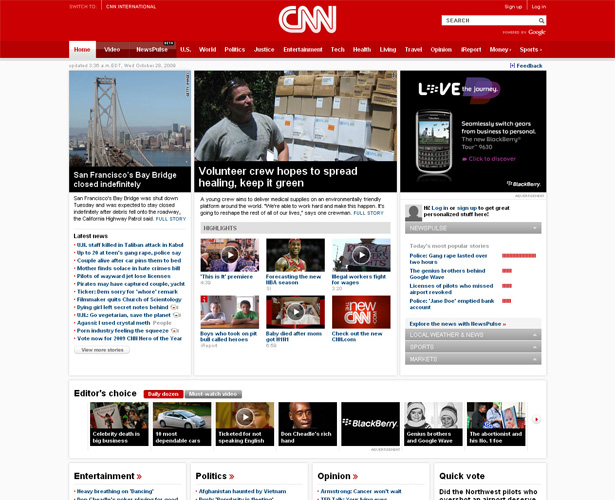
    CNN.com new home page


    Grid-Inspired Layout

    I’m using the phrase “grid-inspired” because the new design seems to be based on a grid, but the precision alignment of elements is not exactly there.

    Taking a cursory look at their primary stylesheet, they appear to have loosely based their style and grid on the Blueprint CSS framework.

    Their CSS reset bears many similarities to the Blueprint framework, and the word “blueprint” is included at the top, so this would be a logical assessment based on my own limited knowledge of Blueprint.

    After analyzing a screen capture of their home page, I’ve concluded that if they based the new layout on a grid, the specifics of that grid would be: 16 columns, 50px per column, with 12px gutters (the space between columns), totaling 980px in width.

    Below is a visual representation of my grid estimate, as a Photoshop mock up:
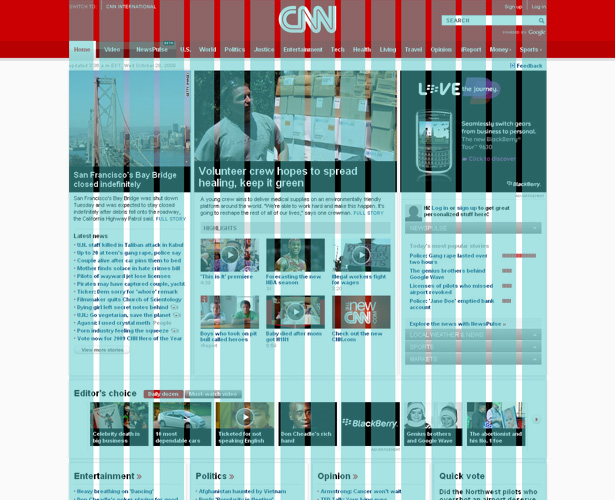
    CNN.com home page grid

    Even though the elements on the page do not follow the kind of alignment and balance that would customarily be expected of a grid layout, there is a noticeable improvement in this layout over the previous design, shown below:
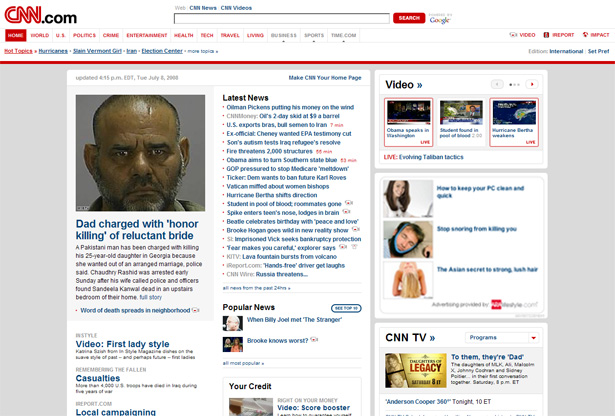
    CNN.com old design

    The new layout keeps all page elements inside the 980px-wide container — unlike the clunky-looking previous design that had a fluid-width header that spanned the entire page above a fixed-width content section.

    Also, while the old design couldn’t seem to decide between rounded corners and square, the new design consistently features square corners with subtle bevel effects separating appropriate elements, as shown in the image below.

    CNN.com beveled edges

    Although the format is grid-like, it is, as mentioned, not a strict grid format, and the sections below the fold stray quite a bit in structure from those above.


    Drastically Improved Header Section

    One of the most apparent improvements in the new design is the header section.

    The horizontal navigation bar is modern, clean, and clear. The search box, signup option and login link are in the top-right corner, where they should be.

    And, although it is not customary in modern design to center the site logo, in this case it works. It creates a very dominant, vivid, brand experience that is not easily forgotten.

    CNN.com header

    Another nice feature of the navigation bar is that it indicates by means of color and graphics which links are primary, which are secondary, and which will open in micro-sites or sister sites. The latter are indicated by right-pointing triangles (”Money” and “Sports” — more on this below).


    Effective Use of Space

    On the right-hand side of the page, below the primary ad unit, they’ve included an accordion-style content switcher, allowing the user to view previews, in a relatively small area, of content related to a number of different topics.
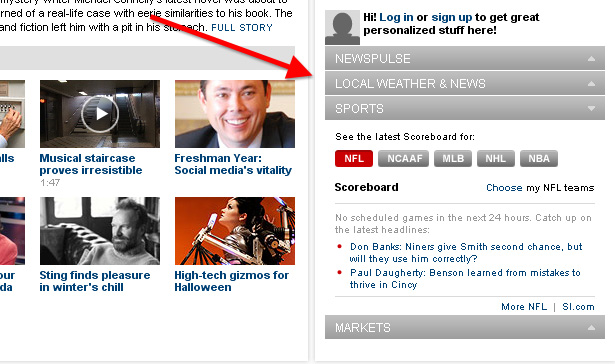
    CNN.com accordion content switcher


    Emphasis on Video & Story Popularity

    In the previous design, video had fairly strong emphasis, featured in a box on the right side. In the new design, video is a major category in the primary navigation bar, given virtually the same visual importance as the “Home” link.

    CNN.com video link

    Video stories are featured throughout the site, and are clearly indicated by the customary “play button” link on photos that link to video content, as shown below:
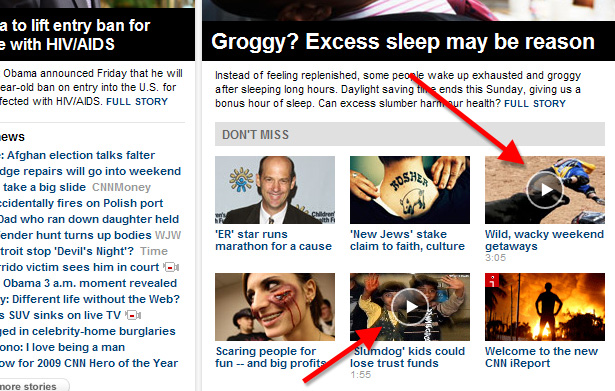
    CNN.com video button

    Another category given the same importance as “Home” and “Video”, as shown in the image above, is the “NewsPulse” section, which is new and still in beta.

    This section displays news stories by popularity (which seems to be calculated by total page views, not comments), and allows the reader to filter the results by category or story type.
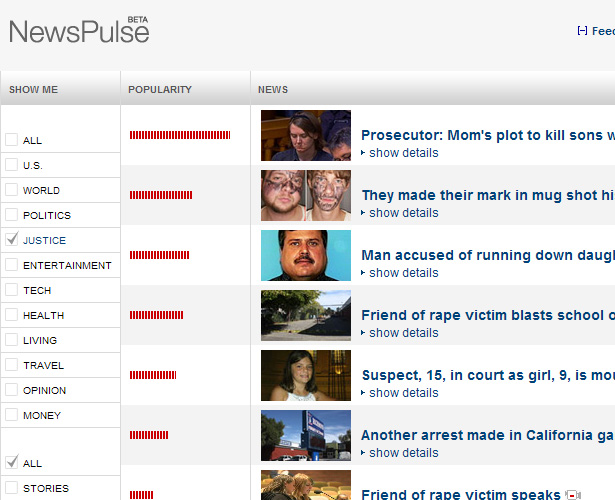
    CNN.com NewsPulse


    Strong Category Pages

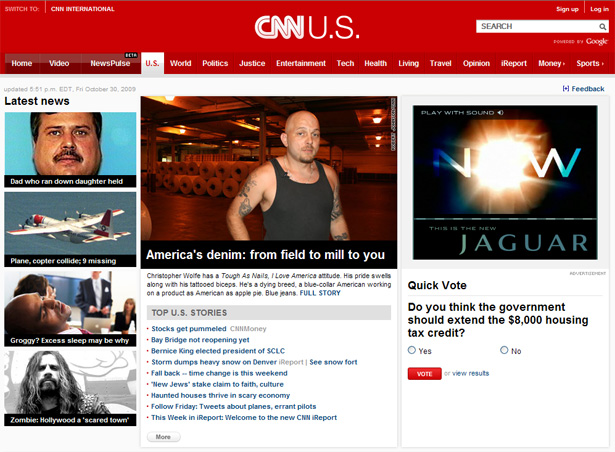
    The main category pages (”U.S.”, “World”, “Politics”, etc.), accessed from the primary navigation bar, work similarly to the home page.

    In fact, if you didn’t know what page you were on, you might think you were on the home page. The “U.S.” category is shown below:

    CNN.com category page

    Each of these sections conveniently displays top stories, latest news, and other items related to that category.

    The black and white captions below images, also featured on the home page and on article pages, are eye-catching and easy to read, without the use of overly-fancy graphics or font styles.


    Strong Article Pages

    The article pages, for the most part, maintain the vivid branding of the home page. Body text is nicely displayed in 14px Arial with a very readable line-height.

    Although some elements on the pages seem somewhat small, I personally like the way the font size of the article body stands out on the page, so the reader can stay focused on it.
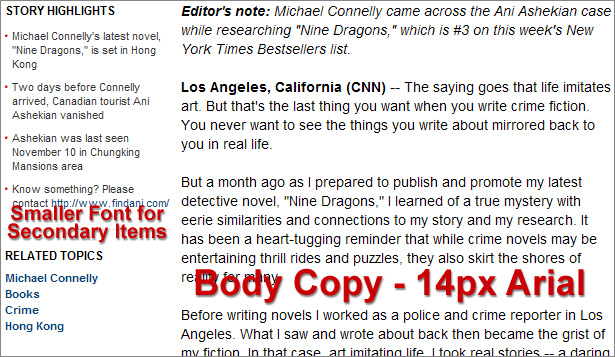
    CNN.com body copy

    Also, on the left side of each story, there is a section called “Story Highlights” that summarizes the current story in a few bulleted-list points. This shows that CNN’s designers are aware of the online tendency of users to “scan” lengthy material.


    Information Overload

    Of all the negative aspects of the new design, probably the first problem that is immediately evident is the overload of links and information on the home page — although it is more structured and organized, as discussed earlier.

    The home page is about two and a half screens long, and includes sections that duplicate items in the main navigation bar, with about a half dozen sub-links under each category. These sections appear below the fold and are shown in this image:
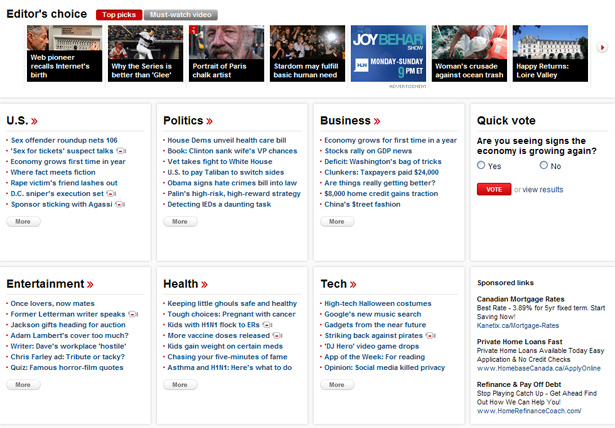
    CNN.com below the fold

    Since CNN is one of the most popular sites in the world (38 million unique visitors each month), these sections will receive considerable traffic in comparison to other sites, however, because they appear so far below the fold, and because there are so many links, the relative amount of traffic visiting those links through the home page would likely be quite low.


    Important Sections Buried?

    As pointed out above, a lot of information on the home page appears well below the fold. And, significantly, it appears that some important content is completely buried at the bottom of the home page, more than two full screens below the header.

    For example, a section entitled “Hot Topics” appears near the bottom, on the right side, just above some promos and ads.
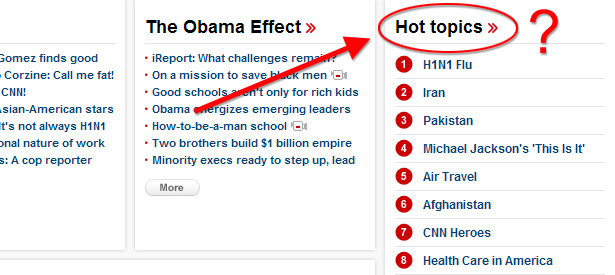
    CNN.com Hot Topics

    It seems to make more sense that this section would replace the accordion content switcher, or else be incorporated into the accordion.

    The ads and promos that appear below the “Hot Topics” also appear to be more important than their location reveals. Again, although such a high traffic website would receive many clicks on these areas, the click-through rate in comparison to the sections and ads above the fold would likely be drastically different.

    Of course, CNN’s producers know what content is most important, and they understand their users’ habits better than anyone else — but these layout and usability challenges are helpful to analyze should other developers face similar decisions.


    Usability Mysteries

    There are a few elements on the new site that may not be designed for optimal usability.

    One example is the right-pointing triangle that appears on each of the micro-site links. At first glance, I wasn’t sure what those triangles were for. They appear to indicate some sort of a JavaScript slider section that would pop up.

    Some users not paying full attention may even mistaken them for downward-pointing arrows that produce drop-down menus.

    CNN.com micro-site links

    Is there a better way to indicate a same-window micro-site link? I’m really not sure. Maybe something similar to the well-known Wikipedia icon would have sufficed — but then that would present the problem of users assuming that the links opened in a new window, which in this case is not true.

    The accordion content switcher, discussed earlier, also has a few usability problems. First, when JavaScript is disabled, the accordion is rendered useless and doesn’t display any content.

    It should expand by default to display all content, or else display one of the items. Also, the hyperlinked headers for the accordion sections should still link to their respective sections, but they don’t.

    Another problem with the accordion content is that, since the text it contains is so small, it is not always clear what is clickable inside the accordion. This makes the links less distinct from the rest of the accordion content.

    In the image below, the red arrow I’ve drawn is pointing to two bulleted list items. The text in those list items is hyperlinked, but this is not obvious at first glance.
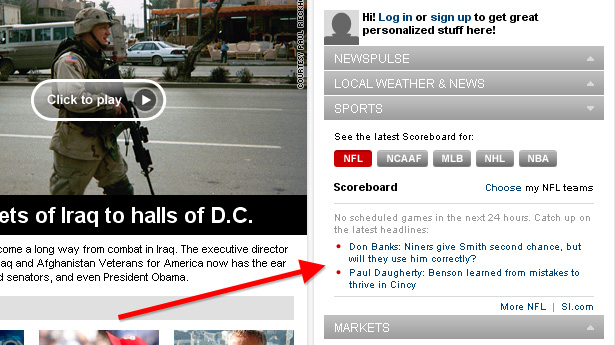
    CNN.com accordion links


    Some Sections Still Reflect Old Design

    As will be the case with any redesign of a site the size of CNN’s, some sections will still reflect the old design until all pages are fully integrated.

    This is usually the case with older content that won’t be visited as often, but in the case of CNN, some important sections still have the old skin.

    Two examples are the about and contact pages.


    Small Typography

    One particular design issue that does not conform to modern web design trends is the use of small text and small typographic elements.

    The small size of the font in the accordion content was discussed earlier. There’s also the “share” toolbar that appears on article and video pages, the “Latest News” section on the home page, the “Sign up” and “Log in” links in the header, and the text links below the fold on the home page, to mention a few.
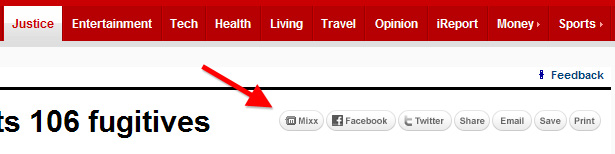
    CNN.com share bar

    Would the “share” toolbar, shown above, be more effective with bigger typography? What about the “recommended” section, shown below, or other sections with smaller type?
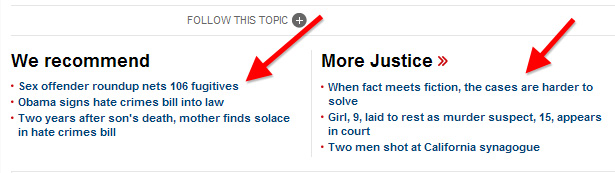
    CNN.com recommended


    Conclusion

    The new CNN.com site has added a number of features not discussed here that relate more to their news services and customized content. The first link below contains a video presented by CNN that discusses some of the new features.

    I definitely think the new site presents a much more beautiful and interesting user experience than the old, and aside from the weaknesses in the accordion content switcher, the drawbacks to the new design are not really that significant.

    It looks like a lot of time and planning went into the design of the new CNN.com, and I think web designers and those interested in improving usability on their own sites would do well to consider and try to learn from some of the changes presented on CNN’s new website.


    Further Reading


    This post was written exclusively for Webdesigner Depot by Louis Lazaris, a freelance writer and web developer. Louis runs Impressive Webs where he posts articles and tutorials on web design. You can follow Louis on Twitter or get in touch with him through his website.

    What do you like or dislike about CNN’s new site design? Share your comments below.


  • 73 Comments »

     
    #1
    Rahul - Web Guru
    November 2nd, 2009 at 8:54 pm

    The new design does look far better than the previous one. But still, it has some flaws too as you’ve pointed here in this article.

    Hope the design team will notice it soon and get it rectified :)


    #2
    Marek
    November 2nd, 2009 at 8:59 pm

    Looks really clean. I must admit.


    #3
    Kevin
    November 2nd, 2009 at 9:02 pm

    Great article. CNN.com was overdo for a redesign.

    I was a bit taken a back that they didn’t seem to do much of anything when it came to optimizing for performance. The new version has 27 JS files, 6 style sheets and they don’t appear to be using gzip. It is surprising that a website this popular isn’t employing known techniques to reduce HTTP requests.

    Wonder why their priorities surround visuals and reorganization and performance takes more of a backseat? To me it makes sense to include performance optimization while you’re taking the time and effort to revamp the design of the site.

     
    2 Replies
     
    #4
    Martin Leblanc
    November 2nd, 2009 at 9:17 pm

    Fantastic post. Thanks.


    #5
    D Ross
    November 2nd, 2009 at 9:26 pm

    Oy…for a site like CNN where most of the visitors are regulars I don’t think they’re worrying about secondary content being “below the fold”.

    People are used to scrolling these days…worrying about “below the fold” is old school.


    #6
    Peter
    November 2nd, 2009 at 9:30 pm

    Nice article guys.

    Good point Kevin.


    #7
    aledesign.it
    November 2nd, 2009 at 9:36 pm

    A good post. Very nice and clean the site..but some points are a little mistake, for example hot topics…I don’t understand because they aren’t in the top of site..under the menu…maybe for leave a place for the banner (and money)?


    #8
    Anne
    November 2nd, 2009 at 9:44 pm

    I originally commented on the most glaring usability issues with the new CNN design on their ‘unveiling’ post a while back.

    While some of the re-design is an improvement, the site fails miserably in some of the most obvious usability standards!

    1. It does not fit smaller screen resolutions (Jeez, there really are people out there using 800×600 and 1024×768 – what a concept!). Horizontal scroll is highly annoying. Not everyone uses huge monitors, think about laptop users.

    2. The font is WAY too small on the home page (article pages are better), and the content is even more overwhelming than the original version — too much content ’switches’ people off and does NOT invite further exploration.

    3. The font for completing the comment form is ridiculously tiny!4. Too much red!!! Red is not a very inviting color on the web, it needs to be pared down a tad … go read the comments from the many non-techie readers, don’t take my word for it.

    5. The latest updated headlines is badly placed crammed into the far left hand corner (in tiny font too!).

    6. Not everyone wants to, or is able to, watch news videos — people visit news sites to read as well. There needs to be a proper balance between videos and text articles (if you post a video, then post the text article as well – duh!)

    I could go on and on. Personally, I removed CNN from my bookmarks and never visit it any more since the re-do, it is totally annoying.

     
    1 Reply
     
    #9
    Angela
    November 2nd, 2009 at 9:48 pm

    Great article Louis. Although I never disliked the previous CNN design, you can see the improvements in this one.


    #10
    Josh
    November 2nd, 2009 at 10:27 pm

    1. Site was done by Huge (www.hugeinc.com) No, i don’t work for them.

    2. The problem with new web design folk is that they have a better knowledge of what is going on, but not a lick of sense as to how it should work. Great…it conforms to Blueprint….not a symbol of greatness by the way. I don’t care how carefully it conforms to a grid because if I can’t tell where to focus when I reach the page, it’s a failure immediately. In relative terms each 1/3 of the page where there is an image on the home page is competing against each other. Though the video frame is larger it’s barely perceptible when it comes to figuring out where to look first. In all honesty I can’t say which home page design bothers me more. The new or the original. I’m very surprised, as Huge is great and this is like a rookie mistake (or a meddling client) kind of result.

    Basically that ruins the whole experience for me. That and CNN’s fluff reporting. I’d rather dig through the visual CF of Huffington Post, because at least it gets me to click on things.


    #11
    Web Design Kent
    November 2nd, 2009 at 10:31 pm

    Big improvement


    #12
    Mel
    November 2nd, 2009 at 10:39 pm

    Like Angela (I’m a big fan of TBD btw, more power and keep it up), I didn’t mind the previous design considering how it looked before that.With the latest CNN redesign, my biggest issue is that there seems to be 2 competing headlines with an image and a caption.

    Unlike the previous design where there’s only 1 major headline which to me made more sense.If you go deeper into a section, say U.S., there’s a main headline, and a list of other news with an image and a caption too. However, the images are less than half of the size of the main headline with captions that are much smaller. Basically it competes much less, there’s belongingness and all that. Those elements worked.

    I didn’t get the “Hot Topics” section either. Not sure why the “Latest News” are quite subdued. Font sizes are fine with me. People have been able to cope with that issue. What I would like to see is “scanability” though.

    I am pretty sure there will be a second round of changes soon. That’s the point of redesigns anyway, to measure and learn what works and what doesn’t.

     
    1 Reply
     
    #13
    Mauricio robayo
    November 2nd, 2009 at 10:47 pm

    Hi, I was shocked about the redesign, because I didn’t notice that some people were complaining about it, maybe CNN notice that some places were not receiving visits, this new design makes the people to visit and receive more content.

    About the points discussed, I’m a graphic designer, currently working in web design (I don’t really like the term web designer) but with moddern browser its common to have disable javascript? by default javascript is on on every browser, and the people that might turn off js they will know how to turn in on when some sites looks to use it. am I wrong?

     
    1 Reply
     
    #14
    NextDayFlyers.com
    November 2nd, 2009 at 11:16 pm

    It is def an improvement over the old design, especially the top of the site. I also like the big images on news pages an if there are multiple images you get this nice gallery at the top of the article. People love images and i think the bigger images work great.


    #15
    Melody
    November 2nd, 2009 at 11:16 pm

    It definitely looks better, awesome thorough breakdown of the design!


    #16
    Lindsey
    November 2nd, 2009 at 11:27 pm

    I think the new look is similar to the BBC site, http://news.bbc.co.uk.


    #17
    Dan "Digger" Proczko
    November 2nd, 2009 at 11:38 pm

    Great dissection of the new CNN design. I enjoyed the depth of the analysis.

    The site is cleaner and easier to navigate, but still feels really cluttered and has too many choices on the front page. I feel almost overwhelmed, if I click on a link what am I not clicking on.

    I have “missed link anxiety” by the time I hit the fold!

    I know they know their audience better than us, but when I look for news I’m looking for customized relevant news for ME. The customizable accordion should probably have been given more importance and definitely larger text.

    I agree that the latest news list text is too small and given almost no importance. Yes, it is at the top left, but the size of the font makes it hard to read and distinguish text lines. With the section breakdown below the fold what’s the point of the “latest news” list if it has to share space with a “featured article”, “don’t miss” and a user defined accordion.


    #18
    Fred Epner
    November 3rd, 2009 at 12:31 am

    i guess i’m in the minority. the new site looks cluttered and i think the old site looked much better, cleaner.


    #19
    David Trang
    November 3rd, 2009 at 12:37 am

    I didn’t mind the old design as much as other people did, but one thing that bothers me about the new design is the alignment of some of the article copy. For instance, “Related Topics” or Videos will break into the left-alignment awkwardly around 60px on the left, then jump back to its original width. It looked broken to me at first, then I realized it was that way on all news stories.


    #20
    Josh
    November 3rd, 2009 at 12:42 am

    Thanks for the breakdown and review. Very useful as a learning tool for designing UX.


    #21
    czar
    November 3rd, 2009 at 1:42 am

    The site looks good but the fonts are way to small at the bottom. If you have all those links and small fonts it will give the users a headache because they have to concentrate more on reading small little links rather than just the links themselves. If you also add all those articles it feels like information overload. Too much thinking and the pleasures of the site escapes.


    #22
    Angelo W.
    November 3rd, 2009 at 2:10 am

    Nice article and design, but looks a litte bit like http://www.last.fm

     
    1 Reply
     
    #23
    Carlos
    November 3rd, 2009 at 2:38 am

    I liked the previous design better. The new design is a bit lacking in some usability. And the fact that the ad at the top-right of the homepage is given just as much space on the page as the story photos is not a good move. I know they need to generate income from ad space but I think it could have been a better choice. Much of the text is too small on the homepage and alot of the stuff, as previously mentioned, are way below the fold. Just a few of my gripes.

     
    1 Reply
     
    #24
    Lueezo
    November 3rd, 2009 at 2:42 am

    1. I’m not so sure about the accordion-style content switcher. From a user point of view, I didn’t even realise i was there until I read this article.. It is too subtle and I personally like to have all content presented in front of me without making any effort (eg. clicking on the tabs)

    2. Is the “Grid layout” a good thing? I’m a professional web designer for a TV network. For most of the projects I’ve dealt with, none of the E.P.s or Project Managers like the “boxy” style, i mean, NONE. Personally I don’t mind it, and I do understand that the CNN website is content heavy, grid/container based layout helps visually managing/sorting content. But it is less appealing comparing to some seamless style, eg. apple.com

     
    1 Reply
     
    #25
    Abdu
    November 3rd, 2009 at 4:23 am

    The header is too heavy on red.
    Fonts are small. The Ltest News section needs to have bigger font. It’s the most important section. Personally I don’t care for the extra images. I prefer more and bigger headlines.

    (Note: Error: Please input Numerical. is not proper grammar).


    #26
    Scott
    November 3rd, 2009 at 5:02 am

    Great dissection of the site. I thoroughly enjoyed it. Keep up the great work.


    #27
    kyle
    November 3rd, 2009 at 6:43 am

    a couple of notes:

    • i personally can’t stand when content types are mixed into topic types in global headers. video is such a stupid global nav item for a site like cnn. politics, etc., make much more sense. i don’t think too many people are coming to cnn and thinking, “oh, let me go browse video”. they’re looking for a subject or topic first or foremost.

    • i really like the visual design of the top stories unit on their politics page. moreso then on their homepage. wish they’d tighten up the interactions though.

    • new article pages are nice. i love the video displayed in the page, rather than behind a tab. but i wish they could bring the story highlights back up to their old spot. seemed much more useful there.

    • i hate accordions. why they ever caught on, i’ll never understand. i’ll close the accordion when i want to close it. give me the control.

    • the above are all small nitpicks. cnn rocks. kudos to the team.

     
    1 Reply
     
    #28
    Mars
    November 3rd, 2009 at 7:00 am

    this is one great detailed review of cnn website, further more the design was great


    #29
    Kieran Weston
    November 3rd, 2009 at 7:45 am

    Great design, vast improvement, I think the triangles to the right of Money and Sports indicate links to externally hosted sites, though iReport is external and has no triangle? Still thats the best explanation i have


    #30
    DJ Designer Lab
    November 3rd, 2009 at 8:02 am

    I must say this that you have a great knowledge of UI design. The way you have described the CNN design part by part, it show it all. Wish to see more of your.

     
    1 Reply
     
    #31
    Inside the Webb
    November 3rd, 2009 at 10:19 am

    This is something new, a deconstruction and breakdown of a website. I haven’t seen a post like this before, interesting stuff.


    #32
    Web Solutions
    November 3rd, 2009 at 10:26 am

    Hi

    It definitely good and nice and good improvement.


    #33
    John
    November 3rd, 2009 at 11:39 am

    Salon just did their redesign as well and used 960 for their grid. Looks very similar to CNN ha! One thing that irks me about novice grid users is that they fail to break out of the grid and their layouts look straight jacketed. You’d be surprised how adding an element here or there that breaks out of the grid can add some dynamic to a site.


    #34
    jono253
    November 3rd, 2009 at 12:44 pm

    looks suspiciously like the BBC website….


    #35
    Yogi
    November 3rd, 2009 at 4:58 pm

    I like the new CNN design, but a bit bigger font size would definitely get a plus from me


    #36
    Richard Kendall
    November 3rd, 2009 at 5:02 pm

    I have mixed feelings towards the new design. At first glance it was a little distracting, all the red and so much content on the homepage.

    But after more visits, I can see the layout has more clarity, but I still feel there a re a few design glitches. It’s a big ask covering all the bases for a global news publisher, but it’s not a bad job.


    #37
    med
    November 3rd, 2009 at 5:19 pm

    previous one was inspiration to all web designers, new version looks like 99% of the internet. good for usability because it has noting innovative like previous one. Its downgrade for me.


    #38
    scotchegg
    November 3rd, 2009 at 5:38 pm

    I do not think you can attempt to call it blueprint grid layout by sticking a few overlayers ontop that sort of fit its layout? The site does not fit a 12 or 16 column layout, so maybe they simply just created 3 columns of a nice width and put content into them?! Thats what it looks like to me anyway, especially as content imagery and blocks seem to vary in size.

    But generally the site looks like a nice and well presented. It follows good standard practices for heavy news sites with clean white space text fields , contrasting headers, interesting images and placements of varying size.

    However I do feel content gets a little loose when you scroll down the front page.
    For example when the header has gone, your left with a little bit of an unstructured feel with images content. The div content class .cnn_sectbincntnt is a very light grey shadow/gradient box, perhaps the containing .cnn_sbalternate div could have a little colour to it to help hold it in place?

     
    1 Reply
     
    #39
    Corve
    November 3rd, 2009 at 5:57 pm

    I liked it at first. But began to hate it after a while.
    Its not user friendly…..


    #40
    Website Judge
    November 3rd, 2009 at 5:59 pm

    That’s a very nice and extensive analysis. I like the new design as well, it’s very clean, at least for one that has so much information.

    But is it just me or are a lot of videos and their thumbs distorted (wrong height/width ratio) ?


    #41
    Live Chat
    November 3rd, 2009 at 6:26 pm

    Thanks for the breakdown. I like the new design because it holds a lot of information without looking cluttered.


    #42
    Chris Pierre
    November 3rd, 2009 at 6:36 pm

    Nice Post!

    I commend CNN on there new Redesign and modern clean look. But as the author brought out about usability there were a few question marks. The Navbar is real clean an sleek and puts focus on the first three sections but as for the right triangle on the other links I was expecting some sort of Drop Down Menu witch was confusing.

    I really like the Accordion style information box on the right side , but it does have its pros and cons if Javascript is turned off. But CNN shoud have done there research about there traffic users before they made such cardinal decisions.

    But overall I really like the Redesign.

    Thanks,

    -CP


    #43
    Sean
    November 3rd, 2009 at 7:18 pm

    I guess I am with the majority in not liking the new design. My initial reaction when I opened it the first time was that all of the negative space was gone, especially along the top, which made it feel cluttered. And after viewing it a few times since launch, I have yet to shake that feeling.

    The previous front page was certainly no masterpiece in design, but it was highly functional and provided for much better scanning.

    I will say that – for the most part – the individual articles are much improved.


    #44
    c$
    November 3rd, 2009 at 7:18 pm

    I’m still perplexed about the left column holding secondary articles. With the primary story located in the center column, I feel like this redesign is trying to re-train my brain on where to look first. Do not like.

    Also, the type is ridiculously small. I’m 32 years old with perfect eye sight and I cringe every time I view the site. Then, if I resize the type up, the primary story description drops UNDERNEATH the “Don’t Miss” section. Why wouldn’t it simply push that section down? Odd.

    Otherwise, I really appreciate the overall aesthetic direction.


    #45
    Montoya
    November 4th, 2009 at 1:13 am

    The developers basically lifted the reset.css from Blueprint and modified it, then added all their custom CSS after it. So it’s not really based on Blueprint, but it’s nice to know they took a snippet.


    #46
    RAFi
    November 4th, 2009 at 2:08 am

    I’m fan of old one CNN.com.


    #47
    RoaldA
    November 4th, 2009 at 5:54 am

    Wow, that’s probably one of the best heavy information sites i’ve seen!


    #48
    David S
    November 4th, 2009 at 6:26 am

    To some extent, I think it must be a truly successful redesign, since people seem to react so strongly to it one way or the other. Certainly not dull…

    Personally, I think it’s 1000% better:

    -bold branding with real character
    -clearer type
    -great gridded layout
    -nice big photos
    -lots of headlines packed neatly into a small space

    I’d say “Well Done”


    #49
    Kris
    November 4th, 2009 at 8:11 am

    Personally, I liked their old design over the new one. That’s not to say their new one is not with out its merits. The old site seemed more unique… nothing else on the web really resembled it to closely.

     
    1 Reply
     
    #50
    James Mowery
    November 4th, 2009 at 9:33 am

    I really love these types of articles, and I hope you will continue to explore other Web site designs, as they are very valuable and entertaining to read.

    Also, I really like the new CNN.com Web site, but I do heavily about the links below the fold.

    Great work!


    #51
    Jonas
    November 4th, 2009 at 12:38 pm

    I don’t know, the homepage got better but sub-pages and video pages really were better before the redesign.


    #52
    wien
    November 4th, 2009 at 4:30 pm

    nice article, thanks


    #53
    Stevie Lee
    November 4th, 2009 at 10:16 pm

    I actually hate the redesign.

    As stated by a few others, there is too much competing for my attention. When I finally have the strength to divert my eyes away from the giant red banner, I’m next drawn to the big video image in the center column. That’s fine if the video is the top story of the hour but at the moment, it appears to be a fluff piece about picture storage.

    Next my eyes go to the smaller picture on the left and wonder if that is the headline story. Or is it (back to the center column again) one of the 6 smaller images/videos begging for my attention?

    The latest news links just don’t seem as important as they use to be. I’m finding hard believing that these (small text links) are really the central news items of the day.

    The ‘boxiness’ of the remainder of the page is annoying. The news links all take on equal sence of non-importance.

    It wasn’t pretty, but I liked the old version better.

     
    1 Reply
     
    #54
    ali
    November 4th, 2009 at 11:39 pm

    so what is next, we need wordpress or joomla version of this, not same but smiliar. l think would be easy and great ;)


    #55
    Webmisstress Anne
    November 5th, 2009 at 2:55 am

    Cool article. I love that I’m not the only one geeky enough to notice tiny little differences like whether button corners are rounded or square…


    #56
    Rupen Sharma
    November 5th, 2009 at 10:57 am

    Now, BBC should get a design revamp or at least some should look at their navigation system.


    #57
    Alex
    November 5th, 2009 at 8:14 pm

    Nice article. Helps me heaps understanding what is considered as important and what “should” be included in up-to-date websites.

    Cheers from Germany!


    #58
    Miles
    November 6th, 2009 at 10:00 am

    The design is bold and an improvement over the previous site but most importantly for this kind of site the organisation of content a big mess.

    The previous design was never inspiring but the one thing it did get right, in my opinion, is the arrangement of content. Items were distributed effectively across the page in visually distinct areas. It wasn’t perfect by any means but the new design, with the exception of the link boxes at the bottom which vary little from the old site, is just all over the place with little clarity or coherence.

    Maybe it’s just me but for this reason I find the new CNN.com far less usable than the old version.


    #59
    claudiamanie
    November 6th, 2009 at 1:47 pm

    wow..i really liked the presentation..CNN filled up with loads of info.


    #60
    Web Designer
    November 6th, 2009 at 4:34 pm

    one of the best things about the new site is the overall balance of the page. it’s really well balanced. very good design. as pointed out in the post the Hot Topics should had been put in a more prominent place.


    #61
    Frank
    November 7th, 2009 at 12:21 am

    I like allot about the new CNN site, and I think one place I agree with that most seem not to agree with is the “Hot Topics” section. I think that CNN may not value this section as much as most other sites. As it seems to list the “hot topics” as items that are linked out and shared the most.

    Which is important. But overall CNN is a news agency and most of the “hot topics” I see on the site are celebrity related. Perhaps CNN is rethinking their marketing strategy? They may be trying to get back to a place with more up to minute world wide news, apposed to a celebrity gossip site.

    ’tis only the opinion of me though.


    #62
    Joey
    November 9th, 2009 at 2:47 pm

    “Money »” and “Sports »” are a subdomain, and the other menu’s are a subfolder


    #63
    Website Design
    November 9th, 2009 at 4:00 pm

    Well, your post was interesting to read. The comparisons that you’ve shown between the new and old CNN.com are also noteworthy. I too liked the new CNN.com rather than the old one as, change is always good and changes made in sites will attract visitors as they get to view a newer look of the site compared to same old visage.


    #64
    Custom Websites
    November 10th, 2009 at 11:27 am

    Yes definitively the change is nice. Changes made by CNN gives us idea to how to make your website more informative to give 100% satisfaction to your website visitors. We all need to keep improving to make more user friendly websites.

    Thanks
    kre8iveminds


    #65
    Jigar
    November 10th, 2009 at 5:00 pm

    I really looks nice.I liked your observation…


    #66
    Octavio Corral
    November 11th, 2009 at 10:10 am

    I love the new redesign. I don’t agree with your information overload screen shot though. yes there is a lot of information but the entire section is easily scanable.


    #67
    dotp
    November 11th, 2009 at 10:51 am

    I have read CNN.com everyday for the past few years. The new redesign might look great, but it does little in the way of conveying written content. I don’t ever go to CNN.com to watch video, I have a TV for that. I go to read articles, and they are poorly highlighted in the new design. Yes, I know it’s grid based, but the usability of the site is off.

    Take a look at NYTimes.com. Not very “clean” looking, but I can read the homepage for 10 min and feel like I’ve got a good overview of the days news on every topic. CNN’s site has no subtitles for articles, no quick teasers on what the articles about, etc. I’m not a HUGE fan of the redesign.


    #68
    Steve Coleman
    November 12th, 2009 at 6:50 pm

    I go to CNN to read the news. Now I’m finding im having to search for the news. So much so I’m jumping onto other web sites that puts the news up in front of me. I don’t like the new CNN web site. It looks like CNN is trying to be all things to all people and give a lot more content choice….. I just want the news. I’ll go elsewhere to find it now. I think this new design will upset their core news readers.


    #69
    Brad Proctor
    November 15th, 2009 at 12:33 am

    I’m actually quite surprised that so many people seem to like the new design. I thought that their old design was quite nice and their new design a major step backwards. I think the new design looks really cheap, cluttered and thrown together. I use to visit CNN regularly and I’ve pretty much stopped visiting the site because it is so disappointing.

     
    1 Reply
     
    #70
    Steve Coleman
    November 18th, 2009 at 10:33 pm

    I think this new design was designed and managed by people who don’t read the news and briefed by people who don’t understand their brand. CNN is having an identity crises. I just want the news, quick and easy. All the other stuff can be pushed back for when we want to drill down to get it, but the NEWS is what will pull people into the site. Give me back the news.


    #71
    Bubba in Biloxi
    November 23rd, 2009 at 2:19 am

    Yes even we red-necks in Mississippi (as CNN thinks) read the news! — well folks we read it when it is thar! But if we have to go fishin fer it well … lordy be … we jus …. go else whar! – Like BBC – or a milunnnn places — cept FOX — they hate folks who think.


    #72
    MattDaddyC
    November 25th, 2009 at 10:05 am

    I’m not such a fan. Haven’t dug into it much, but I really enjoyed using and looking at the old site. Loved the typography, exploring the various tabs. It fell down in a couple of places for me, but this one never seems to stand up. I agree with Brad. It feels like cheap spider food. I can’t stand the way they used the black bg over the images to rest the type on. I’m a fan of Huge, and generally appreciate their design sensibility, but this doesn’t hit it for me


    #73
    website design New York City
    December 1st, 2009 at 8:59 am

    Thank you! That looks like a great resource

     
    Name (required)

    E-mail (required - never shown publicly)

    Web-site

    Your Comment (smaller size | larger size)

Home| Advertising| About| Contact

© 2009 All Rights Reserved